Using the REST API
Access OpenCue functionality through HTTP endpoints
The OpenCue REST Gateway provides HTTP/REST endpoints for all OpenCue functionality, enabling web applications, scripts, and third-party tools to interact with your render farm without requiring gRPC clients.
Before you begin
Make sure you have:
- OpenCue REST Gateway deployed and running
- Valid JWT authentication token
- Access to the gateway endpoint (typically port 8448)
Quick Setup: Deploy the REST Gateway alongside OpenCue:
Important: The REST Gateway is not included in OpenCue’s main docker-compose.yml and must be deployed separately.
# From OpenCue repository root
# Start OpenCue stack first
docker compose up -d

# Deploy REST Gateway separately
export JWT_SECRET=$(openssl rand -base64 32)
docker build -f rest_gateway/Dockerfile -t opencue-rest-gateway:latest .
docker run -d --name opencue-rest-gateway \
  --network opencue_default \
  -p 8448:8448 \
  -e CUEBOT_ENDPOINT=cuebot:8443 \
  -e JWT_SECRET="$JWT_SECRET" \
  opencue-rest-gateway:latest

# The REST Gateway will be available at http://localhost:8448
For detailed installation and deployment options, see the Deploying REST Gateway guide.
Authentication
Important: ALL REST Gateway API endpoints require JWT authentication. The only routes served without a token are the Swagger UI and the OpenAPI definitions under /swagger/, which expose documentation but no data. See Exploring the API with Swagger UI.
Create and use JWT tokens for authentication:
# Generate a JWT token using your gateway's JWT_SECRET
export JWT_TOKEN=$(python3 -c "
import jwt, datetime, os
secret = os.getenv('JWT_SECRET', 'dev-secret-key-change-in-production')
payload = {'user': 'api-user', 'exp': datetime.datetime.now(datetime.timezone.utc) + datetime.timedelta(hours=1)}
print(jwt.encode(payload, secret, algorithm='HS256'))
")

# Use the token in API requests
curl -H "Authorization: Bearer $JWT_TOKEN" \
     -H "Content-Type: application/json" \
     -X POST \
     "http://localhost:8448/show.ShowInterface/GetShows" \
     -d '{}'
Exploring the API with Swagger UI
Before scripting against the API, it is usually quicker to explore it in the browser. The gateway ships an interactive Swagger UI at http://localhost:8448/swagger/ covering every OpenCue interface.
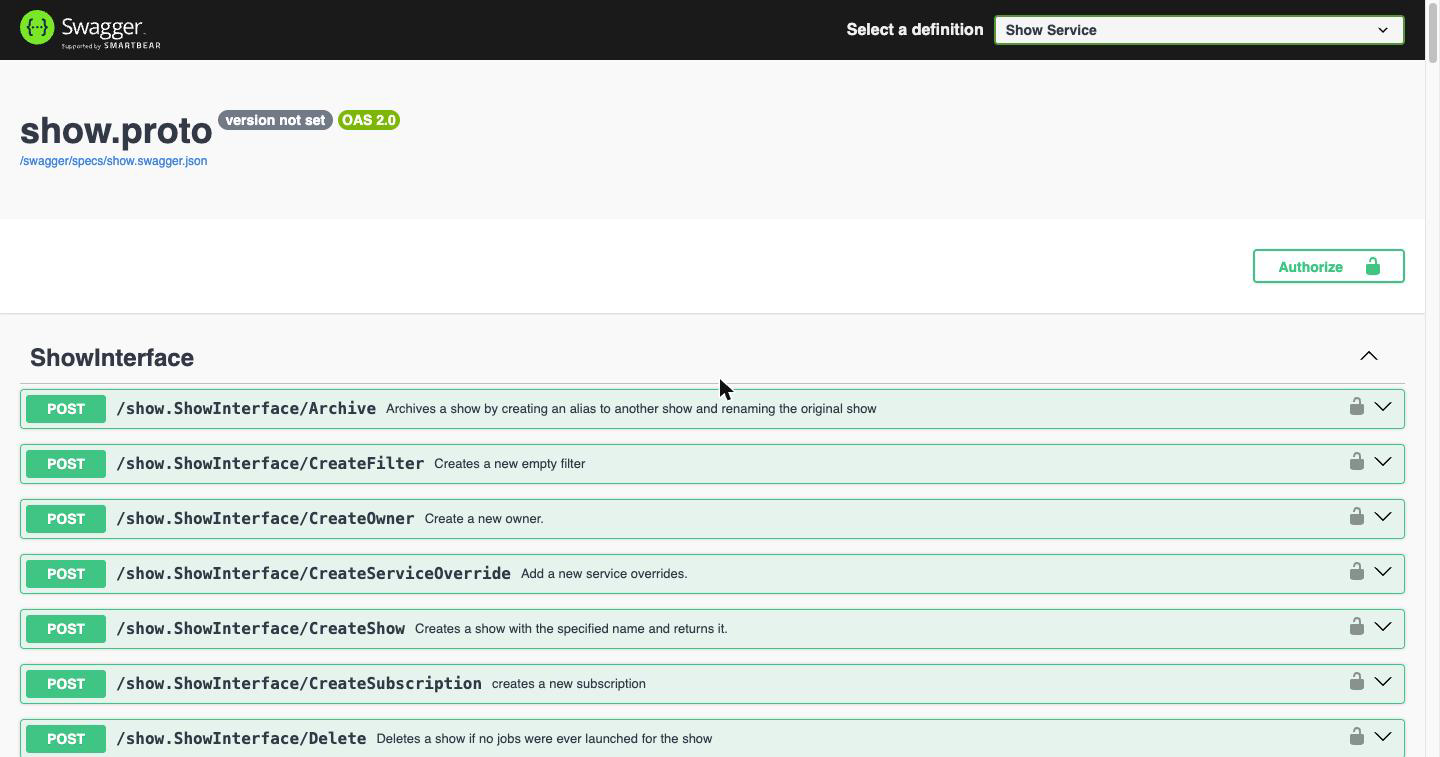
Use the Select a definition menu in the top bar to switch between the 18 definitions. Each is generated from the corresponding .proto file, and one definition can hold several interfaces: Job Service alone covers JobInterface, LayerInterface, FrameInterface and GroupInterface.
| Definition | Interfaces it contains | Endpoints |
|---|---|---|
| Comment Service | CommentInterface | 2 |
| Criterion Service | none, message types only | 0 |
| Cue Service | CueInterface | 1 |
| Department Service | DepartmentInterface | 13 |
| Depend Service | DependInterface | 3 |
| Facility Service | AllocationInterface, FacilityInterface | 19 |
| Filter Service | ActionInterface, FilterInterface, MatcherInterface | 22 |
| Host Service | DeedInterface, HostInterface, OwnerInterface, ProcInterface | 45 |
| Job Service | FrameInterface, GroupInterface, JobInterface, LayerInterface | 116 |
| Limit Service | LimitInterface | 7 |
| Monitoring Service | MonitoringInterface | 6 |
| RenderPartition Service | RenderPartitionInterface | 2 |
| Report Service | RqdReportInterface | 3 |
| Rqd Service | RqdInterface, RunningFrame | 19 |
| Service Service | ServiceInterface, ServiceOverrideInterface | 7 |
| Show Service | ShowInterface | 31 |
| Subscription Service | SubscriptionInterface | 5 |
| Task Service | TaskInterface | 3 |
That is 304 endpoints in total, but only 273 of them work. Cue, Monitoring, RenderPartition, Report and Rqd are published in the menu yet not routed by the gateway, so they return 404 even with a valid token, and Criterion Service has no endpoints at all. See Definitions the Gateway Does Not Route for the reason and the alternatives.
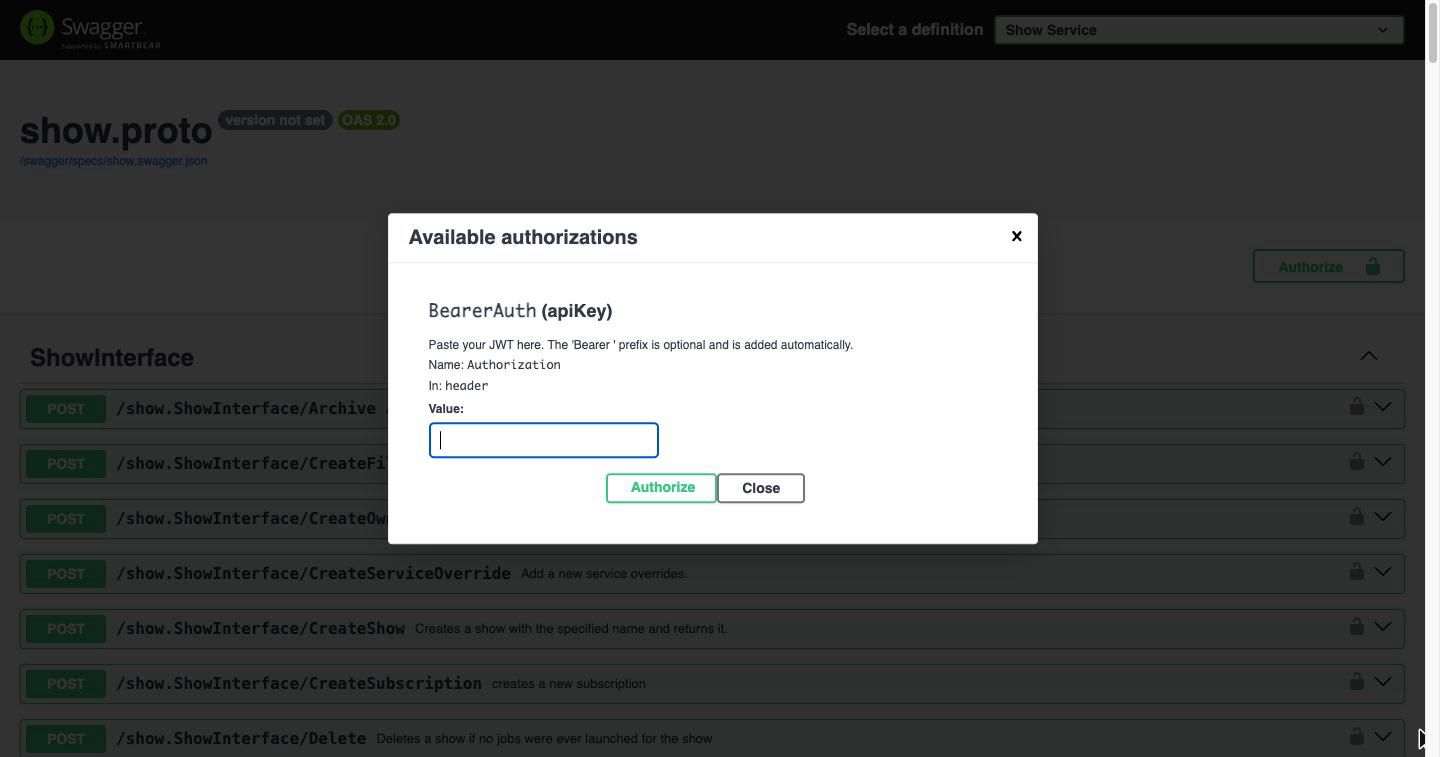
Authorizing
Click Authorize and paste your JWT. The Bearer prefix is optional; the page adds it if you leave it off.
Sending a request
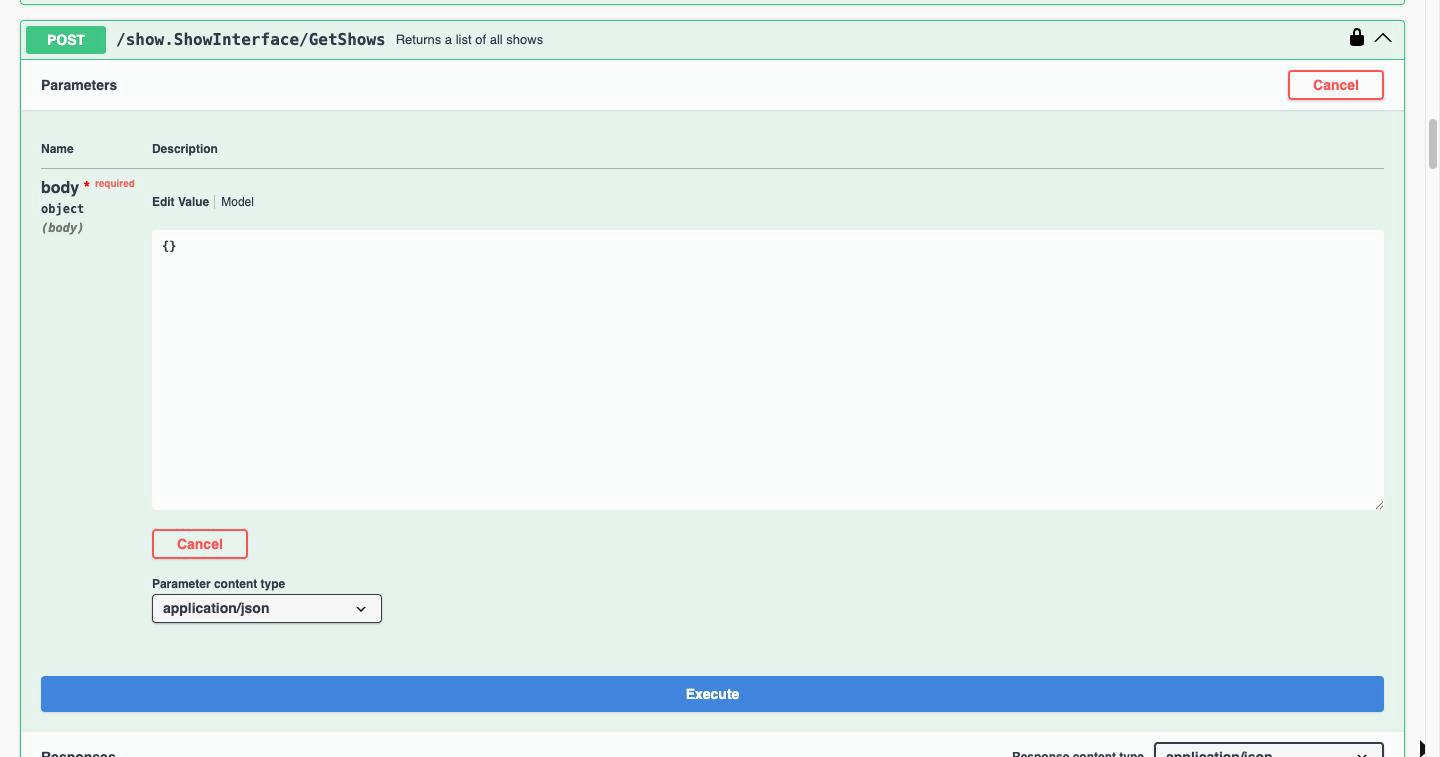
Expand an endpoint to see its request body and response schema, then click Try it out, edit the JSON, and click Execute:
Swagger UI shows the equivalent curl command, the request URL, and the live response and headers:
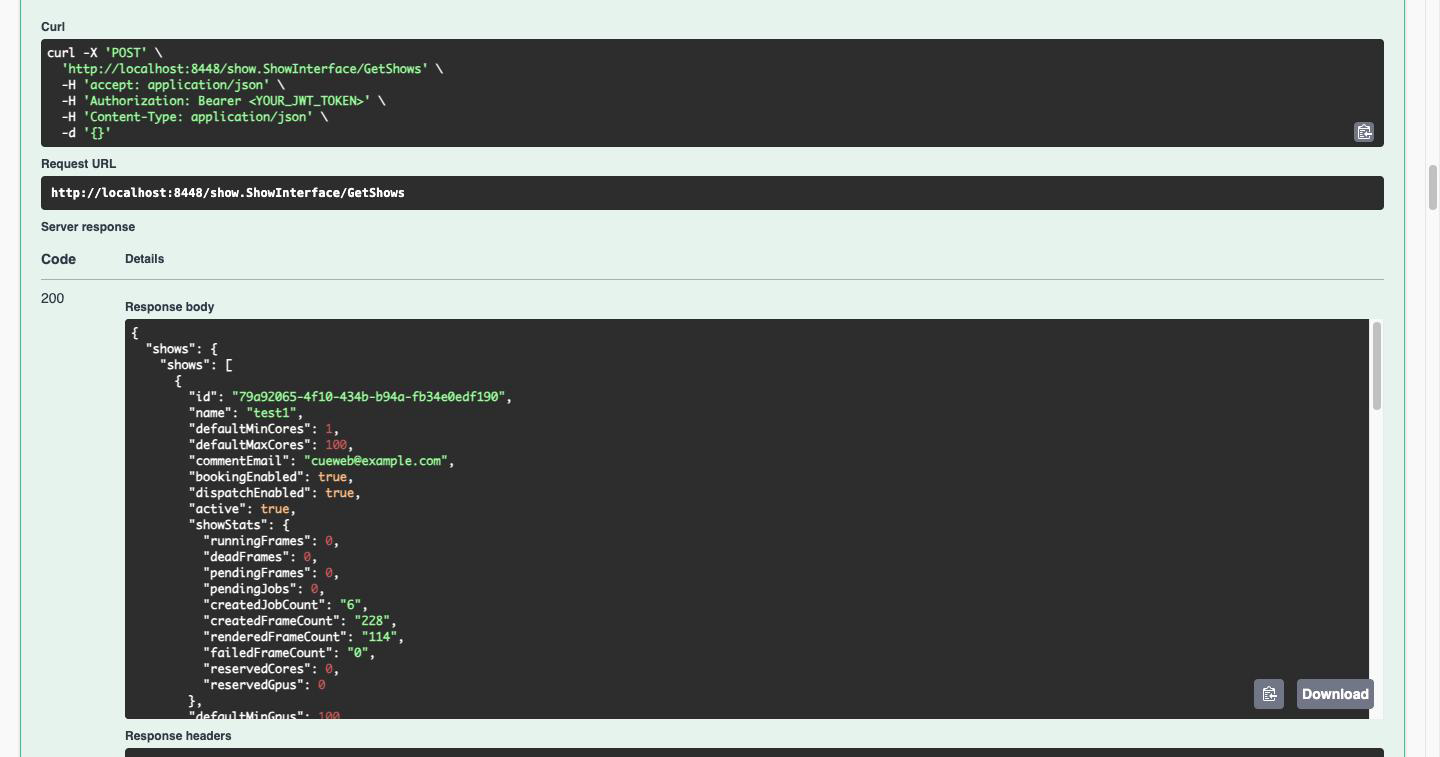
The generated curl command is copy-pasteable, which makes this a fast way to work out the exact request shape before moving it into a script.
Downloading a definition
Each definition is downloadable on its own, which is useful for generating a typed client:
# Fetch a single OpenAPI document (no authentication required)
curl -s http://localhost:8448/swagger/specs/show.swagger.json -o show.swagger.json

# For example, generate a Python client with openapi-generator
openapi-generator generate -i show.swagger.json -g python -o ./opencue-show-client
Note: The Swagger UI is served without authentication so the API can be browsed. If your gateway is reachable beyond a trusted network, ask your administrator to disable it with
SWAGGER_ENABLED=false.
Common REST API Operations
Note: Replace localhost:8448 but the correct URL of the OpenCue REST Gateway.
Getting Shows
List all shows in your OpenCue system:
curl -H "Authorization: Bearer $JWT_TOKEN" \
     -H "Content-Type: application/json" \
     -X POST \
     "http://localhost:8448/show.ShowInterface/GetShows" \
     -d '{}'
Monitoring Jobs
Get jobs for a specific show:
curl -H "Authorization: Bearer $JWT_TOKEN" \
     -H "Content-Type: application/json" \
     -X POST \
     "http://localhost:8448/job.JobInterface/GetJobs" \
     -d '{"r": {"show": "your-show-name"}}'
Getting Job Details
Retrieve detailed information about a specific job:
curl -H "Authorization: Bearer $JWT_TOKEN" \
     -H "Content-Type: application/json" \
     -X POST \
     "http://localhost:8448/job.JobInterface/GetJob" \
     -d '{"id": "job-uuid-here"}'
Monitoring Hosts
List all rendering hosts:
curl -H "Authorization: Bearer $JWT_TOKEN" \
     -H "Content-Type: application/json" \
     -X POST \
     "http://localhost:8448/host.HostInterface/GetHosts" \
     -d '{"r": {}}'
Frame Status and Logs
Get frames for a job:
curl -H "Authorization: Bearer $JWT_TOKEN" \
     -H "Content-Type: application/json" \
     -X POST \
     "http://localhost:8448/frame.FrameInterface/GetFrames" \
     -d '{"r": {"job": "job-uuid-here"}}'
Integration Examples
Python Script
import requests
import json
import os

class OpenCueAPI:
    def __init__(self, base_url, jwt_token):
        self.base_url = base_url
        self.headers = {
            'Authorization': f'Bearer {jwt_token}',
            'Content-Type': 'application/json'
        }

    def get_shows(self):
        response = requests.post(
            f'{self.base_url}/show.ShowInterface/GetShows',
            headers=self.headers,
            json={}
        )
        return response.json()

    def get_jobs(self, show_name):
        response = requests.post(
            f'{self.base_url}/job.JobInterface/GetJobs',
            headers=self.headers,
            json={'r': {'show': show_name}}
        )
        return response.json()

# Usage
api = OpenCueAPI('http://localhost:8448', os.getenv('JWT_TOKEN'))
shows = api.get_shows()
print(f"Found {len(shows.get('shows', []))} shows")
JavaScript/Node.js
const axios = require('axios');

class OpenCueAPI {
    constructor(baseUrl, jwtToken) {
        this.baseUrl = baseUrl;
        this.headers = {
            'Authorization': `Bearer ${jwtToken}`,
            'Content-Type': 'application/json'
        };
    }

    async getShows() {
        const response = await axios.post(
            `${this.baseUrl}/show.ShowInterface/GetShows`,
            {},
            { headers: this.headers }
        );
        return response.data;
    }

    async getJobs(showName) {
        const response = await axios.post(
            `${this.baseUrl}/job.JobInterface/GetJobs`,
            { r: { show: showName } },
            { headers: this.headers }
        );
        return response.data;
    }
}

// Usage
const api = new OpenCueAPI('http://localhost:8448', process.env.JWT_TOKEN);
api.getShows().then(shows => {
    console.log(`Found ${shows.shows?.length || 0} shows`);
});
Error Handling
The REST API returns standard HTTP status codes:
- 200: Success
- 400: Bad Request (invalid JSON or missing fields)
- 401: Unauthorized (missing or invalid JWT token)
- 404: Not Found
- 500: Internal Server Error
Example error response:
{
    "error": "rpc error: code = NotFound desc = Job not found",
    "code": 5,
    "message": "Job not found"
}
Available Endpoints
The REST Gateway provides access to all OpenCue interfaces:
Core Interfaces
- Show: Show management and listing
- Job: Job submission, monitoring, and management
- Frame: Frame status, logs, and operations
- Layer: Layer information and operations
Resource Management
- Host: Host monitoring and management
- Group: Host group operations
- Owner: Ownership and allocation management
Advanced Features
- Proc: Process monitoring
- Deed: Resource deed management
For the authoritative list on your own deployment, open http://localhost:8448/swagger/. The definition menu is populated from the OpenAPI documents the gateway was built with, so it always reflects the running version.
Rate Limiting and Performance
- Keep connections alive when making multiple requests
- Use appropriate timeouts for long-running operations
- Consider pagination for large result sets
- Monitor response times and adjust concurrent requests accordingly
Security Best Practices
- Store JWT tokens securely (environment variables, not in code)
- Use HTTPS in production environments
- Rotate JWT tokens regularly
- Implement proper error handling to avoid token leakage
What’s next?
- REST API Reference - API documentation
- Deploying REST Gateway - Production deployment
- REST API Tutorial - Step-by-step examples