OpenCue REST API Reference
Complete API reference for the OpenCue REST Gateway endpoints, authentication, and data formats.
Table of contents
- Overview
- Interactive API Documentation
- Authentication
- Interface Overview
- Show Interface
- Job Interface
- Comment Interface
- Frame Interface
- Layer Interface
- Host Interface
- Group Interface
- Owner Interface
- Proc Interface
- Deed Interface
- Allocation Interface
- Facility Interface
- Filter Interface
- Action Interface
- Matcher Interface
- Depend Interface
- Subscription Interface
- Limit Interface
- Service Interface
- ServiceOverride Interface
- Task Interface
- Department Interface
- Data Types
- Error Handling
- Rate Limiting
- Best Practices
- SDK Examples
- Tag Management
- What’s next?
Overview
The OpenCue REST Gateway provides HTTP/REST endpoints for all OpenCue gRPC interfaces. It converts HTTP requests to gRPC calls and returns JSON responses, enabling web applications and HTTP clients to interact with OpenCue services.
Base Information
- Base URL:
http://your-gateway:8448(configurable) - Protocol: HTTP/HTTPS
- Authentication: JWT Bearer tokens
- Request Method: POST (for all endpoints)
- Content Type:
application/json - Response Format: JSON
Authentication
All API endpoints require JWT authentication:
POST /interface.Interface/Method
Authorization: Bearer <jwt-token>
Content-Type: application/json
The documentation routes under /swagger/ are the sole exception. See Interactive API Documentation.
Interactive API Documentation
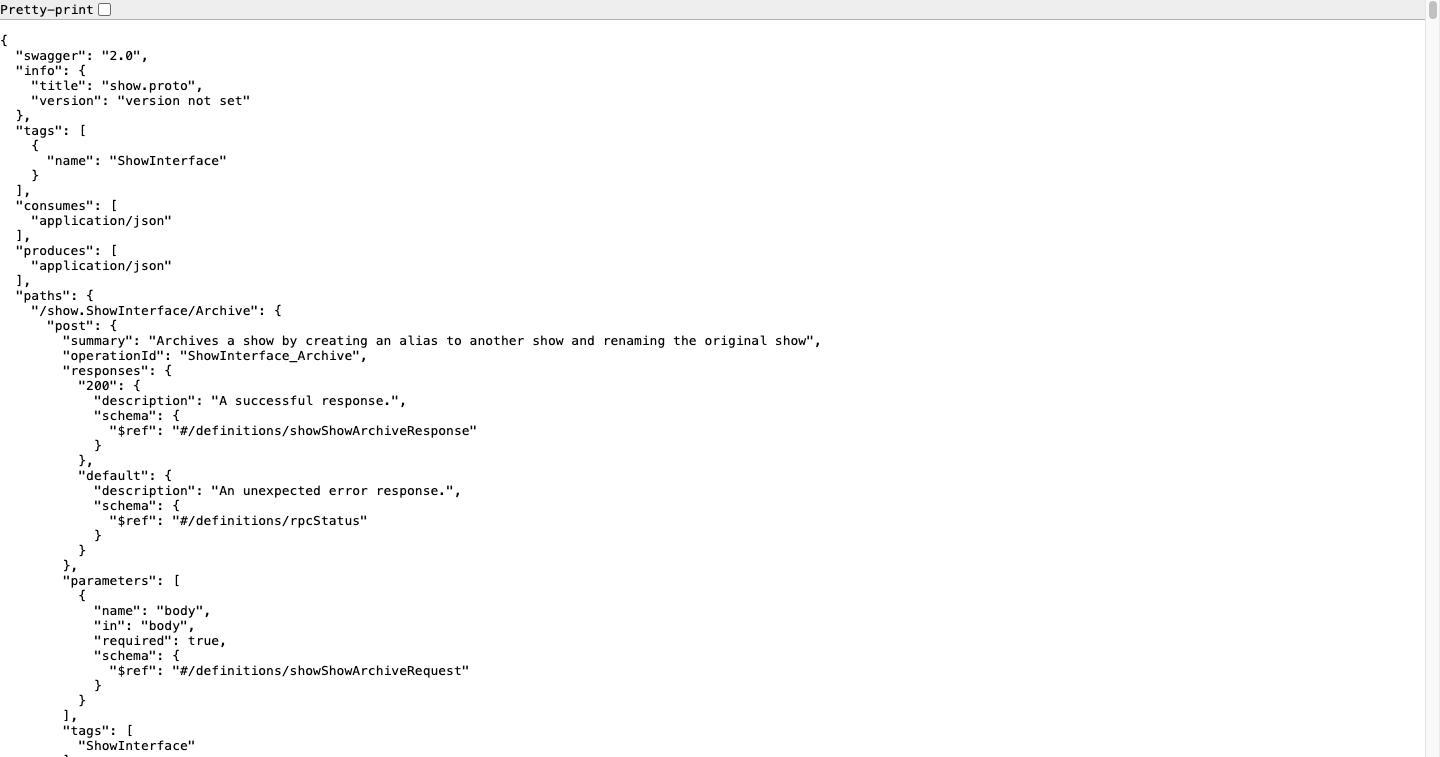
The gateway serves a Swagger UI and the machine-readable OpenAPI definitions that back it. Both are generated from the same .proto files as the HTTP handlers, so the paths and the request and response schemas they describe are always correct for that build. They describe a slightly wider surface than the gateway routes, however: see Definitions the Gateway Does Not Route.
Documentation Routes
| Route | Method | Returns | Auth required |
|---|---|---|---|
/swagger/ |
GET | Swagger UI page (HTML) | No |
/swagger/specs/<name>.swagger.json |
GET | One OpenAPI 2.0 document (JSON) | No |
/swagger/assets/swagger-ui.css |
GET | Swagger UI stylesheet | No |
/swagger/assets/swagger-ui-bundle.js |
GET | Swagger UI script | No |
/swagger/assets/swagger-ui-standalone-preset.js |
GET | Swagger UI script | No |
Requests to /swagger (no trailing slash) redirect to /swagger/ with 301.
Only the three asset files listed above are served; any other path under /swagger/assets/ returns 404. Directory listings are disabled, so GET /swagger/specs/ returns 404 rather than an index.
Definition Map
One document is generated per OpenCue .proto file, named <proto>.swagger.json, and each appears in the Select a definition menu. A single document can contain several interfaces: job.swagger.json alone holds four.
The table below lists all 18 definitions, the interfaces in each, and how many endpoints each interface publishes. Status records whether the gateway actually routes those endpoints.
| Definition (menu entry) | Interfaces (endpoints) | Status |
|---|---|---|
comment (Comment Service) |
CommentInterface (2) | Routed |
criterion (Criterion Service) |
none | Empty, see below |
cue (Cue Service) |
CueInterface (1) | Not routed |
department (Department Service) |
DepartmentInterface (13) | Routed |
depend (Depend Service) |
DependInterface (3) | Routed |
facility (Facility Service) |
AllocationInterface (14), FacilityInterface (5) | Routed |
filter (Filter Service) |
ActionInterface (3), FilterInterface (16), MatcherInterface (3) | Routed |
host (Host Service) |
DeedInterface (3), HostInterface (25), OwnerInterface (6), ProcInterface (13) | Routed |
job (Job Service) |
FrameInterface (18), GroupInterface (20), JobInterface (42), LayerInterface (36) | Routed |
limit (Limit Service) |
LimitInterface (7) | Routed |
monitoring (Monitoring Service) |
MonitoringInterface (6) | Not routed |
renderPartition (RenderPartition Service) |
RenderPartitionInterface (2) | Not routed |
report (Report Service) |
RqdReportInterface (3) | Not routed |
rqd (Rqd Service) |
RqdInterface (17), RunningFrame (2) | Not routed |
service (Service Service) |
ServiceInterface (5), ServiceOverrideInterface (2) | Routed |
show (Show Service) |
ShowInterface (31) | Routed |
subscription (Subscription Service) |
SubscriptionInterface (5) | Routed |
task (Task Service) |
TaskInterface (3) | Routed |
Totals: 18 definitions, 28 interfaces, 306 published endpoints, of which 275 across 22 interfaces are routed by the gateway.
The list is discovered at request time from SWAGGER_DIR, so GET /swagger/ always reflects what the running gateway was built with.
Definitions the Gateway Does Not Route
The OpenAPI documents are generated with generate_unbound_methods=true, which produces an entry for every method in every .proto file. The gateway, however, registers handlers only for the interfaces Cuebot exposes to REST clients. The difference is visible in the Swagger UI: the definitions below appear in the menu and their endpoints render normally, but calling one returns 404 with a gRPC NOT_FOUND body, even with a valid token.
{"code":5,"message":"Not Found","details":[]}
| Interface | Endpoints | Implemented by | Why it is not routed |
|---|---|---|---|
CueInterface |
GetSystemStats |
Cuebot (CueStatic) |
Internal Cuebot statistics, not intended for REST clients |
MonitoringInterface |
GetFarmStatistics, GetFrameHistory, GetHostHistory, GetJobHistory, GetLayerHistory, GetLayerMemoryHistory |
Cuebot (ManageMonitoring) |
Not registered on the gateway; farm history is normally read from the Prometheus and Grafana stack |
RenderPartitionInterface |
Delete, SetMaxResources |
Cuebot (ManageRenderPartition) |
Not registered on the gateway |
RqdReportInterface |
ReportRqdStartup, ReportRunningFrameCompletion, ReportStatus |
Cuebot (RqdReportStatic) |
Agent-facing rather than client-facing; RQD calls it to report in |
RqdInterface |
GetRunFrame, GetRunningFrameStatus, KillRunningFrame, LaunchFrame, Lock, LockAll, NimbyOff, NimbyOn, RebootIdle, RebootNow, ReportStatus, RestartRqdIdle, RestartRqdNow, ShutdownRqdIdle, ShutdownRqdNow, Unlock, UnlockAll |
The RQD agent on each host | Cuebot is a client of this interface, not its server, so the gateway has nothing to forward to |
RunningFrame |
Kill, Status |
The RQD agent on each host | As above |
In other words, these endpoints return 404 because this gateway does not register them, not because the operations are unavailable in OpenCue. Four of the six are Cuebot services that are internal or agent-facing; the other two belong to RQD.
Where an equivalent exists, use the routed interface instead:
| To do this | Use |
|---|---|
| Lock, unlock, reboot, or act on a host | HostInterface |
| Kill or retry a running frame | FrameInterface, which Cuebot relays to RQD |
| Create a render partition | FrameInterface, JobInterface, or LayerInterface AddRenderPartition |
| List render partitions | HostInterface/GetRenderPartitions |
RenderPartitionInterface’s own Delete and SetMaxResources have no routed equivalent, so a partition can be created and listed over REST but not resized or removed.
Criterion Service is a special case. criterion.proto defines only message types (the numeric matchers used by filters) and no service, so the definition contains zero endpoints. Selecting it in the menu shows a page with a Models section and nothing else. This is expected.
To check the routed set on your own deployment:
# Publishes 306 endpoints
curl -s http://localhost:8448/swagger/ \
  | grep -o '/swagger/specs/[a-zA-Z_]*\.swagger\.json' | sort -u \
  | while read -r s; do curl -s "http://localhost:8448$s" | jq '.paths | length'; done \
  | paste -sd+ - | bc

# A routed endpoint returns 200, an unrouted one returns 404
curl -s -o /dev/null -w "%{http_code}\n" -X POST \
  -H "Authorization: Bearer $JWT_TOKEN" -H 'Content-Type: application/json' -d '{}' \
  http://localhost:8448/department.DepartmentInterface/GetDepartmentNames
Fetching a Definition
curl -s http://localhost:8448/swagger/specs/show.swagger.json | jq '.paths | keys[]'
"/show.ShowInterface/Archive"
"/show.ShowInterface/CreateFilter"
"/show.ShowInterface/CreateOwner"
"/show.ShowInterface/GetShows"
Authorizing in the Browser
Swagger UI injects a BearerAuth security definition (apiKey, in header, named Authorization) into every document it loads, so the Authorize button is always available:
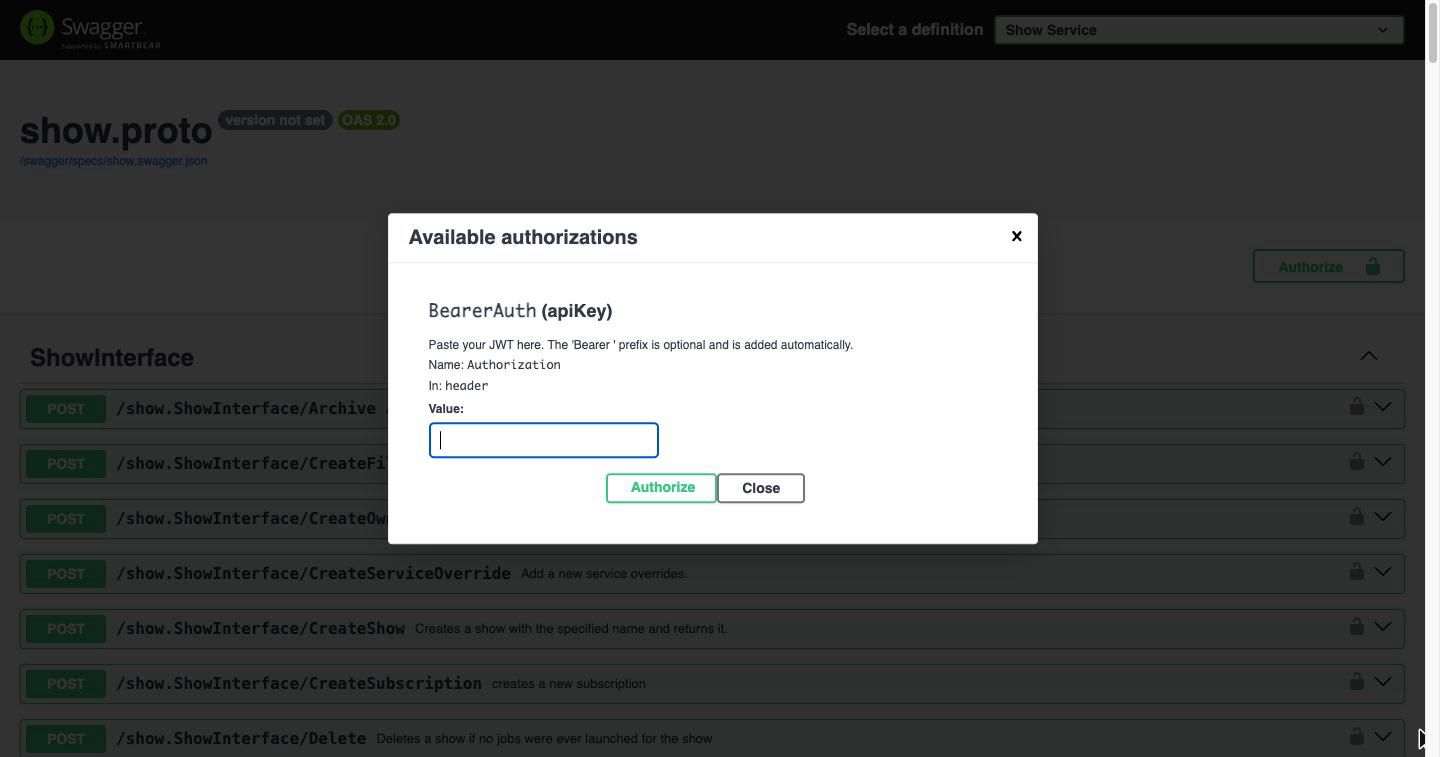
The value you enter is sent as the Authorization header. A Bearer prefix, followed by a single space, is added automatically if you omit it, so both <token> and Bearer <token> work.
Configuration
| Variable | Default | Description |
|---|---|---|
SWAGGER_ENABLED |
true |
Mount the /swagger/ routes. false, 0, no or off (case-insensitive) disables them |
SWAGGER_DIR |
./gen/openapiv2 (/app/gen/openapiv2 in the Docker image) |
Directory holding the generated OpenAPI documents |
When the routes are disabled, or when SWAGGER_DIR does not exist, nothing is mounted and /swagger/ falls through to the authenticated handler, returning 401.
Authentication
JWT Token Requirements
- Algorithm: HMAC SHA256 (HS256)
- Required Claims:
sub(subject),exp(expiration) - Header Format:
Authorization: Bearer <token>
Token Creation Example
import jwt
import time

def create_token(secret, user_id):
    payload = {
        'sub': user_id,
        'exp': int(time.time()) + 3600  # 1 hour
    }
    return jwt.encode(payload, secret, algorithm='HS256')
Error Responses
| Status Code | Description |
|---|---|
401 |
Missing or invalid Authorization header |
403 |
Token validation failed or expired |
500 |
Internal server error |
Interface Overview
The REST API provides access to all OpenCue interfaces:
Core Interfaces
| Interface | Purpose | Key Endpoints |
|---|---|---|
| Show Interface | Show management | GetShows, FindShow, CreateShow |
| Job Interface | Job operations | GetJobs, FindJob, Kill, Pause, Resume, GetComments, AddComment |
| Comment Interface | Comment management | Save, Delete |
| Frame Interface | Frame management | GetFrame, Kill, Retry, Eat |
| Layer Interface | Layer operations | GetLayer, FindLayer, Kill |
| Group Interface | Host groups | FindGroup, GetGroup, SetMinCores, SetMaxCores |
| Host Interface | Host management | GetHosts, FindHost, Lock, Unlock |
| Owner Interface | Ownership | GetOwner, SetMaxCores, TakeOwnership |
| Proc Interface | Process monitoring | GetProc, Kill, Unbook |
| Deed Interface | Resource deeds | GetOwner, GetHost |
Management Interfaces
| Interface | Purpose | Key Endpoints |
|---|---|---|
| Allocation Interface | Resource allocation | GetAll, Get, Find, GetHosts, SetBillable |
| Facility Interface | Multi-site management | Get, Create, Delete, GetAllocations |
| Filter Interface | Job filters | FindFilter, GetActions, GetMatchers, SetEnabled |
| Action Interface | Filter actions | Delete, Commit, GetParentFilter |
| Matcher Interface | Filter matchers | Delete, Commit, GetParentFilter |
| Depend Interface | Dependencies | GetDepend, Satisfy, Unsatisfy |
| Subscription Interface | Show subscriptions | Get, Find, Delete, SetSize, SetBurst |
| Limit Interface | Resource limits | GetAll, Get, Create, Delete, SetMaxValue |
| Service Interface | Service definitions | GetService, GetDefaultServices, CreateService, Update, Delete |
| ServiceOverride Interface | Service overrides | Update, Delete |
| Task Interface | Task management | Delete, SetMinCores, ClearAdjustments |
| Department Interface | Show departments and their tasks | GetDepartmentNames, GetTasks, AddTask, SetManagedCores |
These 22 interfaces are the ones the gateway routes. The Swagger UI menu also lists six interfaces it does not route; see Definitions the Gateway Does Not Route.
Show Interface
Manage shows (projects) in OpenCue.
Get All Shows
Get a list of all shows in the system.
POST /show.ShowInterface/GetShows
Request Body:
{}
Response:
{
  "shows": {
    "shows": [
      {
        "id": "00000000-0000-0000-0000-000000000000",
        "name": "myshow",
        "defaultMinCores": 1,
        "defaultMaxCores": 100,
        "commentEmail": "",
        "bookingEnabled": true,
        "dispatchEnabled": true,
        "active": true,
        "showStats": {
          "runningFrames": 5,
          "deadFrames": 0,
          "pendingFrames": 10,
          "pendingJobs": 2
        },
        "defaultMinGpus": 0,
        "defaultMaxGpus": 10
      }
    ]
  }
}
Find Show
Find a specific show by name.
POST /show.ShowInterface/FindShow
Request Body:
{
  "name": "myshow"
}
Response:
{
  "show": {
    "id": "00000000-0000-0000-0000-000000000000",
    "name": "myshow",
    "defaultMinCores": 1,
    "defaultMaxCores": 100,
    "active": true
  }
}
Create Show
Create a new show.
POST /show.ShowInterface/CreateShow
Request Body:
{
  "name": "newshow",
  "defaultMinCores": 1,
  "defaultMaxCores": 50
}
Response:
{
  "show": {
    "id": "new-show-id",
    "name": "newshow",
    "defaultMinCores": 1,
    "defaultMaxCores": 50,
    "active": true
  }
}
Job Interface
Manage rendering jobs and their lifecycle.
Get Jobs
Retrieve jobs for a show with optional filtering.
POST /job.JobInterface/GetJobs
Request Body:
{
  "r": {
    "show": {
      "name": "myshow"
    },
    "includeFinished": false,
    "maxResults": 100
  }
}
Response:
{
  "jobs": {
    "jobs": [
      {
        "id": "job-id-123",
        "name": "myshow-shot001-comp",
        "state": "PENDING",
        "shot": "shot001",
        "show": "myshow",
        "user": "artist1",
        "group": "comp",
        "facility": "cloud",
        "priority": 100,
        "minCores": 1,
        "maxCores": 10,
        "isPaused": false,
        "hasComment": false,
        "startTime": 1694000000,
        "stopTime": 0,
        "eligibleTime": 1694000000,
        "jobStats": {
          "runningFrames": 0,
          "deadFrames": 0,
          "pendingFrames": 25,
          "succeededFrames": 0,
          "totalFrames": 25
        }
      }
    ]
  }
}
Find Job
Find a specific job by name.
POST /job.JobInterface/FindJob
Request Body:
{
  "name": "myshow-shot001-comp"
}
Get Job Frames
Retrieve frames for a specific job.
POST /job.JobInterface/GetFrames
Request Body:
{
  "job": {
    "id": "job-id-123"
  },
  "req": {
    "includeFinished": true,
    "page": 1,
    "limit": 100
  }
}
Response:
{
  "frames": {
    "frames": [
      {
        "id": "frame-id-456",
        "name": "0001-layer_name",
        "layerName": "comp_layer",
        "number": 1,
        "state": "WAITING",
        "retryCount": 0,
        "exitStatus": -1,
        "startTime": 0,
        "stopTime": 0,
        "eligibleTime": 1694000000,
        "submissionTime": 1694000000,
        "maxRss": "0",
        "usedMemory": "0",
        "lastResource": "/0.00/0"
      }
    ]
  }
}
Pause Job
Pause a running or pending job.
POST /job.JobInterface/Pause
Request Body:
{
  "job": {
    "id": "job-id-123"
  }
}
Response:
{}
Resume Job
Resume a paused job.
POST /job.JobInterface/Resume
Request Body:
{
  "job": {
    "id": "job-id-123"
  }
}
Kill Job
Terminate a job and all its frames.
POST /job.JobInterface/Kill
Request Body:
{
  "job": {
    "id": "job-id-123"
  }
}
Get Comments
List comments attached to a job.
POST /job.JobInterface/GetComments
Request Body:
{
  "job": {
    "id": "job-id-123"
  }
}
Response:
{
  "comments": {
    "comments": [
      {
        "id": "comment-id-1",
        "timestamp": 1715990400,
        "user": "alice",
        "subject": "Render note",
        "message": "Re-rendered after lighting fix"
      }
    ]
  }
}
Add Comment
Add a new comment to a job. The server stamps the id and timestamp fields.
POST /job.JobInterface/AddComment
Request Body:
{
  "job": {
    "id": "job-id-123"
  },
  "new_comment": {
    "user": "alice",
    "subject": "Render note",
    "message": "Re-rendered after lighting fix"
  }
}
Comment Interface
Manage individual comments (currently used for job comments; hosts also support commenting via the same interface).
Save Comment
Update an existing comment’s subject and/or message. The id identifies which comment to update.
POST /comment.CommentInterface/Save
Request Body:
{
  "comment": {
    "id": "comment-id-1",
    "timestamp": 1715990400,
    "user": "alice",
    "subject": "Render note (updated)",
    "message": "Re-rendered after lighting fix and a tweak to motion blur"
  }
}
Delete Comment
Delete a comment by id.
POST /comment.CommentInterface/Delete
Request Body:
{
  "comment": {
    "id": "comment-id-1"
  }
}
Frame Interface
Manage individual frame operations.
Get Frame
Retrieve detailed information about a specific frame.
POST /frame.FrameInterface/GetFrame
Request Body:
{
  "id": "frame-id-456"
}
Response:
{
  "frame": {
    "id": "frame-id-456",
    "name": "0001-layer_name",
    "layerName": "comp_layer",
    "number": 1,
    "state": "SUCCEEDED",
    "retryCount": 0,
    "exitStatus": 0,
    "startTime": 1694000000,
    "stopTime": 1694000300,
    "eligibleTime": 1693999998,
    "submissionTime": 1693999995,
    "maxRss": "2147483648",
    "usedMemory": "1073741824",
    "totalCoreTime": 300
  }
}
Retry Frame
Retry a failed frame.
POST /frame.FrameInterface/Retry
Request Body:
{
  "frame": {
    "id": "frame-id-456"
  }
}
Kill Frame
Kill a running frame.
POST /frame.FrameInterface/Kill
Request Body:
{
  "frame": {
    "id": "frame-id-456"
  }
}
Eat Frame
Mark a frame as completed (skip rendering).
POST /frame.FrameInterface/Eat
Request Body:
{
  "frame": {
    "id": "frame-id-456"
  }
}
Layer Interface
Manage job layers and their properties.
Get Layer
Retrieve layer information.
POST /layer.LayerInterface/GetLayer
Request Body:
{
  "id": "layer-id-789"
}
Response:
{
  "layer": {
    "id": "layer-id-789",
    "name": "comp_layer",
    "type": "Render",
    "isEnabled": true,
    "minimumCores": 1,
    "maximumCores": 4,
    "minimumMemory": 2147483648,
    "startTime": 1694000010,
    "stopTime": 0,
    "layerStats": {
      "totalFrames": 25,
      "runningFrames": 0,
      "deadFrames": 0,
      "pendingFrames": 25,
      "succeededFrames": 0
    }
  }
}
Find Layer
Find a layer within a job.
POST /layer.LayerInterface/FindLayer
Request Body:
{
  "job": {
    "id": "job-id-123"
  },
  "layer": "comp_layer"
}
Get Layer Frames
Get all frames for a specific layer.
POST /layer.LayerInterface/GetFrames
Request Body:
{
  "layer": {
    "id": "layer-id-789"
  },
  "req": {
    "page": 1,
    "limit": 100
  }
}
Kill Layer
Kill all frames in a layer.
POST /layer.LayerInterface/Kill
Request Body:
{
  "layer": {
    "id": "layer-id-789"
  }
}
Set Layer Tags
Set tags on a layer for job categorization and routing. Tags help filter and organize layers by render type, software, or other attributes.
POST /layer.LayerInterface/SetTags
Request Body:
{
  "layer": {
    "id": "layer-id-789"
  },
  "tags": ["nuke", "comp", "high-priority"]
}
Response:
{}
Use Cases:
- Tag layers by software (nuke, maya, blender, houdini)
- Tag by render type (comp, lighting, fx, sim)
- Tag by priority or department for resource allocation
- Filter jobs by layer tags in monitoring dashboards
Note: SetTags replaces all existing tags on the layer. To retrieve current tags, call GetLayer - the tags field is included in the layer response:
{
  "layer": {
    "id": "layer-id-789",
    "name": "comp_layer",
    "tags": ["nuke", "comp", "high-priority"],
    "type": "Render",
    "isEnabled": true
  }
}
Host Interface
Manage render hosts and their resources.
Get All Hosts
Retrieve all hosts in the render farm.
POST /host.HostInterface/GetHosts
Request Body:
{}
Response:
{
  "hosts": {
    "hosts": [
      {
        "id": "host-id-abc",
        "name": "render-node-01",
        "lockState": "OPEN",
        "bootTime": 1694000000,
        "pingTime": 1694001000,
        "os": "linux",
        "totalCores": 16,
        "idleCores": 12,
        "totalMemory": 68719476736,
        "freeMemory": 34359738368,
        "totalGpus": 2,
        "freeGpus": 2,
        "hostStats": {
          "totalFrames": 4,
          "runningFrames": 4
        }
      }
    ]
  }
}
Find Host
Find a specific host by name.
POST /host.HostInterface/FindHost
Request Body:
{
  "name": "render-node-01"
}
Get Host
Get detailed host information.
POST /host.HostInterface/GetHost
Request Body:
{
  "id": "host-id-abc"
}
Lock Host
Prevent new jobs from being assigned to a host.
POST /host.HostInterface/Lock
Request Body:
{
  "host": {
    "id": "host-id-abc"
  }
}
Unlock Host
Allow jobs to be assigned to a host.
POST /host.HostInterface/Unlock
Request Body:
{
  "host": {
    "id": "host-id-abc"
  }
}
Add Tags to Host
Add one or more tags to a host for categorization and filtering.
POST /host.HostInterface/AddTags
Request Body:
{
  "host": {
    "id": "host-id-abc"
  },
  "tags": ["gpu", "high-memory", "linux"]
}
Response:
{}
Use Cases:
- Tag hosts by hardware capabilities (gpu, cpu-only, high-memory)
- Tag hosts by location or department (studio-a, comp-team)
- Tag hosts for specific job routing and allocation
Remove Tags from Host
Remove one or more tags from a host.
POST /host.HostInterface/RemoveTags
Request Body:
{
  "host": {
    "id": "host-id-abc"
  },
  "tags": ["gpu", "high-memory"]
}
Response:
{}
Rename Host Tag
Rename a tag across a host (useful for standardizing tag names).
POST /host.HostInterface/RenameTag
Request Body:
{
  "host": {
    "id": "host-id-abc"
  },
  "old_tag": "gpu",
  "new_tag": "nvidia-gpu"
}
Response:
{}
Get Host Tags
Retrieve tags for a host by calling GetHost - tags are included in the host object.
POST /host.HostInterface/GetHost
Request Body:
{
  "id": "host-id-abc"
}
Response:
{
  "host": {
    "id": "host-id-abc",
    "name": "render-node-01",
    "tags": ["gpu", "high-memory", "linux"],
    "lockState": "OPEN",
    "totalCores": 16,
    "totalMemory": 68719476736,
    "totalGpus": 2
  }
}
Group Interface
Manage resource groups and allocation.
Find Group
Find a group within a show.
POST /group.GroupInterface/FindGroup
Request Body:
{
  "show": {
    "name": "myshow"
  },
  "name": "comp"
}
Response:
{
  "group": {
    "id": "group-id-def",
    "name": "comp",
    "department": "compositing",
    "defaultJobPriority": 100,
    "defaultJobMinCores": 1,
    "defaultJobMaxCores": 8,
    "groupStats": {
      "runningFrames": 5,
      "deadFrames": 0,
      "pendingFrames": 20,
      "pendingJobs": 3
    }
  }
}
Get Group
Get detailed group information.
POST /group.GroupInterface/GetGroup
Request Body:
{
  "id": "group-id-def"
}
Set Minimum Cores
Set minimum core allocation for a group.
POST /group.GroupInterface/SetMinCores
Request Body:
{
  "group": {
    "id": "group-id-def"
  },
  "cores": 4
}
Set Maximum Cores
Set maximum core allocation for a group.
POST /group.GroupInterface/SetMaxCores
Request Body:
{
  "group": {
    "id": "group-id-def"
  },
  "cores": 16
}
Owner Interface
Manage resource ownership and allocation.
Get Owner
Get owner information and resource allocation.
POST /owner.OwnerInterface/GetOwner
Request Body:
{
  "name": "artist1"
}
Response:
{
  "owner": {
    "name": "artist1",
    "maxCores": 20,
    "minCores": 2,
    "maxGpus": 4,
    "minGpus": 0,
    "ownerStats": {
      "runningFrames": 8,
      "maxFrames": 50
    }
  }
}
Set Maximum Cores
Set maximum core allocation for an owner.
POST /owner.OwnerInterface/SetMaxCores
Request Body:
{
  "owner": {
    "name": "artist1"
  },
  "cores": 32
}
Take Ownership
Take ownership of a host.
POST /owner.OwnerInterface/TakeOwnership
Request Body:
{
  "host": {
    "id": "host-id-abc"
  },
  "owner": {
    "name": "artist1"
  }
}
Proc Interface
Manage running processes on hosts.
Get Process
Get information about a running process.
POST /proc.ProcInterface/GetProc
Request Body:
{
  "id": "proc-id-ghi"
}
Response:
{
  "proc": {
    "id": "proc-id-ghi",
    "name": "render_process",
    "logPath": "/tmp/rqd/logs/render_process.log",
    "unbooked": false,
    "reserved": true,
    "bookedCores": 4,
    "virtualMemory": 8589934592,
    "usedMemory": 4294967296,
    "bookedGpus": 1,
    "usedGpuMemory": 2147483648
  }
}
Kill Process
Terminate a running process.
POST /proc.ProcInterface/Kill
Request Body:
{
  "proc": {
    "id": "proc-id-ghi"
  }
}
Unbook Process
Unbook resources from a process.
POST /proc.ProcInterface/Unbook
Request Body:
{
  "proc": {
    "id": "proc-id-ghi"
  }
}
Deed Interface
Manage resource deeds and ownership records.
Get Deed Owner
Get the owner of a deed.
POST /deed.DeedInterface/GetOwner
Request Body:
{
  "deed": {
    "id": "deed-id-jkl"
  }
}
Response:
{
  "owner": {
    "name": "artist1",
    "maxCores": 20,
    "minCores": 2
  }
}
Get Deed Host
Get the host associated with a deed.
POST /deed.DeedInterface/GetHost
Request Body:
{
  "deed": {
    "id": "deed-id-jkl"
  }
}
Response:
{
  "host": {
    "id": "host-id-abc",
    "name": "render-node-01",
    "lockState": "OPEN",
    "totalCores": 16,
    "idleCores": 8
  }
}
Allocation Interface
Manage resource allocations across facilities and shows.
Get All Allocations
Retrieve all allocations in the system.
POST /facility.AllocationInterface/GetAll
Request Body:
{}
Response:
{
  "allocations": {
    "allocations": [
      {
        "id": "alloc-id-123",
        "name": "cloud",
        "tag": "cloud",
        "facility": "aws-us-west",
        "billable": true,
        "stats": {
          "cores": 256,
          "availableCores": 128,
          "idleCores": 64,
          "runningCores": 64,
          "lockedCores": 0,
          "hosts": 16,
          "lockedHosts": 0,
          "downHosts": 0
        }
      }
    ]
  }
}
Get Allocation
Get details for a specific allocation.
POST /facility.AllocationInterface/Get
Request Body:
{
  "id": "alloc-id-123"
}
Find Allocation
Find an allocation by name.
POST /facility.AllocationInterface/Find
Request Body:
{
  "name": "cloud"
}
Get Allocation Hosts
Get all hosts in an allocation.
POST /facility.AllocationInterface/GetHosts
Request Body:
{
  "allocation": {
    "id": "alloc-id-123"
  }
}
Set Allocation Billable
Set whether an allocation is billable.
POST /facility.AllocationInterface/SetBillable
Request Body:
{
  "allocation": {
    "id": "alloc-id-123"
  },
  "value": true
}
Facility Interface
Manage multi-site render farm facilities.
Get Facility
Get facility information by name.
POST /facility.FacilityInterface/Get
Request Body:
{
  "name": "aws-us-west"
}
Response:
{
  "facility": {
    "id": "facility-id-456",
    "name": "aws-us-west"
  }
}
Create Facility
Create a new facility.
POST /facility.FacilityInterface/Create
Request Body:
{
  "name": "aws-us-east"
}
Delete Facility
Mark a facility as inactive.
POST /facility.FacilityInterface/Delete
Request Body:
{
  "name": "aws-us-east"
}
Get Facility Allocations
Get all allocations for a facility.
POST /facility.FacilityInterface/GetAllocations
Request Body:
{
  "facility": {
    "id": "facility-id-456"
  }
}
Filter Interface
Manage job filters for automated job routing and actions.
Find Filter
Find a filter by show and name.
POST /filter.FilterInterface/FindFilter
Request Body:
{
  "show": "myshow",
  "name": "auto_priority"
}
Response:
{
  "filter": {
    "id": "filter-id-789",
    "name": "auto_priority",
    "type": "MATCH_ALL",
    "order": 1,
    "enabled": true
  }
}
Get Filter Actions
Get all actions for a filter.
POST /filter.FilterInterface/GetActions
Request Body:
{
  "filter": {
    "id": "filter-id-789"
  }
}
Response:
{
  "actions": {
    "actions": [
      {
        "id": "action-id-abc",
        "type": "SET_JOB_PRIORITY",
        "valueType": "INTEGER_TYPE",
        "integerValue": 200
      }
    ]
  }
}
Get Filter Matchers
Get all matchers for a filter.
POST /filter.FilterInterface/GetMatchers
Request Body:
{
  "filter": {
    "id": "filter-id-789"
  }
}
Response:
{
  "matchers": {
    "matchers": [
      {
        "id": "matcher-id-def",
        "subject": "JOB_NAME",
        "type": "CONTAINS",
        "input": "urgent"
      }
    ]
  }
}
Set Filter Enabled
Enable or disable a filter.
POST /filter.FilterInterface/SetEnabled
Request Body:
{
  "filter": {
    "id": "filter-id-789"
  },
  "enabled": true
}
Delete Filter
Delete a filter.
POST /filter.FilterInterface/Delete
Request Body:
{
  "filter": {
    "id": "filter-id-789"
  }
}
Action Interface
Manage filter actions.
Delete Action
Delete a filter action.
POST /filter.ActionInterface/Delete
Request Body:
{
  "action": {
    "id": "action-id-abc"
  }
}
Commit Action
Update action properties.
POST /filter.ActionInterface/Commit
Request Body:
{
  "action": {
    "id": "action-id-abc",
    "type": "SET_JOB_PRIORITY",
    "integerValue": 250
  }
}
Matcher Interface
Manage filter matchers.
Delete Matcher
Delete a filter matcher.
POST /filter.MatcherInterface/Delete
Request Body:
{
  "matcher": {
    "id": "matcher-id-def"
  }
}
Commit Matcher
Update matcher properties.
POST /filter.MatcherInterface/Commit
Request Body:
{
  "matcher": {
    "id": "matcher-id-def",
    "subject": "JOB_NAME",
    "type": "REGEX",
    "input": "^urgent.*"
  }
}
Depend Interface
Manage job and frame dependencies.
Get Dependency
Get a dependency by ID.
POST /depend.DependInterface/GetDepend
Request Body:
{
  "id": "depend-id-ghi"
}
Response:
{
  "depend": {
    "id": "depend-id-ghi",
    "type": "JOB_ON_JOB",
    "target": "EXTERNAL",
    "anyFrame": false,
    "active": true,
    "dependerJob": "myshow-shot002-comp",
    "dependerLayer": "",
    "dependerFrame": "",
    "dependOnJob": "myshow-shot001-render",
    "dependOnLayer": "",
    "dependOnFrame": ""
  }
}
Satisfy Dependency
Mark a dependency as satisfied.
POST /depend.DependInterface/Satisfy
Request Body:
{
  "depend": {
    "id": "depend-id-ghi"
  }
}
Unsatisfy Dependency
Mark a dependency as unsatisfied (reactivate).
POST /depend.DependInterface/Unsatisfy
Request Body:
{
  "depend": {
    "id": "depend-id-ghi"
  }
}
Subscription Interface
Manage show subscriptions to allocations.
Get Subscription
Get a subscription by ID.
POST /subscription.SubscriptionInterface/Get
Request Body:
{
  "id": "sub-id-jkl"
}
Response:
{
  "subscription": {
    "id": "sub-id-jkl",
    "name": "myshow.cloud",
    "showName": "myshow",
    "facility": "aws-us-west",
    "allocationName": "cloud",
    "size": 50,
    "burst": 25,
    "reservedCores": 45,
    "reservedGpus": 8
  }
}
Find Subscription
Find a subscription by name.
POST /subscription.SubscriptionInterface/Find
Request Body:
{
  "name": "myshow.cloud"
}
Delete Subscription
Delete a subscription.
POST /subscription.SubscriptionInterface/Delete
Request Body:
{
  "subscription": {
    "id": "sub-id-jkl"
  }
}
Set Subscription Size
Set the base size of a subscription.
POST /subscription.SubscriptionInterface/SetSize
Request Body:
{
  "subscription": {
    "id": "sub-id-jkl"
  },
  "newSize": 75
}
Set Subscription Burst
Set the burst capacity of a subscription.
POST /subscription.SubscriptionInterface/SetBurst
Request Body:
{
  "subscription": {
    "id": "sub-id-jkl"
  },
  "burst": 50
}
Limit Interface
Manage resource limits for layer types.
Get All Limits
Get all limits in the system.
POST /limit.LimitInterface/GetAll
Request Body:
{}
Response:
{
  "limits": [
    {
      "id": "limit-id-mno",
      "name": "nuke_license",
      "maxValue": 50,
      "currentRunning": 32
    }
  ]
}
Get Limit
Get a limit by ID.
POST /limit.LimitInterface/Get
Request Body:
{
  "id": "limit-id-mno"
}
Find Limit
Find a limit by name.
POST /limit.LimitInterface/Find
Request Body:
{
  "name": "nuke_license"
}
Create Limit
Create a new resource limit.
POST /limit.LimitInterface/Create
Request Body:
{
  "name": "maya_license",
  "maxValue": 100
}
Response:
{
  "limit": {
    "id": "limit-id-new",
    "name": "maya_license",
    "maxValue": 100,
    "currentRunning": 0
  }
}
Delete Limit
Delete a limit.
POST /limit.LimitInterface/Delete
Request Body:
{
  "name": "maya_license"
}
Set Limit Max Value
Update the maximum value for a limit.
POST /limit.LimitInterface/SetMaxValue
Request Body:
{
  "name": "nuke_license",
  "maxValue": 75
}
Service Interface
Manage service definitions and requirements.
Get Service
Get a service by name.
POST /service.ServiceInterface/GetService
Request Body:
{
  "name": "nuke"
}
Response:
{
  "service": {
    "id": "service-id-pqr",
    "name": "nuke",
    "threadable": true,
    "minCores": 1,
    "maxCores": 8,
    "minMemory": 4294967296,
    "minGpuMemory": 0,
    "tags": ["nuke", "comp"],
    "timeout": 0,
    "timeoutLlu": 0,
    "minGpus": 0,
    "maxGpus": 0,
    "minMemoryIncrease": 0
  }
}
Get Default Services
Get all default services.
POST /service.ServiceInterface/GetDefaultServices
Request Body:
{}
Response:
{
  "services": {
    "services": [
      {
        "id": "service-id-pqr",
        "name": "nuke",
        "threadable": true,
        "minCores": 1,
        "maxCores": 8,
        "minMemory": 4294967296
      },
      {
        "id": "service-id-stu",
        "name": "maya",
        "threadable": false,
        "minCores": 1,
        "maxCores": 1,
        "minMemory": 2147483648
      }
    ]
  }
}
Create Service
Create a new service definition.
POST /service.ServiceInterface/CreateService
Request Body:
{
  "data": {
    "name": "blender",
    "threadable": true,
    "minCores": 1,
    "maxCores": 16,
    "minMemory": 2147483648,
    "tags": ["blender", "render"]
  }
}
Update Service
Update service properties.
POST /service.ServiceInterface/Update
Request Body:
{
  "service": {
    "id": "service-id-pqr",
    "name": "nuke",
    "minMemory": 8589934592
  }
}
Delete Service
Delete a service definition.
POST /service.ServiceInterface/Delete
Request Body:
{
  "service": {
    "id": "service-id-pqr"
  }
}
ServiceOverride Interface
Manage service overrides for specific shows.
Update Service Override
Update a service override.
POST /service.ServiceOverrideInterface/Update
Request Body:
{
  "service": {
    "id": "override-id-vwx",
    "minMemory": 16777216000
  }
}
Delete Service Override
Delete a service override.
POST /service.ServiceOverrideInterface/Delete
Request Body:
{
  "service": {
    "id": "override-id-vwx"
  }
}
Task Interface
Manage tasks for shot priorities and department resources.
Delete Task
Remove a task.
POST /task.TaskInterface/Delete
Request Body:
{
  "task": {
    "id": "task-id-yz1"
  }
}
Set Task Min Cores
Set minimum cores for a task.
POST /task.TaskInterface/SetMinCores
Request Body:
{
  "task": {
    "id": "task-id-yz1"
  },
  "newMinCores": 16
}
Response:
{}
Clear Task Adjustments
Clear any core adjustments made to a task.
POST /task.TaskInterface/ClearAdjustments
Request Body:
{
  "task": {
    "id": "task-id-yz1"
  }
}
Department Interface
Manage a show’s departments and the tasks that allocate cores to them. A department groups work such as Lighting or FX within a show, and can be managed either manually or by a track-it system.
All 13 endpoints are routed by the gateway.
| Endpoint | Purpose |
|---|---|
GetDepartmentNames |
List the department names configured in the system |
AddDepartmentName |
Register a new department name |
RemoveDepartmentName |
Remove a department name |
Delete |
Delete a department from a show |
GetTasks |
List the tasks belonging to a department |
AddTask |
Add a single task |
AddTasks |
Add several tasks at once |
ReplaceTasks |
Replace the department’s full task list |
ClearTasks |
Remove every task from the department |
ClearTaskAdjustments |
Clear core adjustments across the department’s tasks |
SetManagedCores |
Set the core count the department manages |
EnableTiManaged |
Hand core management to a track-it system |
DisableTiManaged |
Return the department to manual management |
Get Department Names
List every department name known to the system.
POST /department.DepartmentInterface/GetDepartmentNames
Request Body:
{}
Response:
{
  "names": [
    "Animation",
    "Cloth",
    "FX",
    "Hair",
    "Layout",
    "Lighting",
    "Pipeline",
    "Unknown"
  ]
}
Add Department Name
Register a new department name.
POST /department.DepartmentInterface/AddDepartmentName
Request Body:
{
  "name": "Compositing"
}
Get Tasks
List the tasks that belong to a department.
POST /department.DepartmentInterface/GetTasks
Request Body:
{
  "department": {
    "id": "department-id-abc"
  }
}
Set Managed Cores
Set the number of cores the department manages.
POST /department.DepartmentInterface/SetManagedCores
Request Body:
{
  "department": {
    "id": "department-id-abc"
  },
  "cores": 100
}
Response:
{}
Data Types
Common Types
Job States
PENDING    - Job is waiting to start
RUNNING    - Job has active frames
FINISHED   - Job completed successfully
KILLED     - Job was terminated
PAUSED     - Job is paused
Frame States
WAITING    - Frame is waiting to start
RUNNING    - Frame is currently executing
SUCCEEDED  - Frame completed successfully
DEAD       - Frame failed
EATEN      - Frame was skipped
Host Lock States
OPEN       - Host accepts new jobs
LOCKED     - Host locked by user
NIMBY      - Host locked automatically
Request/Response Objects
Job Object
{
  "id": "string",
  "name": "string",
  "state": "JobState",
  "shot": "string",
  "show": "string",
  "user": "string",
  "group": "string",
  "facility": "string",
  "priority": "int32",
  "minCores": "float",
  "maxCores": "float",
  "isPaused": "bool",
  "hasComment": "bool",
  "startTime": "int32",
  "stopTime": "int32",
  "eligibleTime": "int32",
  "jobStats": {
    "runningFrames": "int32",
    "deadFrames": "int32",
    "pendingFrames": "int32",
    "succeededFrames": "int32",
    "totalFrames": "int32"
  }
}
Frame Object
{
  "id": "string",
  "name": "string",
  "layerName": "string",
  "number": "int32",
  "state": "FrameState",
  "retryCount": "int32",
  "exitStatus": "int32",
  "startTime": "int32",
  "stopTime": "int32",
  "eligibleTime": "int32",
  "submissionTime": "int32",
  "maxRss": "string",
  "usedMemory": "string",
  "lastResource": "string",
  "totalCoreTime": "int32"
}
Host Object
{
  "id": "string",
  "name": "string",
  "lockState": "LockState",
  "bootTime": "int32",
  "pingTime": "int32",
  "os": "string",
  "totalCores": "int32",
  "idleCores": "int32",
  "totalMemory": "int64",
  "freeMemory": "int64",
  "totalGpus": "int32",
  "freeGpus": "int32"
}
Comment Object
Mirrors comment.Comment in proto/src/comment.proto. Used by Job.GetComments, Job.AddComment, and the CommentInterface (Save / Delete).
{
  "id": "string",
  "timestamp": "int32",
  "user": "string",
  "subject": "string",
  "message": "string"
}
Notes:
timestampis unix epoch seconds.- On
AddComment, the server assignsidandtimestamp; the request body’snew_commentonly needsuser,subject, andmessage. - On
Save,idis required to identify the comment; the server overwrites the persisted fields with what’s in the request.
Error Handling
Error Response Format
{
  "error": "string",
  "code": "int32",
  "message": "string"
}
Common Error Codes
| Code | Status | Description |
|---|---|---|
2 |
UNKNOWN |
Unknown error occurred |
3 |
INVALID_ARGUMENT |
Invalid request parameters |
5 |
NOT_FOUND |
Requested resource not found |
7 |
PERMISSION_DENIED |
Insufficient permissions |
16 |
UNAUTHENTICATED |
Authentication required |
HTTP Status Codes
| Status | Meaning |
|---|---|
200 |
Success |
400 |
Bad Request - Invalid JSON or parameters |
401 |
Unauthorized - Missing or invalid JWT |
403 |
Forbidden - JWT validation failed |
404 |
Not Found - Resource not found |
500 |
Internal Server Error |
Rate Limiting
The REST Gateway implements rate limiting to prevent abuse:
- Default Limit: 100 requests per second per client
- Configurable: Set via
RATE_LIMIT_RPSenvironment variable - Headers: Rate limit information in response headers
X-RateLimit-Limit: 100
X-RateLimit-Remaining: 95
X-RateLimit-Reset: 1694001000
Best Practices
Performance
- Batch Requests: Group related operations when possible
- Use Pagination: Limit large data requests with page/limit parameters
- Cache Responses: Implement client-side caching for static data
- Connection Pooling: Reuse HTTP connections for multiple requests
Security
- Token Expiration: Use short-lived JWT tokens (1-2 hours)
- HTTPS Only: Always use HTTPS in production
- Input Validation: Validate all request parameters
- Error Handling: Don’t expose sensitive information in errors
Reliability
- Retry Logic: Implement exponential backoff for failed requests
- Circuit Breaker: Use circuit breaker pattern for service calls
- Health Checks: Monitor gateway health endpoints
- Graceful Degradation: Handle partial failures gracefully
SDK Examples
Python Client
import requests
import jwt
import time

class OpenCueClient:
    def __init__(self, base_url, jwt_secret):
        self.base_url = base_url
        self.jwt_secret = jwt_secret

    def _get_headers(self):
        token = jwt.encode({
            'sub': 'api-client',
            'exp': int(time.time()) + 3600
        }, self.jwt_secret, algorithm='HS256')

        return {
            'Authorization': f'Bearer {token}',
            'Content-Type': 'application/json'
        }

    def get_shows(self):
        response = requests.post(
            f'{self.base_url}/show.ShowInterface/GetShows',
            headers=self._get_headers(),
            json={}
        )
        return response.json()

    def pause_job(self, job_id):
        response = requests.post(
            f'{self.base_url}/job.JobInterface/Pause',
            headers=self._get_headers(),
            json={'job': {'id': job_id}}
        )
        return response.json()

# Usage
client = OpenCueClient('http://localhost:8448', 'your-secret')
shows = client.get_shows()
client.pause_job('job-id-123')
JavaScript Client
class OpenCueClient {
  constructor(baseUrl, jwtSecret) {
    this.baseUrl = baseUrl;
    this.jwtSecret = jwtSecret;
  }

  async getHeaders() {
    const token = await this.createJWT();
    return {
      'Authorization': `Bearer ${token}`,
      'Content-Type': 'application/json'
    };
  }

  async createJWT() {
    // Use jsonwebtoken library
    const jwt = require('jsonwebtoken');
    return jwt.sign({
      sub: 'web-client',
      exp: Math.floor(Date.now() / 1000) + 3600
    }, this.jwtSecret);
  }

  async getShows() {
    const headers = await this.getHeaders();
    const response = await fetch(
      `${this.baseUrl}/show.ShowInterface/GetShows`,
      {
        method: 'POST',
        headers,
        body: JSON.stringify({})
      }
    );
    return response.json();
  }

  async pauseJob(jobId) {
    const headers = await this.getHeaders();
    const response = await fetch(
      `${this.baseUrl}/job.JobInterface/Pause`,
      {
        method: 'POST',
        headers,
        body: JSON.stringify({ job: { id: jobId } })
      }
    );
    return response.json();
  }
}

// Usage
const client = new OpenCueClient('http://localhost:8448', 'your-secret');
const shows = await client.getShows();
await client.pauseJob('job-id-123');
Tag Management
Tags are labels used to categorize and filter hosts and job layers in OpenCue. They enable resource allocation, job routing, and organizational workflows.
Tag Use Cases
Host Tags:
- Hardware classification (gpu, high-memory, cpu-only)
- Location/facility identification (studio-a, datacenter-west)
- Department allocation (lighting-team, fx-team)
- Maintenance status (testing, production, maintenance)
Layer Tags:
- Software requirements (nuke, maya, blender, houdini)
- Render type (comp, lighting, fx, simulation, rendering)
- Priority classification (rush, standard, low-priority)
- Department routing (comp-dept, lighting-dept)
Tag Operations Summary
| Operation | Host Endpoint | Layer Endpoint | Description |
|---|---|---|---|
| Get Tags | GetHost (returns tags field) |
GetLayer (returns tags field) |
Retrieve all tags |
| Add Tags | AddTags |
N/A | Add tags (hosts only) |
| Set Tags | N/A | SetTags |
Replace all tags (layers only) |
| Remove Tags | RemoveTags |
N/A | Remove specific tags (hosts only) |
| Rename Tag | RenameTag |
N/A | Rename a tag (hosts only) |
Tag Management Workflows
Host Tagging Workflow
# 1. Get current host tags
curl -X POST http://localhost:8448/host.HostInterface/GetHost \
  -H "Authorization: Bearer $JWT_TOKEN" \
  -H "Content-Type: application/json" \
  -d '{"id": "host-id-abc"}'
# Response includes: "tags": ["existing-tag"]

# 2. Add new tags
curl -X POST http://localhost:8448/host.HostInterface/AddTags \
  -H "Authorization: Bearer $JWT_TOKEN" \
  -H "Content-Type: application/json" \
  -d '{
    "host": {"id": "host-id-abc"},
    "tags": ["gpu", "high-memory"]
  }'

# 3. Remove unwanted tags
curl -X POST http://localhost:8448/host.HostInterface/RemoveTags \
  -H "Authorization: Bearer $JWT_TOKEN" \
  -H "Content-Type: application/json" \
  -d '{
    "host": {"id": "host-id-abc"},
    "tags": ["existing-tag"]
  }'

# 4. Rename a tag for standardization
curl -X POST http://localhost:8448/host.HostInterface/RenameTag \
  -H "Authorization: Bearer $JWT_TOKEN" \
  -H "Content-Type: application/json" \
  -d '{
    "host": {"id": "host-id-abc"},
    "old_tag": "gpu",
    "new_tag": "nvidia-gpu"
  }'
Layer Tagging Workflow
# 1. Get current layer tags
curl -X POST http://localhost:8448/layer.LayerInterface/GetLayer \
  -H "Authorization: Bearer $JWT_TOKEN" \
  -H "Content-Type: application/json" \
  -d '{"id": "layer-id-789"}'
# Response includes: "tags": ["existing-tag"]

# 2. Set new tags (replaces all existing tags)
curl -X POST http://localhost:8448/layer.LayerInterface/SetTags \
  -H "Authorization: Bearer $JWT_TOKEN" \
  -H "Content-Type: application/json" \
  -d '{
    "layer": {"id": "layer-id-789"},
    "tags": ["nuke", "comp", "high-priority"]
  }'
Best Practices
- Tag Naming Conventions:
- Use lowercase with hyphens (e.g.,
high-memory, notHighMemory) - Be consistent across the facility
- Avoid special characters
- Use lowercase with hyphens (e.g.,
- Tag Organization:
- Use a hierarchical scheme (e.g.,
hw-gpu,hw-cpu,dept-lighting) - Document tag meanings in a central location
- Review and clean up unused tags regularly
- Use a hierarchical scheme (e.g.,
- Security Considerations:
- Tags can affect job routing and resource allocation
- Restrict tag modification permissions appropriately
- Audit tag changes for compliance
- Integration with Job Routing:
- Use host tags to route jobs to specific hardware
- Use layer tags to identify software requirements
- Combine with filters for automated job management
API Endpoints Reference
Host Tag Endpoints:
- Host tags: Add Tags, Remove Tags, Rename Tag, Get Tags
Layer Tag Endpoints:
- Layer tags: Set Tags
What’s next?
- Using the REST API - Usage examples and integration
- REST API Tutorial - Step-by-step walkthrough
- Deploying REST Gateway - Deployment instructions
- OpenCueWeb Developer Guide - Integration examples with OpenCueWeb