REST API Tutorial
Step-by-step guide to using the OpenCue REST API
This tutorial walks you through using the OpenCue REST API to interact with your render farm programmatically. You’ll learn to authenticate, query shows and jobs, monitor rendering progress, and integrate OpenCue into web applications.
Prerequisites
- OpenCue REST Gateway deployed and running
- Basic understanding of HTTP/REST APIs
- Command-line tools:
curl,jq(optional for JSON formatting) - Text editor for creating scripts
Quick Setup: If you don’t have OpenCue running yet, start it with Docker:
Important: The REST Gateway is not included in OpenCue’s main docker-compose.yml and must be deployed separately.
# From OpenCue repository root
# Start OpenCue stack first
docker compose up -d

# Deploy REST Gateway separately
export JWT_SECRET=$(openssl rand -base64 32)
docker build -f rest_gateway/Dockerfile -t opencue-rest-gateway:latest .
docker run -d --name opencue-rest-gateway \
  --network opencue_default \
  -p 8448:8448 \
  -e CUEBOT_ENDPOINT=cuebot:8443 \
  -e JWT_SECRET="$JWT_SECRET" \
  opencue-rest-gateway:latest

# This will make the REST Gateway available at http://localhost:8448
Step 1: Setup and Authentication
Environment Setup
First, set up your environment variables:
# Gateway endpoint
export OPENCUE_REST_GATEWAY_URL="http://localhost:8448"

# Use the JWT secret from your Docker Compose setup
# (or generate a new one if running manually)
export JWT_SECRET="your-secret-key"
Generate JWT Token
Create a JWT token for authentication. You can use Python:
# generate_token.py
import jwt
import datetime
import os

secret = os.getenv('JWT_SECRET', 'your-secret-key')
payload = {
    "user": "api-tutorial",
    "exp": datetime.datetime.utcnow() + datetime.timedelta(hours=24)
}

token = jwt.encode(payload, secret, algorithm="HS256")
print(f"export JWT_TOKEN='{token}'")
Run the script and export the token:
python3 generate_token.py
# Copy and paste the export command from output
Test Connection
Verify your setup by testing service connectivity:
# Test if service is responding (expects 401 - confirms service is running)
response=$(curl -s -o /dev/null -w "%{http_code}" "$OPENCUE_REST_GATEWAY_URL/")
if [ "$response" = "401" ]; then
    echo "✓ Gateway is running and requiring authentication (as expected)"
else
    echo "✗ Gateway may not be running (got HTTP $response)"
fi
Note: The REST Gateway requires JWT authentication for ALL API endpoints - there are no public health endpoints. The Swagger UI on /swagger/ is the one route served without a token; it exposes documentation only.
Step 2: Explore the API in Swagger UI
Before writing any curl commands, it is worth seeing what the API offers. Open the gateway’s built-in Swagger UI:
open "$OPENCUE_REST_GATEWAY_URL/swagger/"
One OpenAPI definition is generated per OpenCue .proto file, and each appears in the Select a definition menu in the top bar. A definition can hold more than one interface: Job Service alone covers JobInterface, LayerInterface, FrameInterface, and GroupInterface. Start with Show Service:
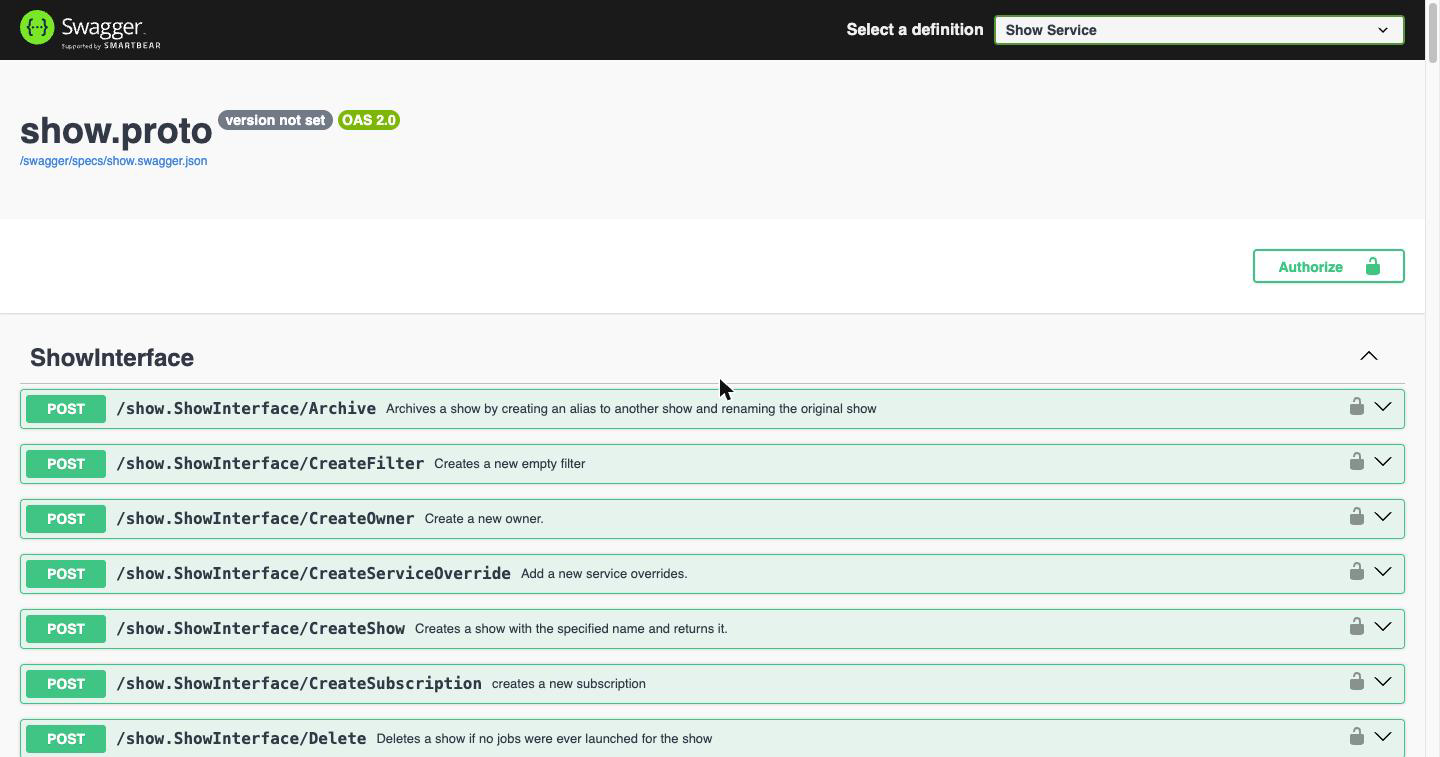
The menu holds 18 definitions covering 304 endpoints in total. This tutorial uses Show Service throughout, but the same Authorize and Try it out steps apply to any of them:
| Definition | Contains |
|---|---|
| Comment Service | Comments on jobs |
| Criterion Service | Message types only, no endpoints |
| Cue Service | System statistics |
| Department Service | Show departments and their tasks |
| Depend Service | Dependencies between jobs, layers and frames |
| Facility Service | Facilities and allocations |
| Filter Service | Filters, actions and matchers |
| Host Service | Hosts, owners, procs and deeds |
| Job Service | Jobs, layers, frames and groups |
| Limit Service | Resource limits |
| Monitoring Service | Farm and job history |
| RenderPartition Service | Local desktop rendering slices |
| Report Service | RQD status reports |
| Rqd Service | RQD agent control |
| Service Service | Service definitions and overrides |
| Show Service | Shows, subscriptions and owners |
| Subscription Service | Show subscriptions |
| Task Service | Department tasks |
Two caveats before you start clicking. Five of these definitions publish endpoints the gateway does not route, so calling one returns 404 even with a valid token: Cue, Monitoring, RenderPartition, Report and Rqd. Separately, Criterion contains no endpoints at all, so there is nothing there to call; selecting it shows a Models section and nothing else. The remaining twelve definitions are fully routed. The API reference explains why and lists what to use instead.
Authorize with your token
Click Authorize in the top right, paste the JWT_TOKEN you generated in Step 1, and click Authorize:
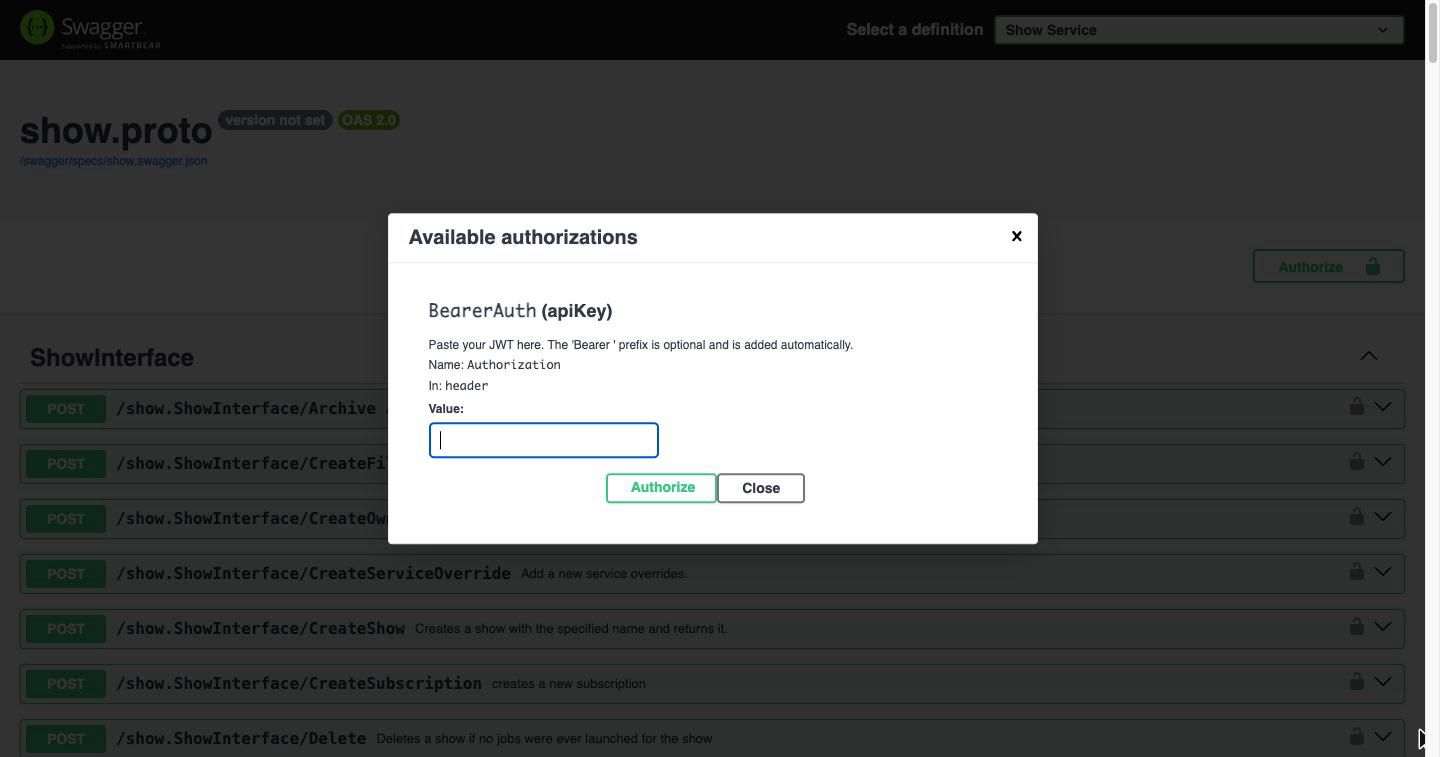
The Bearer prefix is optional; the page adds it for you. Once authorized, the value is masked and the padlocks on each endpoint close:
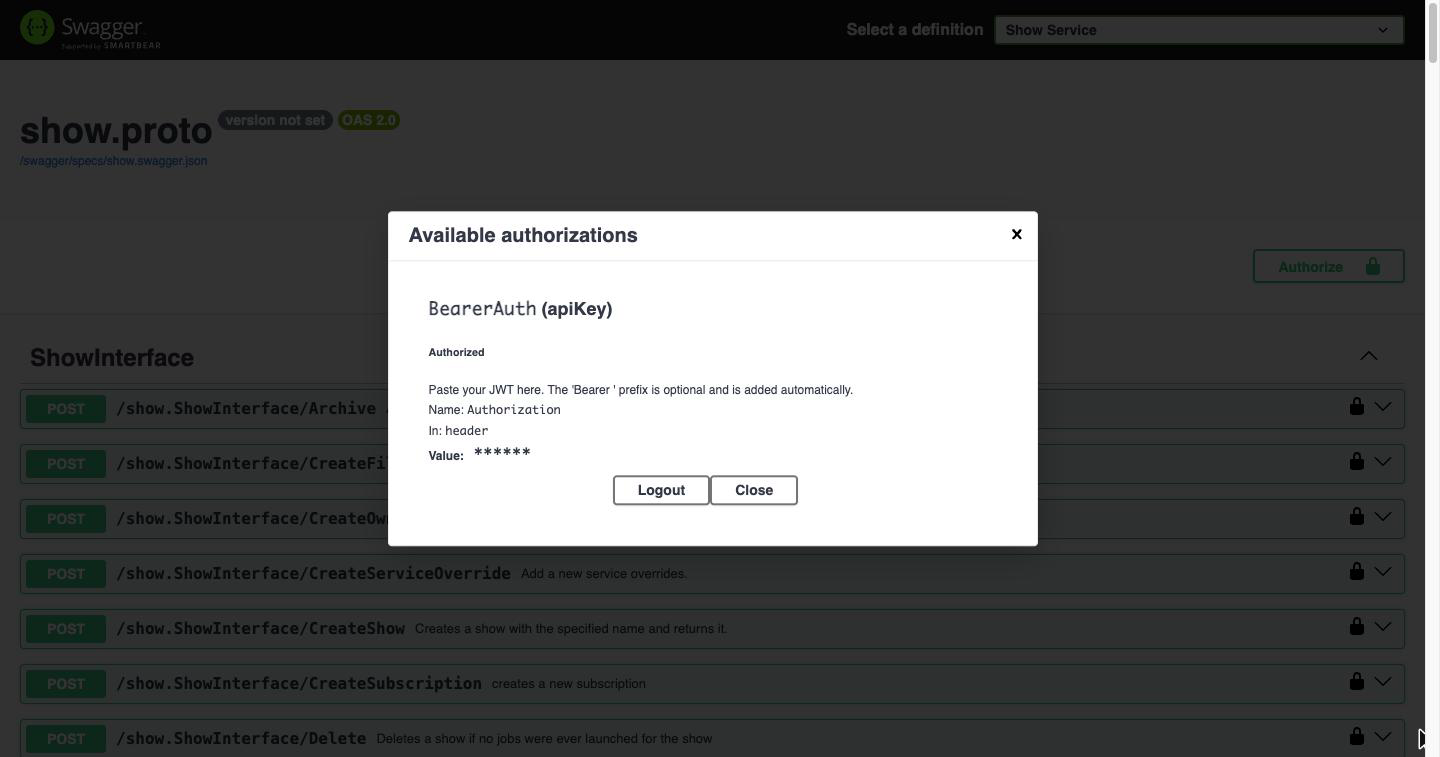
Click Close to dismiss the dialog. Your token now applies to every request you send from this page.
Inspect an endpoint
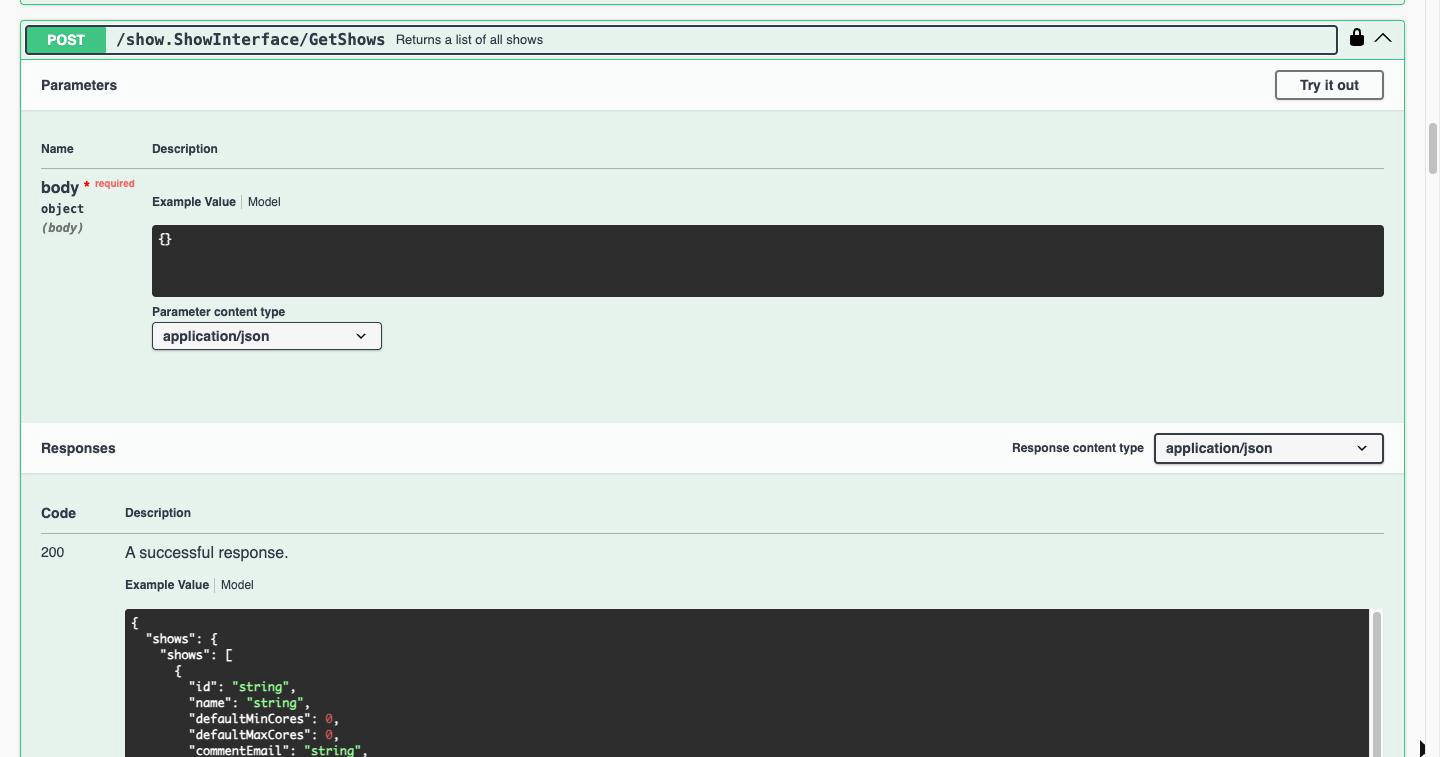
Find /show.ShowInterface/GetShows and click it to expand. You will see the request body it expects, the parameter content type, and the schema of a successful response:
Send your first request
Click Try it out. The request body becomes editable. GetShows takes no arguments, so leave it as {}:
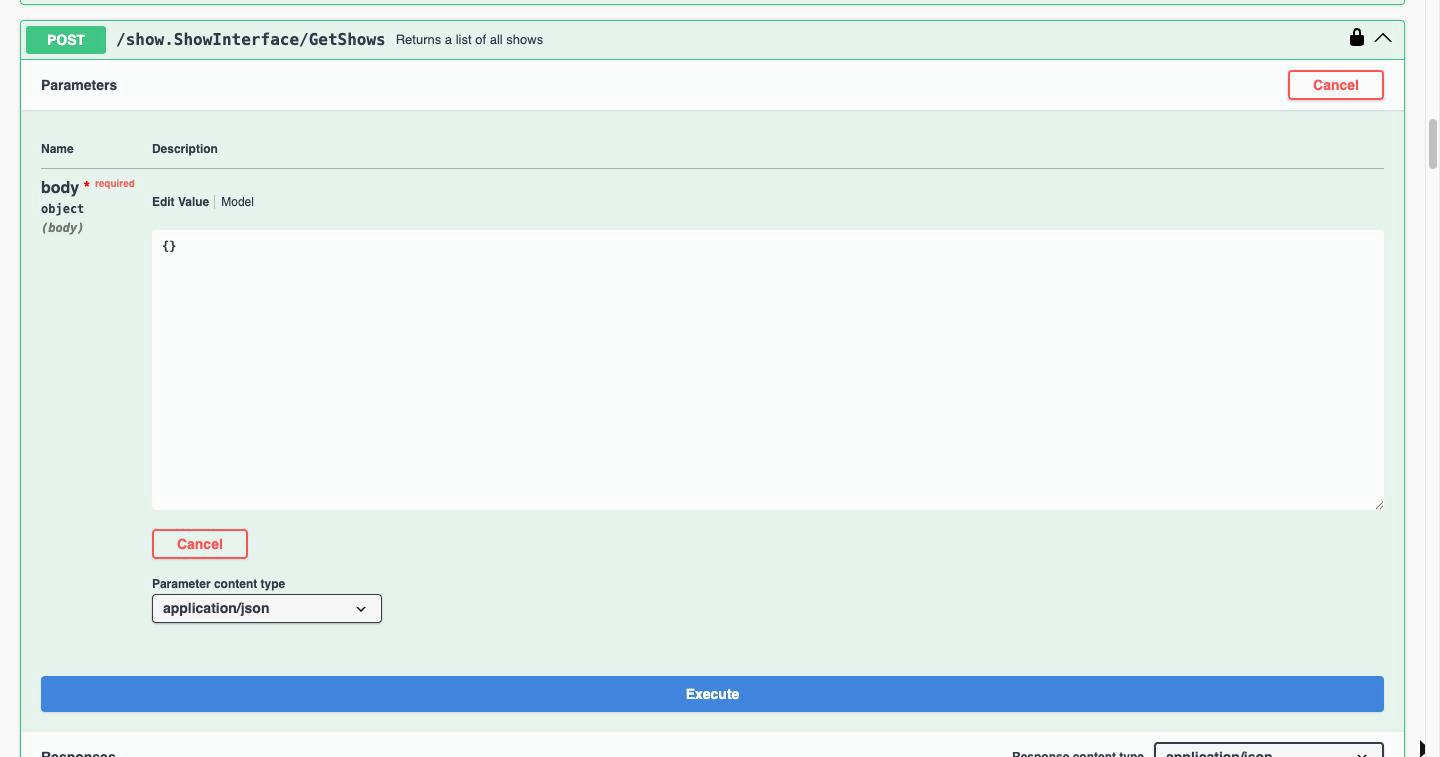
Click Execute. Swagger UI shows the exact curl command it ran, the request URL, and the live response from your farm:
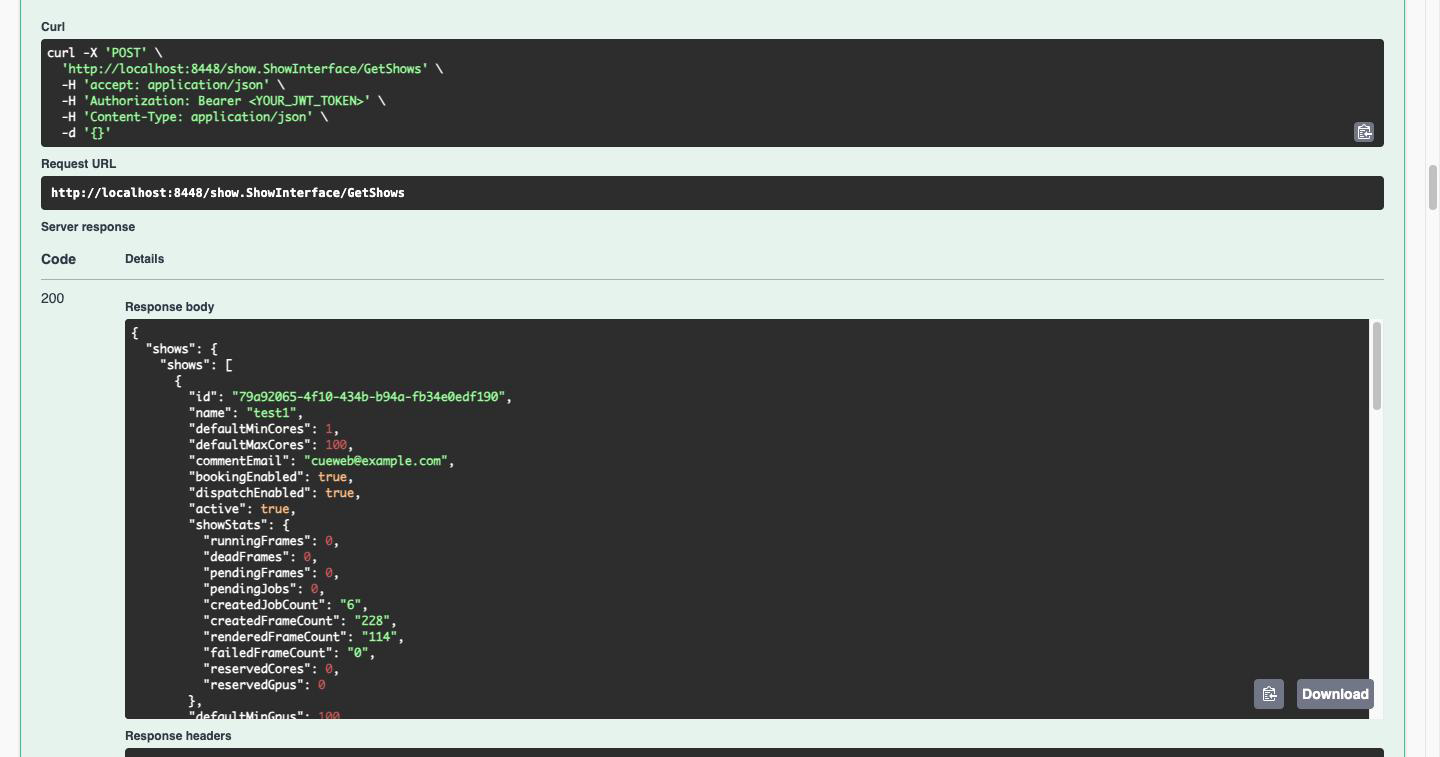
A 200 with a shows array means your gateway, your token, and Cuebot are all working end to end. If you get a 401, your token is wrong or expired. Go back to Step 1.
Tip: The
curlcommand Swagger UI generates is copy-pasteable. Working out a request in the browser first and then copying the command is usually faster than writing it by hand, and it is exactly how thecurlexamples in the rest of this tutorial were built.
Step 3: Exploring Shows
List All Shows
Get all shows in your OpenCue system:
curl -s -H "Authorization: Bearer $JWT_TOKEN" \
     -H "Content-Type: application/json" \
     -X POST \
     "$OPENCUE_REST_GATEWAY_URL/show.ShowInterface/GetShows" \
     -d '{}' | jq .
Response:
{
  "shows": [
    {
      "id": "550e8400-e29b-41d4-a716-446655440000",
      "name": "demo_show",
      "active": true,
      "default_min_cores": 1.0,
      "default_max_cores": 10.0
    }
  ]
}
Get Specific Show Details
Retrieve detailed information about a show:
curl -s -H "Authorization: Bearer $JWT_TOKEN" \
     -H "Content-Type: application/json" \
     -X POST \
     "$OPENCUE_REST_GATEWAY_URL/show.ShowInterface/GetShow" \
     -d '{"name": "demo_show"}' | jq .
Step 4: Working with Jobs
List Jobs for a Show
Get all jobs in a specific show:
curl -s -H "Authorization: Bearer $JWT_TOKEN" \
     -H "Content-Type: application/json" \
     -X POST \
     "$OPENCUE_REST_GATEWAY_URL/job.JobInterface/GetJobs" \
     -d '{"r": {"show": "demo_show"}}' | jq .
Response:
{
  "jobs": [
    {
      "id": "job-550e8400-e29b-41d4-a716-446655440001",
      "name": "render_job_001",
      "show": "demo_show",
      "user": "artist1",
      "state": "PENDING",
      "total_frames": 100,
      "stats": {
        "pending_frames": 90,
        "running_frames": 10,
        "succeeded_frames": 0,
        "dead_frames": 0
      }
    }
  ]
}
Get Job Details
Retrieve detailed information about a specific job:
JOB_ID="job-550e8400-e29b-41d4-a716-446655440001"

curl -s -H "Authorization: Bearer $JWT_TOKEN" \
     -H "Content-Type: application/json" \
     -X POST \
     "$OPENCUE_REST_GATEWAY_URL/job.JobInterface/GetJob" \
     -d "{\"id\": \"$JOB_ID\"}" | jq .
Filter Jobs by User
Find jobs submitted by a specific user:
curl -s -H "Authorization: Bearer $JWT_TOKEN" \
     -H "Content-Type: application/json" \
     -X POST \
     "$OPENCUE_REST_GATEWAY_URL/job.JobInterface/GetJobs" \
     -d '{"r": {"show": "demo_show", "user": "artist1"}}' | jq .
Step 5: Monitoring Frame Progress
Get Frames for a Job
List all frames in a job:
curl -s -H "Authorization: Bearer $JWT_TOKEN" \
     -H "Content-Type: application/json" \
     -X POST \
     "$OPENCUE_REST_GATEWAY_URL/frame.FrameInterface/GetFrames" \
     -d "{\"r\": {\"job\": \"$JOB_ID\"}}" | jq .
Filter Frames by State
Get only failed frames:
curl -s -H "Authorization: Bearer $JWT_TOKEN" \
     -H "Content-Type: application/json" \
     -X POST \
     "$OPENCUE_REST_GATEWAY_URL/frame.FrameInterface/GetFrames" \
     -d "{\"r\": {\"job\": \"$JOB_ID\", \"state\": [\"DEAD\"]}}" | jq .
Get Frame Details
Get detailed information about a specific frame:
FRAME_ID="frame-550e8400-e29b-41d4-a716-446655440002"

curl -s -H "Authorization: Bearer $JWT_TOKEN" \
     -H "Content-Type: application/json" \
     -X POST \
     "$OPENCUE_REST_GATEWAY_URL/frame.FrameInterface/GetFrame" \
     -d "{\"id\": \"$FRAME_ID\"}" | jq .
Step 6: Host and Resource Monitoring
List Rendering Hosts
Get all rendering hosts:
curl -s -H "Authorization: Bearer $JWT_TOKEN" \
     -H "Content-Type: application/json" \
     -X POST \
     "$OPENCUE_REST_GATEWAY_URL/host.HostInterface/GetHosts" \
     -d '{"r": {}}' | jq .
Filter Hosts by State
Get only online hosts:
curl -s -H "Authorization: Bearer $JWT_TOKEN" \
     -H "Content-Type: application/json" \
     -X POST \
     "$OPENCUE_REST_GATEWAY_URL/host.HostInterface/GetHosts" \
     -d '{"r": {"state": ["UP"]}}' | jq .
Get Host Details
Get detailed information about a specific host:
curl -s -H "Authorization: Bearer $JWT_TOKEN" \
     -H "Content-Type: application/json" \
     -X POST \
     "$OPENCUE_REST_GATEWAY_URL/host.HostInterface/GetHost" \
     -d '{"name": "render01"}' | jq .
Step 7: Job Management Operations
Pause a Job
Pause a running job:
curl -s -H "Authorization: Bearer $JWT_TOKEN" \
     -H "Content-Type: application/json" \
     -X POST \
     "$OPENCUE_REST_GATEWAY_URL/job.JobInterface/Pause" \
     -d "{\"job\": {\"id\": \"$JOB_ID\"}}" | jq .
Resume a Job
Resume a paused job:
curl -s -H "Authorization: Bearer $JWT_TOKEN" \
     -H "Content-Type: application/json" \
     -X POST \
     "$OPENCUE_REST_GATEWAY_URL/job.JobInterface/Resume" \
     -d "{\"job\": {\"id\": \"$JOB_ID\"}}" | jq .
Set Job Priority
Change job priority (higher numbers = higher priority):
curl -s -H "Authorization: Bearer $JWT_TOKEN" \
     -H "Content-Type: application/json" \
     -X POST \
     "$OPENCUE_REST_GATEWAY_URL/job.JobInterface/SetPriority" \
     -d "{\"job\": {\"id\": \"$JOB_ID\"}, \"priority\": 75}" | jq .
Retry Failed Frame
Retry a failed frame:
curl -s -H "Authorization: Bearer $JWT_TOKEN" \
     -H "Content-Type: application/json" \
     -X POST \
     "$OPENCUE_REST_GATEWAY_URL/frame.FrameInterface/Retry" \
     -d "{\"frame\": {\"id\": \"$FRAME_ID\"}}" | jq .
Step 8: Creating a Simple Monitoring Script
Basic Monitoring Script
Create a simple bash script to monitor job progress:
#!/bin/bash
# monitor_job.sh

JOB_ID="$1"
if [ -z "$JOB_ID" ]; then
    echo "Usage: $0 <job-id>"
    exit 1
fi

echo "Monitoring job: $JOB_ID"
echo "Press Ctrl+C to stop"

while true; do
    echo "$(date): Checking job status..."

    # Get job stats
    RESPONSE=$(curl -s -H "Authorization: Bearer $JWT_TOKEN" \
                    -H "Content-Type: application/json" \
                    -X POST \
                    "$OPENCUE_REST_GATEWAY_URL/job.JobInterface/GetJob" \
                    -d "{\"id\": \"$JOB_ID\"}")

    if echo "$RESPONSE" | jq -e '.job' > /dev/null; then
        STATS=$(echo "$RESPONSE" | jq -r '.job.stats')
        PENDING=$(echo "$STATS" | jq -r '.pending_frames')
        RUNNING=$(echo "$STATS" | jq -r '.running_frames')
        SUCCEEDED=$(echo "$STATS" | jq -r '.succeeded_frames')
        DEAD=$(echo "$STATS" | jq -r '.dead_frames')

        echo "  Pending: $PENDING, Running: $RUNNING, Succeeded: $SUCCEEDED, Dead: $DEAD"
    else
        echo "  Error getting job status"
    fi

    sleep 30
done
Make it executable and run:
chmod +x monitor_job.sh
./monitor_job.sh "your-job-id-here"
Step 9: Python Integration Example
Complete Python Class
Create a comprehensive Python client:
# opencue_client.py
import requests
import json
import time
from datetime import datetime, timedelta

class OpenCueClient:
    def __init__(self, base_url, jwt_token):
        self.base_url = base_url.rstrip('/')
        self.headers = {
            'Authorization': f'Bearer {jwt_token}',
            'Content-Type': 'application/json'
        }
        self.session = requests.Session()
        self.session.headers.update(self.headers)

    def _post(self, endpoint, data=None):
        """Make POST request to REST API"""
        url = f"{self.base_url}/{endpoint}"
        response = self.session.post(url, json=data or {})
        response.raise_for_status()
        return response.json()

    # Show operations
    def get_shows(self):
        return self._post('show.ShowInterface/GetShows')

    def get_show(self, name):
        return self._post('show.ShowInterface/GetShow', {'name': name})

    # Job operations
    def get_jobs(self, show=None, user=None, state=None):
        filter_data = {}
        if show:
            filter_data['show'] = show
        if user:
            filter_data['user'] = user
        if state:
            filter_data['state'] = state
        return self._post('job.JobInterface/GetJobs', {'r': filter_data})

    def get_job(self, job_id):
        return self._post('job.JobInterface/GetJob', {'id': job_id})

    def pause_job(self, job_id):
        return self._post('job.JobInterface/Pause', {'job': {'id': job_id}})

    def resume_job(self, job_id):
        return self._post('job.JobInterface/Resume', {'job': {'id': job_id}})

    def set_job_priority(self, job_id, priority):
        return self._post('job.JobInterface/SetPriority', {
            'job': {'id': job_id},
            'priority': priority
        })

    # Frame operations
    def get_frames(self, job_id, state=None):
        filter_data = {'job': job_id}
        if state:
            filter_data['state'] = state
        return self._post('frame.FrameInterface/GetFrames', {'r': filter_data})

    def retry_frame(self, frame_id):
        return self._post('frame.FrameInterface/Retry', {'frame': {'id': frame_id}})

    # Host operations
    def get_hosts(self, state=None):
        filter_data = {}
        if state:
            filter_data['state'] = state
        return self._post('host.HostInterface/GetHosts', {'r': filter_data})

    # Utility methods
    def monitor_job_progress(self, job_id, interval=30):
        """Monitor job progress with periodic updates"""
        print(f"Monitoring job {job_id}...")

        while True:
            try:
                job_data = self.get_job(job_id)
                stats = job_data['job']['stats']

                print(f"{datetime.now()}: "
                      f"Pending: {stats['pending_frames']}, "
                      f"Running: {stats['running_frames']}, "
                      f"Succeeded: {stats['succeeded_frames']}, "
                      f"Dead: {stats['dead_frames']}")

                # Check if job is complete
                total = (stats['pending_frames'] + stats['running_frames'] +
                        stats['succeeded_frames'] + stats['dead_frames'])
                if stats['pending_frames'] == 0 and stats['running_frames'] == 0:
                    print("Job completed!")
                    break

                time.sleep(interval)

            except KeyboardInterrupt:
                print("\nMonitoring stopped")
                break
            except Exception as e:
                print(f"Error: {e}")
                time.sleep(interval)

# Usage example
if __name__ == "__main__":
    import os

    client = OpenCueClient(
        base_url=os.getenv('OPENCUE_REST_GATEWAY_URL', 'http://localhost:8448'),
        jwt_token=os.getenv('JWT_TOKEN')
    )

    # List shows
    shows = client.get_shows()
    print(f"Found {len(shows['shows'])} shows")

    # Get jobs for first show
    if shows['shows']:
        show_name = shows['shows'][0]['name']
        jobs = client.get_jobs(show=show_name)
        print(f"Found {len(jobs['jobs'])} jobs in {show_name}")

        # Monitor first job if available
        if jobs['jobs']:
            job_id = jobs['jobs'][0]['id']
            client.monitor_job_progress(job_id)
Run the Python client:
python3 opencue_client.py
Step 10: Web Integration Example
JavaScript/HTML Dashboard
Create a simple web dashboard:
<!DOCTYPE html>
<html>
<head>
    <title>OpenCue Dashboard</title>
    <style>
        body { font-family: Arial, sans-serif; margin: 20px; }
        .job { border: 1px solid #ccc; margin: 10px 0; padding: 15px; }
        .stats { display: flex; gap: 20px; }
        .stat { background: #f0f0f0; padding: 10px; border-radius: 5px; }
        button { padding: 5px 10px; margin: 2px; }
    </style>
</head>
<body>
    <h1>OpenCue Dashboard</h1>

    <div>
        <label>Show: </label>
        <select id="showSelect"></select>
        <button onclick="loadJobs()">Load Jobs</button>
    </div>

    <div id="jobsList"></div>

    <script>
        const API_BASE = 'http://localhost:8448';
        const JWT_TOKEN = 'your-jwt-token-here'; // Set your token

        const headers = {
            'Authorization': `Bearer ${JWT_TOKEN}`,
            'Content-Type': 'application/json'
        };

        async function apiPost(endpoint, data = {}) {
            const response = await fetch(`${API_BASE}/${endpoint}`, {
                method: 'POST',
                headers: headers,
                body: JSON.stringify(data)
            });
            return response.json();
        }

        async function loadShows() {
            try {
                const data = await apiPost('show.ShowInterface/GetShows');
                const select = document.getElementById('showSelect');
                select.innerHTML = '';

                data.shows.forEach(show => {
                    const option = document.createElement('option');
                    option.value = show.name;
                    option.textContent = show.name;
                    select.appendChild(option);
                });
            } catch (error) {
                console.error('Error loading shows:', error);
            }
        }

        async function loadJobs() {
            const showName = document.getElementById('showSelect').value;
            if (!showName) return;

            try {
                const data = await apiPost('job.JobInterface/GetJobs', {
                    r: { show: showName }
                });

                const container = document.getElementById('jobsList');
                container.innerHTML = '';

                data.jobs.forEach(job => {
                    const jobDiv = document.createElement('div');
                    jobDiv.className = 'job';
                    jobDiv.innerHTML = `
                        <h3>${job.name}</h3>
                        <p>User: ${job.user} | State: ${job.state}</p>
                        <div class="stats">
                            <div class="stat">Pending: ${job.stats.pending_frames}</div>
                            <div class="stat">Running: ${job.stats.running_frames}</div>
                            <div class="stat">Succeeded: ${job.stats.succeeded_frames}</div>
                            <div class="stat">Dead: ${job.stats.dead_frames}</div>
                        </div>
                        <button onclick="pauseJob('${job.id}')">Pause</button>
                        <button onclick="resumeJob('${job.id}')">Resume</button>
                    `;
                    container.appendChild(jobDiv);
                });
            } catch (error) {
                console.error('Error loading jobs:', error);
            }
        }

        async function pauseJob(jobId) {
            try {
                await apiPost('job.JobInterface/Pause', { job: { id: jobId } });
                loadJobs(); // Refresh
            } catch (error) {
                console.error('Error pausing job:', error);
            }
        }

        async function resumeJob(jobId) {
            try {
                await apiPost('job.JobInterface/Resume', { job: { id: jobId } });
                loadJobs(); // Refresh
            } catch (error) {
                console.error('Error resuming job:', error);
            }
        }

        // Load shows on page load
        loadShows();
    </script>
</body>
</html>
Step 11: Best Practices and Tips
Error Handling
Always implement proper error handling:
# Bash example with error handling
response=$(curl -s -H "Authorization: Bearer $JWT_TOKEN" \
               -H "Content-Type: application/json" \
               -X POST \
               "$OPENCUE_REST_GATEWAY_URL/job.JobInterface/GetJob" \
               -d "{\"id\": \"$JOB_ID\"}")

if echo "$response" | jq -e '.error' > /dev/null; then
    echo "API Error: $(echo "$response" | jq -r '.message')"
    exit 1
fi
Rate Limiting
Implement reasonable delays between requests:
import time

# Add delay between rapid API calls
for job_id in job_ids:
    job_data = client.get_job(job_id)
    process_job_data(job_data)
    time.sleep(0.1)  # 100ms delay
Token Management
Implement token renewal:
def is_token_expired(token):
    try:
        payload = jwt.decode(token, options={"verify_signature": False})
        exp = payload.get('exp')
        return datetime.utcfromtimestamp(exp) < datetime.utcnow()
    except:
        return True

def renew_token_if_needed():
    if is_token_expired(current_token):
        current_token = generate_new_token()
        client.update_token(current_token)
Troubleshooting
Common Issues
401 Unauthorized:
- Check JWT token is valid and not expired
- Verify JWT secret matches gateway configuration
Connection refused:
- Verify gateway is running: Check for 401 response on
curl http://localhost:8448/ - Check network connectivity and firewall rules
Invalid JSON:
- Ensure Content-Type header is set to
application/json - Validate JSON syntax with tools like
jq
Empty responses:
- Check if data exists (e.g., jobs in the show)
- Verify filter parameters are correct
What’s next?
- REST API Reference - Complete API specification
- Deploying REST Gateway - Production setup
- Using the REST API - Additional usage patterns