Deploying REST Gateway
Production deployment and configuration of the OpenCue REST Gateway
The OpenCue REST Gateway provides HTTP/REST endpoints for OpenCue’s gRPC API, enabling web applications and HTTP clients to interact with your render farm. This guide covers production deployment patterns and configuration.
Architecture Overview
- Browser
- Mobile App
- curl/Scripts
- Third-party"] B["REST Gateway
- Authentication
- Request Trans.
- Response Form.
- Error Handling"] C["Cuebot
- Job Mgmt
- Scheduling
- Resources
- Monitoring"] A <-->|HTTP/JSON| B B <-->|gRPC| C
Prerequisites
- Go 1.19 or later
- Access to OpenCue Cuebot gRPC endpoint
- JWT secret for authentication
- Docker (optional, for containerized deployment)
Installation Methods
Method 1: Standalone Docker Deployment (Recommended)
Important: The REST Gateway is not included in OpenCue’s main docker-compose.yml and must be deployed separately.
Step 1: Start OpenCue Stack
From the OpenCue repository root:
# Start core OpenCue services (database, cuebot, rqd)
docker compose up -d

# Check service status
docker compose ps
Step 2: Deploy REST Gateway Separately
# Generate JWT secret for REST API authentication
export JWT_SECRET=$(openssl rand -base64 32)

# Build REST Gateway image
cd rest_gateway
docker build -t opencue-rest-gateway .

# Run REST Gateway as separate container
docker run -d --name opencue-rest-gateway \
  --network opencue_default \
  -p 8448:8448 \
  -e CUEBOT_ENDPOINT=cuebot:8443 \
  -e JWT_SECRET="$JWT_SECRET" \
  -e LOG_LEVEL=info \
  opencue-rest-gateway
The REST Gateway will be available at http://localhost:8448 alongside the OpenCue infrastructure.
Test the deployment:
# Install PyJWT for token generation
pip install PyJWT

# Generate a test JWT token
export JWT_TOKEN=$(python3 -c "
import jwt, datetime, os
secret = os.getenv('JWT_SECRET')
payload = {'user': 'test', 'exp': datetime.datetime.now(datetime.timezone.utc) + datetime.timedelta(hours=1)}
print(jwt.encode(payload, secret, algorithm='HS256'))
")

# Test service connectivity (expects 401 - confirms service is running)
response=$(curl -s -o /dev/null -w "%{http_code}" http://localhost:8448/)
if [ "$response" = "401" ]; then
    echo "Gateway is running and requiring authentication (as expected)"
else
    echo "Gateway may not be running (got HTTP $response)"
fi

# Test API access
curl -H "Authorization: Bearer $JWT_TOKEN" \
     -H "Content-Type: application/json" \
     -X POST \
     "http://localhost:8448/show.ShowInterface/GetShows" \
     -d '{}'
Method 2: Custom Docker Compose File
For production deployments, create a separate Docker Compose file:
Create a REST Gateway compose file:
# rest-gateway-compose.yml
version: '3.8'
services:
  rest-gateway:
    build: ./rest_gateway
    ports:
      - "8448:8448"
    environment:
      - CUEBOT_ENDPOINT=cuebot:8443
      - JWT_SECRET=${JWT_SECRET}
      - LOG_LEVEL=info
      - CORS_ALLOWED_ORIGINS=https://your-domain.com
      - REST_PORT=8448
    networks:
      - opencue_default
    restart: unless-stopped

networks:
  opencue_default:
    external: true
Deploy separately:
# Start OpenCue stack first
docker compose up -d

# Deploy REST Gateway with separate compose file
export JWT_SECRET=$(openssl rand -base64 32)
docker compose -f rest-gateway-compose.yml up -d
Run with Docker:
docker run -d \
  --name opencue-rest-gateway \
  -p 8448:8448 \
  -e CUEBOT_ENDPOINT=cuebot:8443 \
  -e JWT_SECRET=your-secret-key \
  -e LOG_LEVEL=info \
  opencue-rest-gateway
Method 3: Custom Docker Compose
For custom Docker Compose setups, you can reference the integrated configuration or create your own:
version: '3.8'
services:
  rest-gateway:
    build: ./rest_gateway
    ports:
      - "8448:8448"
    environment:
      - CUEBOT_ENDPOINT=cuebot:8443
      - JWT_SECRET=${JWT_SECRET:-dev-secret-key-change-in-production}
      - LOG_LEVEL=${LOG_LEVEL:-info}
      - CORS_ALLOWED_ORIGINS=${CORS_ALLOWED_ORIGINS:-*}
      - REST_PORT=8448
    depends_on:
      - cuebot
    restart: unless-stopped

  cuebot:
    image: opencue/cuebot:latest
    ports:
      - "8443:8443"
    # Add your cuebot configuration
Deploy with:
export JWT_SECRET=$(openssl rand -base64 32)
docker-compose up -d
Method 3: Binary Deployment
Build from source:
cd rest_gateway/opencue_gateway
go build -o opencue-rest-gateway
Generate the OpenAPI documents. Unlike the Docker build, go build does not
produce them, and they are not checked into the source tree. Without them the
/swagger/ routes are silently not mounted, so the Swagger UI returns 401 as if
it were disabled. Generate and install them alongside the binary:
# Once, to install the plugin
go install github.com/grpc-ecosystem/grpc-gateway/v2/protoc-gen-openapiv2@latest

# From rest_gateway/opencue_gateway
mkdir -p gen/openapiv2
protoc -I ../../proto/src/ \
  --openapiv2_out ./gen/openapiv2 \
  --openapiv2_opt generate_unbound_methods=true \
  --openapiv2_opt logtostderr=true \
  ../../proto/src/*.proto

# Install next to the binary
sudo mkdir -p /opt/opencue/gen/openapiv2
sudo cp gen/openapiv2/*.swagger.json /opt/opencue/gen/openapiv2/
If you do not want the Swagger UI on this host, skip the step above and set
SWAGGER_ENABLED=false in the unit file instead, which makes the intent explicit
rather than relying on a missing directory.
Create systemd service /etc/systemd/system/opencue-rest-gateway.service:
[Unit]
Description=OpenCue REST Gateway
After=network.target

[Service]
Type=simple
User=opencue
WorkingDirectory=/opt/opencue
ExecStart=/opt/opencue/opencue-rest-gateway
Environment=CUEBOT_ENDPOINT=localhost:8443
Environment=JWT_SECRET=your-secret-key
Environment=LOG_LEVEL=info
# Absolute path: SWAGGER_DIR is otherwise resolved relative to WorkingDirectory.
# Set SWAGGER_ENABLED=false instead to leave the UI off on this host.
Environment=SWAGGER_ENABLED=true
Environment=SWAGGER_DIR=/opt/opencue/gen/openapiv2
Restart=always
RestartSec=10

[Install]
WantedBy=multi-user.target
Confirm the routes mounted after starting the service:
journalctl -u opencue-rest-gateway | grep -i swagger
# Expected: Serving Swagger UI / OpenAPI specs from /opt/opencue/gen/openapiv2 on /swagger/
# A "Swagger directory ... not found" line means the documents were not installed.
Enable and start:
sudo systemctl enable opencue-rest-gateway
sudo systemctl start opencue-rest-gateway
Configuration
Environment Variables
| Variable | Default | Description |
|---|---|---|
CUEBOT_ENDPOINT |
localhost:8443 |
Cuebot gRPC endpoint |
REST_PORT |
8448 |
HTTP server port |
JWT_SECRET |
dev-secret-key-change-in-production |
JWT signing secret |
SWAGGER_ENABLED |
true |
Serve the unauthenticated Swagger UI on /swagger/ |
SWAGGER_DIR |
./gen/openapiv2 |
Directory holding the generated OpenAPI documents. The Docker image sets this to /app/gen/openapiv2; a binary deployment resolves it relative to the working directory |
LOG_LEVEL |
info |
Logging level (debug, info, warn, error) |
CORS_ALLOWED_ORIGINS |
* |
CORS allowed origins |
GRPC_MAX_MESSAGE_SIZE |
4194304 |
Max gRPC message size (4MB) |
REQUEST_TIMEOUT |
30s |
Request timeout duration |
SHUTDOWN_TIMEOUT |
30s |
Graceful shutdown timeout |
Production Configuration
For production deployments, create a configuration file:
# /etc/opencue/rest-gateway.env
CUEBOT_ENDPOINT=cuebot.internal:8443
REST_PORT=8448
JWT_SECRET=your-production-secret-key-here
LOG_LEVEL=warn
CORS_ALLOWED_ORIGINS=https://your-domain.com,https://cueweb.internal
GRPC_MAX_MESSAGE_SIZE=8388608
REQUEST_TIMEOUT=60s
SHUTDOWN_TIMEOUT=30s
# The Swagger UI is unauthenticated; keep it off in production
SWAGGER_ENABLED=false
Security Configuration
Swagger UI Exposure
The gateway serves an interactive Swagger UI on /swagger/, mounted outside the JWT middleware so the API can be browsed without a token:
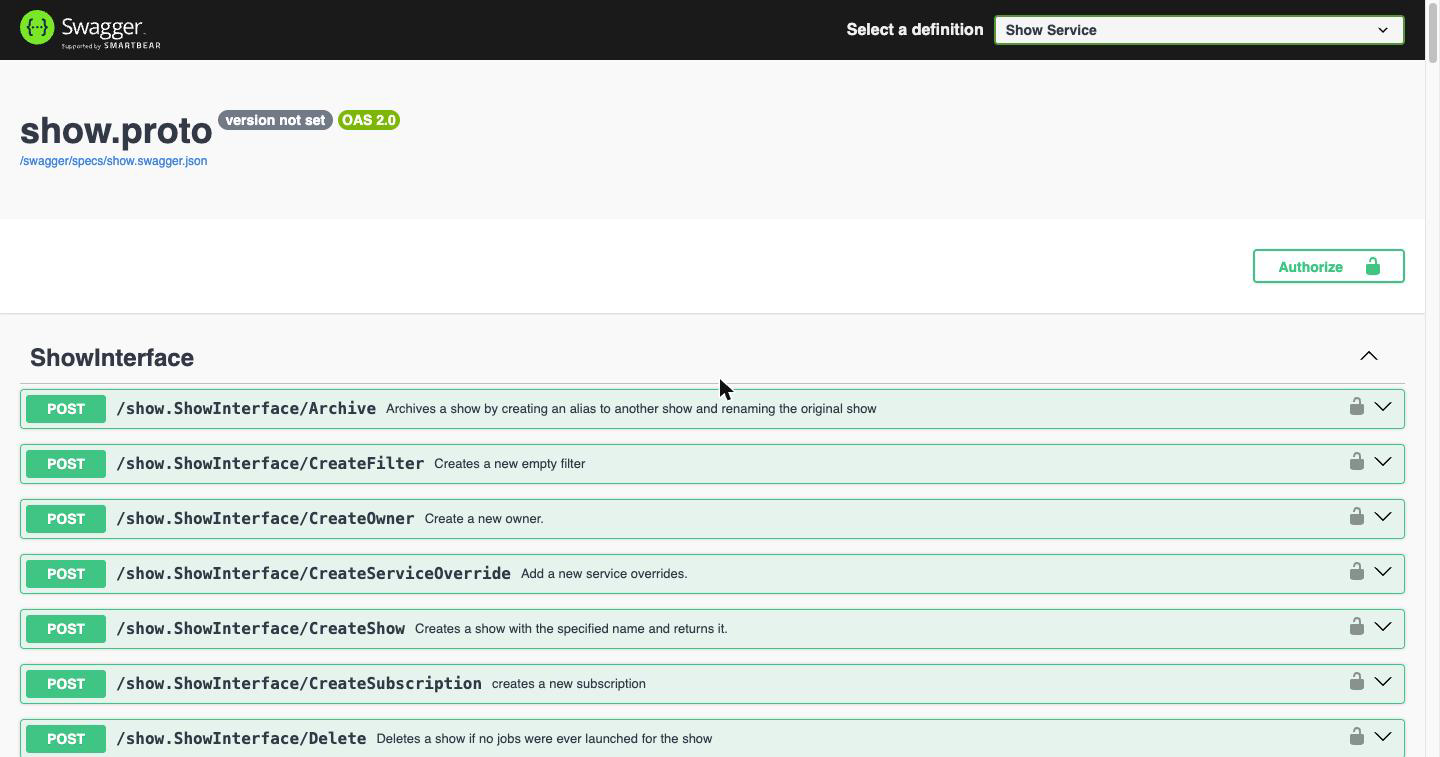
This is convenient during development, but on a production gateway it publishes the complete API surface to anyone who can reach the port, including every interface, method name, and message schema. No data is readable and no operation can be performed without a valid JWT, but the shape of the system is visible.
Choose one of the following for production:
Option 1. Disable it entirely (recommended). The routes are not mounted at all, and /swagger/ falls through to the authenticated handler:
docker run -d --name opencue-rest-gateway \
  -e CUEBOT_ENDPOINT=cuebot.internal:8443 \
  -e REST_PORT=8448 \
  -e JWT_SECRET="$JWT_SECRET" \
  -e SWAGGER_ENABLED=false \
  -p 8448:8448 \
  opencue/rest-gateway:latest
Accepted false values are false, 0, no and off (case-insensitive). Confirm from the gateway log:
SWAGGER_ENABLED is false; not mounting /swagger/ handlers
Option 2. Keep it, but restrict it at the reverse proxy. Useful when you want internal staff to browse the API but do not want it publicly reachable:
location /swagger/ {
    allow 10.0.0.0/8;       # internal network only
    deny  all;
    proxy_pass http://localhost:8448;
}
Verify whichever option you chose:
# Should be 404/401 (disabled) or 403 (proxy-restricted) from outside
curl -s -o /dev/null -w "%{http_code}\n" https://api.your-domain.com/swagger/
JWT Authentication
Generate a secure JWT secret:
openssl rand -base64 32
Create JWT tokens for clients:
import jwt
import datetime

secret = "your-production-secret-key-here"
payload = {
    "user": "api-client",
    "exp": datetime.datetime.now(datetime.timezone.utc) + datetime.timedelta(hours=24)
}
token = jwt.encode(payload, secret, algorithm="HS256")
print(token)
TLS/HTTPS Setup
For production, use a reverse proxy like NGINX:
server {
    listen 443 ssl http2;
    server_name api.your-domain.com;

    ssl_certificate /path/to/certificate.crt;
    ssl_certificate_key /path/to/private.key;

    location / {
        proxy_pass http://localhost:8448;
        proxy_set_header Host $host;
        proxy_set_header X-Real-IP $remote_addr;
        proxy_set_header X-Forwarded-For $proxy_add_x_forwarded_for;
        proxy_set_header X-Forwarded-Proto $scheme;
    }
}
CORS Configuration
Configure CORS for web applications:
export CORS_ALLOWED_ORIGINS="https://cueweb.your-domain.com,https://your-app.com"
High Availability Deployment
Load Balancer Setup
Use HAProxy for load balancing multiple gateway instances:
backend opencue_rest_gateways
    mode http
    balance roundrobin
    option httpchk GET /
    # Note: Expects 401 response - this confirms service is running
    server gateway1 10.0.1.10:8448 check
    server gateway2 10.0.1.11:8448 check
    server gateway3 10.0.1.12:8448 check

frontend opencue_api
    bind *:443 ssl crt /path/to/certificate.pem
    default_backend opencue_rest_gateways
Kubernetes Deployment
Create Kubernetes manifests:
apiVersion: apps/v1
kind: Deployment
metadata:
  name: opencue-rest-gateway
spec:
  replicas: 3
  selector:
    matchLabels:
      app: opencue-rest-gateway
  template:
    metadata:
      labels:
        app: opencue-rest-gateway
    spec:
      containers:
      - name: rest-gateway
        image: opencue-rest-gateway:latest
        ports:
        - containerPort: 8448
        env:
        - name: CUEBOT_ENDPOINT
          value: "cuebot-service:8443"
        - name: JWT_SECRET
          valueFrom:
            secretKeyRef:
              name: opencue-secrets
              key: jwt-secret
        resources:
          requests:
            memory: "64Mi"
            cpu: "100m"
          limits:
            memory: "256Mi"
            cpu: "500m"
---
apiVersion: v1
kind: Service
metadata:
  name: opencue-rest-gateway
spec:
  selector:
    app: opencue-rest-gateway
  ports:
  - port: 8448
    targetPort: 8448
  type: ClusterIP
Monitoring and Health Checks
Service Health Monitoring
Important: The OpenCue REST Gateway requires JWT authentication for ALL API endpoints, and there are no public health endpoints. The one exception is the Swagger UI on /swagger/, which is served without a token while SWAGGER_ENABLED is true. It exposes documentation only; see Swagger UI Exposure.
For health monitoring, use these approaches:
# TCP connectivity check (recommended for load balancers)
timeout 5 bash -c '</dev/tcp/localhost/8448' && echo "Service is up"

# HTTP status check (expects 401 - confirms service is running)
response=$(curl -s -o /dev/null -w "%{http_code}" http://localhost:8448/)
if [ "$response" = "401" ]; then
    echo "✓ Gateway is running and requiring authentication (as expected)"
else
    echo "✗ Gateway may not be running (got HTTP $response)"
fi
Monitoring with Prometheus
Add monitoring labels to your Kubernetes deployment:
metadata:
  annotations:
    prometheus.io/scrape: "true"
    prometheus.io/port: "8448"
    prometheus.io/path: "/metrics"
Log Aggregation
Configure log collection with Fluentd or similar:
apiVersion: v1
kind: ConfigMap
metadata:
  name: fluentd-config
data:
  fluent.conf: |
    <source>
      @type tail
      path /var/log/containers/opencue-rest-gateway*.log
      pos_file /var/log/fluentd-opencue-gateway.log.pos
      tag kubernetes.opencue.gateway
      format json
    </source>
Performance Tuning
Connection Pool Settings
Optimize gRPC connection settings:
export GRPC_MAX_MESSAGE_SIZE=8388608  # 8MB
export GRPC_KEEPALIVE_TIME=30s
export GRPC_KEEPALIVE_TIMEOUT=5s
Resource Limits
Set appropriate resource limits:
resources:
  requests:
    memory: "128Mi"
    cpu: "200m"
  limits:
    memory: "512Mi"
    cpu: "1000m"
Testing Deployment
Basic Connectivity Test
# Test service connectivity (expects 401 - confirms service is running)
response=$(curl -s -o /dev/null -w "%{http_code}" http://localhost:8448/)
if [ "$response" = "401" ]; then
    echo "✓ Gateway is running and requiring authentication (as expected)"
else
    echo "✗ Gateway may not be running (got HTTP $response)"
fi

# Test with JWT authentication
export JWT_TOKEN="your-jwt-token-here"
curl -H "Authorization: Bearer $JWT_TOKEN" \
     -H "Content-Type: application/json" \
     -X POST \
     "http://localhost:8448/show.ShowInterface/GetShows" \
     -d '{}'
Swagger UI Exposure Test
Confirm the documentation routes match your intended configuration:
swagger_status=$(curl -s -o /dev/null -w "%{http_code}" http://localhost:8448/swagger/)
echo "GET /swagger/ -> $swagger_status"
200. The Swagger UI is being served without authentication. Expected in development; on a production gateway, setSWAGGER_ENABLED=falseor restrict the path at your reverse proxy.401. The routes are not mounted and the request fell through to the authenticated handler. Expected in production.
Load Testing
Use Apache Bench for load testing:
# Create test request file
echo '{}' > test_request.json

# Run load test
ab -n 1000 -c 10 -T application/json -p test_request.json \
   -H "Authorization: Bearer $JWT_TOKEN" \
   http://localhost:8448/show.ShowInterface/GetShows
Troubleshooting
Common Issues
Connection refused to Cuebot:
# Check Cuebot connectivity
telnet cuebot-host 8443

# Verify gRPC endpoint
grpc_health_probe -addr=cuebot-host:8443
JWT authentication failures:
# Verify JWT secret matches
echo $JWT_SECRET

# Test token generation
python3 -c "import jwt; print(jwt.encode({'user': 'test'}, 'your-secret', algorithm='HS256'))"
High memory usage:
# Monitor memory usage
docker stats opencue-rest-gateway

# Check for memory leaks
go tool pprof http://localhost:8448/debug/pprof/heap
Debug Mode
Enable debug logging:
export LOG_LEVEL=debug
Security Best Practices
- Use strong JWT secrets (32+ random characters)
- Enable HTTPS in production
- Restrict CORS origins to known domains
- Implement rate limiting at the load balancer
- Regular security updates for base images
- Network segmentation between gateway and Cuebot
- Monitor for suspicious activity
- Disable the Swagger UI with
SWAGGER_ENABLED=false, or restrict/swagger/at the reverse proxy
What’s next?
- Using the REST API - Client usage examples
- REST API Reference - Complete API documentation
- Monitoring with Prometheus - Add gateway metrics