OpenCueWeb Development Guide
Complete guide for developing, customizing, and deploying OpenCueWeb.
Table of contents
- Development Environment Setup
- Project Structure
- Architecture Overview
- OpenCueWeb Audit (web action audit trail)
- CueSubmit (browser-based job submission)
- Set Priority dialog (CueGUI parity)
- Email Artist dialog (CueGUI parity)
- Request Cores dialog (CueGUI parity)
- Subscribe to Job (Email subscription via Cuebot)
- Job Dependencies (CueGUI parity)
- Pause / Unpause Toggle (Job Context Menu)
- Set Min/Max Cores dialog (CueGUI parity)
- Unbook job dialog (CueGUI parity)
- Multi-job batch operation confirmation
- Monitor Cue page (CueCommander parity)
- Host management actions (CueCommander parity)
- Shows window (CueCommander parity)
- Stuck Frames page (CueCommander parity)
- Job / Layer / Frame menu parity + frame log viewer
- Layer Start After (deferred booking)
- Frame log backends (file-based and Loki)
- Facility Service Defaults (CueCommander parity)
- Subscriptions and Subscription Graphs (CueCommander parity)
- Redirect tool (CueCommander parity)
- Plugin system
- Workspace layout (view presets, immersive, split view)
- Development Workflow
- API Integration
- Component Development
- Styling and Theming
- Usage metrics (Prometheus + Grafana)
- Configuration and Deployment
Development Environment Setup
Prerequisites
Before starting development, ensure you have:
- Node.js (version 18 or later)
- npm or yarn package manager
- Git for version control
- Docker (for REST Gateway and testing)
- OpenCue running instance (Cuebot, RQD, PostgreSQL)
Clone and Setup
# Clone OpenCue repository
git clone https://github.com/AcademySoftwareFoundation/OpenCue.git
cd OpenCue/cueweb

# Install dependencies
npm install

# Create development environment file
cp .env.example .env
Development Configuration
Configure your .env file for development:
# .env file for development
NEXT_PUBLIC_OPENCUE_ENDPOINT=http://localhost:8448
NEXT_PUBLIC_URL=http://localhost:3000
NEXT_JWT_SECRET=dev-secret-key

# Development settings
NODE_ENV=development
NEXT_TELEMETRY_DISABLED=1

# Authentication (optional for development)
# NEXT_PUBLIC_AUTH_PROVIDER=github,google
NEXTAUTH_URL=http://localhost:3000
NEXTAUTH_SECRET=dev-nextauth-secret

# Sentry (disabled for development)
# SENTRY_DSN=your-sentry-dsn
SENTRY_ENVIRONMENT=development
Start Development Server
# Start the development server
npm run dev

# Server will start at http://localhost:3000
# Hot reload enabled for development
Project Structure
Directory Layout
cueweb/
├── app/                  # Next.js App Router pages
│   ├── globals.css       # Global styles and theme CSS variables
│   ├── layout.tsx        # Root layout - mounts ThemeProvider,
│   │                     #   AppSessionProvider, AppHeader,
│   │                     #   ReadOnlyBanner, AppSidebar,
│   │                     #   AttributesPanel, StatusBar, and
│   │                     #   JobSubscriptionPoller around {children}
│   ├── page.tsx          # Jobs dashboard (Cuetopia → Monitor Jobs)
│   ├── icon.png          # Favicon (OpenCue logo, theme-agnostic)
│   ├── login/            # Authentication pages (chrome is hidden here)
│   ├── providers/        # Client-side providers
│   │   ├── session-provider.tsx       # Wraps NextAuth's SessionProvider
│   │   └── job-subscription-poller.tsx # Polls subscribed jobs
│   ├── utils/            # Client-side hooks and shared data
│   │   ├── menus.ts                       # Shared NAV_MENUS (Cuetopia/CueCommander)
│   │   ├── help_menu.ts                   # Help links + env-var overrides
│   │   ├── use_disable_job_interaction.ts # Safety flag hook
│   │   ├── use_cuebot_facility.ts         # Active facility hook
│   │   ├── use_facility_health.ts         # Per-facility gateway health poll (30s)
│   │   ├── gateway_server.ts              # Server-only REST gateway proxy + JWT signing
│   │   ├── use_attributes_panel.ts        # Panel open/closed + dock position
│   │   ├── use_attribute_selection.ts     # Selected entity for the panel
│   │   ├── use_menu_registry.ts           # Flat command registry for Help search
│   │   ├── use_shortcut_notifications.ts  # Toast-on-shortcut opt-out pref
│   │   ├── layer_progress_utils.ts        # Layer progress segments (mirrors jobs)
│   │   └── job_progress_utils.ts          # Job progress segments + tooltip rows
│   ├── settings/         # Admin screens
│   │   └── facilities/   # Manage Facilities (runtime per-facility config + audit)
│   └── api/              # API routes (REST gateway proxy + auth)
│       ├── health/       # Gateway reachability probe used by StatusBar
│       └── facility/health/ # Per-facility gateway health (menu dots)
├── components/           # Reusable React components
│   ├── ui/               # Base UI components
│   │   ├── app-header.tsx       # Global persistent header (incl. mobile hamburger)
│   │   ├── app-sidebar.tsx      # Collapsible left sidebar (desktop)
│   │   ├── mobile-nav-sheet.tsx # Mobile drawer mirroring every sidebar group
│   │   ├── sheet.tsx            # Side-slide panel primitive (Radix Dialog-based)
│   │   ├── row-actions-cell.tsx # Per-row "⋮" Actions button (touch equivalent of right-click)
│   │   ├── about-dialog.tsx     # "About OpenCueWeb" dialog (Help → About)
│   │   ├── attributes-panel.tsx # Docked Attributes drawer
│   │   ├── breadcrumbs.tsx      # Detail-view breadcrumb primitive
│   │   ├── read-only-banner.tsx # Amber strip when safety flag is on
│   │   ├── status-bar.tsx       # IDE-style fixed bottom status bar
│   │   ├── shortcuts-overlay.tsx # `?` overlay + global key handler + clickable kbd chips
│   │   ├── job-progress-bar.tsx # Stacked Jobs progress bar (tooltip + colors)
│   │   ├── layer-progress-bar.tsx # Stacked Layers progress bar (same renderer)
│   │   ├── job-details-inline.tsx # Inline Layers + Frames panel under the Jobs grid
│   │   ├── simple-data-table.tsx # Shared TanStack-table wrapper for Layers/Frames
│   │   ├── subscribe-bell.tsx   # Per-row bell in the Jobs Notify column
│   │   ├── cuewebicon.tsx       # OpenCue icon + "OpenCueWeb" wordmark
│   │   ├── theme-toggle.tsx     # Light/dark toggle
│   │   ├── theme-provider.tsx   # next-themes wrapper
│   │   └── ...                  # button, dialog, dropdown-menu, etc.
│   └── context_menus/    # Right-click context menus (Job / Layer / Frame)
├── lib/                  # Utility libraries
│   ├── auth.ts           # NextAuth configuration (Okta/Google/GitHub/LDAP)
│   ├── facility.ts       # Cuebot Facility resolver (per-request gateway + JWT, client-safe)
│   ├── facility-server.ts # Override-aware facility resolution (server-only)
│   ├── facility-store.ts # Runtime per-facility override store + audit log (server-only)
│   ├── utils.ts          # General utilities (incl. cn())
│   └── metrics-service.ts # Prometheus metrics
├── public/               # Static assets
│   ├── opencue-icon-black.png   # Header logo (light mode)
│   ├── opencue-icon-white.png   # Header logo (dark mode)
│   └── workers/                 # Web workers
├── __tests__/            # Unit and integration tests
├── jest.config.js        # Jest testing configuration
├── next.config.js        # Next.js configuration
├── tailwind.config.js    # Tailwind CSS configuration
├── tsconfig.json         # TypeScript configuration
└── package.json          # Dependencies and scripts
The OpenCue brand assets that drive the icon/wordmark live at the repo
root in images/ (icon, horizontal, stacked × PNG + SVG × black + white)
so other OpenCue projects can re-use them. The two PNGs OpenCueWeb actually
loads at runtime are copies under cueweb/public/.
Key Components
Core Components
AppHeader(components/ui/app-header.tsx): Persistent global header mounted byapp/layout.tsx. Hidden on/login*. Composes:- The OpenCue logo (theme-aware via Tailwind
block dark:hidden/hidden dark:block) + the OpenCueWeb wordmark. - Six
DropdownMenus that mirror the CueGUI menu bar - File (Disable Job Interaction), Cuebot Facility (one item per facility), Cuetopia, CueCommander (both built fromNAV_MENUSimported fromapp/utils/menus.ts), Other (Attributes toggle, Show Shortcuts launcher, Notify on Shortcut toggle), and a custom Help dropdown with a search input that searches the fulluseMenuRegistrylist and renders matches asGroup > Label. - The “Show Shortcuts” item dispatches a
cueweb:open-shortcutsCustomEventonwindowthatKeyboardShortcuts(incomponents/ui/shortcuts-overlay.tsx) listens for; “Notify on Shortcut” reads/writes thecueweb.shortcutNotificationspref viauseShortcutNotifications(). - The existing
ThemeToggle. - An always-visible Sign out button.
handleSignOutclears twolocalStoragekeys (tableData,tableDataUnfiltered) and callssignOut({ callbackUrl: "/login" })regardless of session state. When a session exists the button is preceded by the session’s name or email (truncated, hidden on mobile).
- The OpenCue logo (theme-aware via Tailwind
AppSidebar(components/ui/app-sidebar.tsx): Persistent collapsible left sidebar mounted byapp/layout.tsx. Hidden on/login*and on viewports smaller than themdbreakpoint. Same six groups as the header, rendered as RadixCollapsibleaccordions when expanded and as an icon-only rail when collapsed. The group containing the active route auto-expands; overall state is persisted undercueweb.sidebar.collapsed, and per-group open/closed state undercueweb.sidebar.openGroups.AttributesPanel(components/ui/attributes-panel.tsx): Docked drawer toggled from Other ▸ Attributes. Renders a collapsible key/value tree of the entity inuseAttributeSelection. Dock position (right / bottom / left / top), open state, and the filter query are all driven byuseAttributesPanel.ReadOnlyBanner(components/ui/read-only-banner.tsx): Amber strip rendered just under the header whenuseDisableJobInteraction().disabledis true. Includes a Re-enable button so users can clear the safety flag without opening the menu.Breadcrumbs(components/ui/breadcrumbs.tsx): Reusable<Breadcrumbs items={...} showHome />primitive used on detail views. AcceptsArray<{ label, href?, title? }>; non-last items with anhrefrender asnext/links, the last item getsaria-current="page", and every label is wrapped in a Radix Tooltip withmax-w-[40ch] truncateso over-long names collapse with an ellipsis but remain recoverable on hover. Currently consumed by the frame log page (app/frames/[frame-name]/page.tsx) and the per-job comments page (app/jobs/[job-name]/comments/page.tsx).StatusBar(components/ui/status-bar.tsx): IDE-style fixed 24px bar at the bottom of every authenticated route. Polls/api/healthevery 10s, listens to thecueweb:jobs-refreshedCustomEvent for “last refresh”, and readsNEXT_PUBLIC_APP_VERSIONfor the build version. Turns red when the gateway is unreachable. Hidden on/login*.- The companion route
app/api/health/route.tsis a cheap JWT-signed reachability probe of the REST gateway (POSTshow.ShowInterface/GetActiveShowswith a 5sAbortControllertimeout). It returns 200 in both healthy and unhealthy cases so the UI never sees an error response while polling. - The jobs data table dispatches
window.dispatchEvent(new CustomEvent("cueweb:jobs-refreshed", { detail: { at: ISO } }))after each 5s reload tick; the status bar listens and updates the “last refresh” timer.
- The companion route
AppSessionProvider(app/providers/session-provider.tsx): Thin client wrapper aroundnext-auth/react’sSessionProvidersouseSession()works inside the header and any other client component.CueWebIcon(components/ui/cuewebicon.tsx): OpenCue icon + OpenCueWeb wordmark, sized off a singleheightprop. Used by the login page, LDAP login page, frame log page, and comments page. Reads the brand assets fromcueweb/public/opencue-icon-{black,white}.png.JobsTable(app/jobs/data-table.tsx): Main jobs dashboard table (no longer renders its own inline header - the globalAppHeaderowns that chrome). EachTableRowleft-click dispatchessetAttributeSelection(...)so the Attributes panel updates as the user inspects rows and also surfaces the inline Layers + Frames panel below the grid viaJobDetailsInline. Destructive toolbar actions (Eat / Retry / Pause / Unpause / Kill) consumeuseDisableJobInteraction()and dim themselves when the safety flag is on. Wires TanStack’scolumnVisibility,columnOrder, andglobalFilterstate into the reducer State so each is persisted tolocalStorage(columnVisibility,columnOrder); the per-table substring filter is purely component-state.JobDetailsInline(components/ui/job-details-inline.tsx): Inline Layers + Frames panel rendered below the Jobs table when a row is selected. Polls layers and frames every 5s with cancellation guards. Layer-row clicks toggle a frames-table filter to that layer and push the layer’s attributes into the docked Attributes panel. WhenuseShowDependencyGraph()is on, it also mountsJobDependencyGraphas a third stacked panel (id="job-dependency-graph-panel") below Frames, with a header naming the focus job plus show/hide and close controls.JobDependencyGraph(components/ui/job-dependency-graph.tsx): Read-only, interactive node graph of a job’s dependency tree, built with React Flow (@xyflow/react) + dagre. Mirrors CueGUI’sJobMonitorGraph. A breadth-first walk from the focus job follows bothGetDepends(downstream) andGetWhatDependsOnThis(upstream, active-only), bounded bymaxDepth(default 4) and a visited-set to break cycles. Each hop resolves a job name to its UUID via/api/job/getjobsanchored-regex (Cuebot rejects name-only depend lookups), memoized in aMapso the whole walk costs ~one lookup per distinct job. All BFS fetches go through asilentPosthelper that bypassesaccessGetApi, so jobs in other shows / unmonitored + pruned don’t cascade into red toasts. The customDependencyNoderenderer truncates long names (full name in atitletooltip), color-codes the left border by kind (JOB/LAYER/FRAME), rings the focus job, and shows hierarchical labels for layer/frame nodes. dagre lays out fresh per call (no module-level singleton); the data fetch is keyed onjob.idso flipping the theme doesn’t re-walk the tree, and the crosshair-cursor SVG is scoped per instance via adata-graph-idattribute. It also fetches the focus job’s layers (ingestFocusLayers) so a job with no cross-job depends still shows its layers. Double-clicking a node navigates (onNodeNavigate(jobName)orrouter.push("/jobs/<jobName>?tab=overview")); right-clicking a layer node opens a menu reusing the Layers-table actions (Auto Layout Nodes, View Dependencies / Dependency Wizard / Mark done, Reorder / Stagger, Properties, Kill / Eat / Retry / Retry Dead Frames).JobDetailsPage(app/jobs/[job-name]/page.tsx): Standalone tabbed job-details route reached via the View Job Details right-click entry (or the row’s⋮Actions button). Resolves the job by name throughfindJobByName(...), polls layers + frames every 5s with cancellation guards, and exposes five tabs - Overview, Layers, Frames, Comments, Dependencies. The active tab is mirrored to the URL as?tab=<key>and read back throughuseSearchParams()+router.replace(...)so the page is bookmarkable and browser back/forward walks between tabs.isTabKey(value)rejects unknown query values so the URL can never select a missing tab. The Comments tab embeds a read-only preview ofgetJobComments(...)with a link out to the full/jobs/<jobName>/commentseditor; Dependencies is currently a placeholder. The standardBreadcrumbs+EmptyState(FileXicon, “Job not found”) wrappers cover loading and missing-job paths.SimpleDataTable(components/ui/simple-data-table.tsx): Shared TanStack-table wrapper used by Layers, Frames, the Monitor Hosts table, the host detail page’s procs table, the Shows table, the Allocations table, and the Limits table (plus the standalone log-viewer / per-job detail page). Owns the per-table substring filter (globalFilter+getFilteredRowModel), column-visibility persistence (columnVisibilityStorageKey), and column-order persistence (a parallelcueweb.<table>.columnOrderkey derived from the visibility key). Renders the Columns dropdown that holds the←/→reorder buttons and the Reset to Default action. The mutually-exclusiveisFramesTable/isFramesLogTable/isHostsTable/isProcsTable/isShowsTable/isAllocationsTable/isLimitsTableflags select per-table filter/empty-state copy and which row context menu renders (isHostsTable→HostContextMenu;isShowsTable→ShowContextMenu;isLimitsTable→LimitContextMenu; frames →FrameContextMenu;isProcsTable/isAllocationsTable→ none, read-only; otherwiseLayerContextMenu).JobProgressBar/LayerProgressBar(components/ui/{job,layer}-progress-bar.tsx): Stacked progress bars with a hover tooltip showing per-state counts and percentages. Both delegate to the shared<ProgressBar/>renderer incomponents/ui/progressbar.tsx. Segment colors and ordering come fromapp/utils/{job,layer}_progress_utils.ts.-
KeyboardShortcuts(components/ui/shortcuts-overlay.tsx): Global keyboard handler + cheat-sheetDialogmounted once fromapp/layout.tsx. ExportsCUEWEB_REFRESH_NOW_EVENT,CUEWEB_FOCUS_SEARCH_EVENT, andCUEWEB_OPEN_SHORTCUTS_EVENTso menu items / pages can subscribe without prop drilling. Fires atoastSuccess(...)on every triggered shortcut whengetShortcutNotificationsEnabled()returns true (read imperatively so the latest pref applies on the next keypress). AboutDialog(components/ui/about-dialog.tsx): CueGUI parity for Help → About. ADialogmounted once fromapp/layout.tsx, opened via the exportedCUEWEB_OPEN_ABOUT_EVENT(dispatched by the About OpenCueWeb command inuseMenuRegistry). Shows the build version (NEXT_PUBLIC_APP_VERSION) and SHA (NEXT_PUBLIC_GIT_SHA), the active facility (useCuebotFacility), the REST gateway URL masked bymaskGatewayUrl()(scheme + port + first/last host chars, path/userinfo stripped), the Apache-2.0 license link, and credits. Copy diagnostics writes the fields (incl. the masked gateway) as JSON to the clipboard. The version is resolved at build time innext.config.js:NEXT_PUBLIC_APP_VERSIONenv wins, elsecueweb/OVERRIDE_CUEWEB_VERSION.in(theVERSION.insentinel reads the repo-rootVERSION.in, supplied to the Docker build via theproject_rootnamed context; any other value pins an explicit version), elsepackage.json.FrameViewer: Frame log viewer component. The frame log page (app/frames/[frame-name]/page.tsx) branches onisLokiEnabled(): by default it reads the on-disk.rqloginline; whenNEXT_PUBLIC_LOKI_URLis set it rendersLokiLogView(app/frames/[frame-name]/loki-log-view.tsx) instead, which reuses the same Monaco editor, Log versions dropdown, and empty/loading states. See Frame log backends.SearchBar: Job search and filteringThemeProvider: Dark/light theme managementJobSubscriptionPoller(app/providers/job-subscription-poller.tsx): App-wide client provider (mounted inapp/layout.tsx) that polls subscribed jobs every 15s. When a job reachesFINISHED,fireCompletionNotice(entry)runs inside anavigator.locks.request("cueweb:notify-<jobId>", ...)block: it fires an in-apptoastSuccess(...)(always) and a desktopnew Notification(...)popup (whenNotification.permission === "granted"at fire-time). The lock serializes the re-read + fire + mark sequence across same-origin tabs so only one tab toasts when several poll the same job. AninFlightref guards against overlapping ticks, and jobs that no longer exist in Cuebot are removed from the store on the next poll.
UI Components
DataTable: Reusable table component with sorting/filteringButton: Standardized button componentDialog: Modal dialog wrapperSelect: Dropdown selection componentToast: Notification systemSubscribeBell(components/ui/subscribe-bell.tsx): Per-row bell button in theJobsTableNotify column. Reads/writes per-job subscription state via theuseJobSubscriptionshook (app/utils/use_job_subscriptions.ts), backed bylocalStoragethroughapp/utils/subscription_utils.ts. The bell always subscribes immediately; the OS-level permission is requested afterwards via an inlinedrequestNotificationPermission()helper that returns"granted" | "denied" | "default" | "unsupported". The toast wording branches on the outcome:granted(in-app toast + desktop popup will fire on completion),denied(in-app only, instruction to enable in browser settings),default(in-app only, user dismissed the prompt). The button is disabled on rows whosejobStateis alreadyFINISHEDand the row has no existing subscription.
Subscription store
Subscriptions are stored as a Record<jobId, JobSubscription> under the localStorage key cueweb:job-subscriptions. Each entry tracks jobId, jobName, subscribedAt, and notifiedAt (null until the poller fires the notification). Mutations dispatch a cueweb:subscriptions-changed window event so every useJobSubscriptions consumer re-reads from localStorage — this keeps the bell, the poller, and any other consumer in sync within the same tab without prop drilling. The store getter defensively returns {} for missing or malformed JSON so a stale or hand-edited entry cannot crash the UI.
Application state hooks
OpenCueWeb keeps global UI state (which menus you toggled, which facility you
picked, where you docked the Attributes panel) outside of React Context.
Each piece of state lives in its own localStorage key with a module-level
helper that broadcasts changes via a CustomEvent (same tab) and the
browser’s built-in storage event (cross-tab). Every consumer reads via a
small use* hook that subscribes to those events - no prop drilling, no
provider tree.
useDisableJobInteraction(app/utils/use_disable_job_interaction.ts) —{ disabled, setDisabled, toggle }.- Key:
cueweb.safety.disable-job-interaction. Event:cueweb:disable-job-interaction-changed. - Drives the read-only banner and every destructive button/menu item.
- Key:
useCuebotFacility(app/utils/use_cuebot_facility.ts) —{ facility, facilities, setFacility }.- Key:
cueweb.facility.selected. Event:cueweb:facility-changed. - Available facilities are read from
NEXT_PUBLIC_CUEBOT_FACILITIES(comma-separated); defaults tolocal,dev,cloud,external. setFacilityalso mirrors the selection into thecueweb.facilitycookie (so server routes can read it) and reloads the page so every view re-fetches against the newly selected gateway — mirroring CueGUI, which clears and re-fetches all data on a facility change.- Server-side routing lives in
lib/facility.ts.getRequestFacilityTarget()reads the cookie and resolves the facility to a REST gateway URL + JWT secret fromCUEBOT_<NAME>_REST_GATEWAY_URL/CUEBOT_<NAME>_JWT_SECRET, falling back toNEXT_PUBLIC_OPENCUE_ENDPOINT/NEXT_JWT_SECRET. Every proxied request goes through it viafetchObjectFromRestGateway(app/utils/gateway_server.ts), and/api/healthprobes the selected facility’s gateway. (next/headersis imported dynamically there so the module stays out of the client bundle.) - Per-facility health + runtime config.
useFacilityHealth(app/utils/use_facility_health.ts) polls/api/facility/healthevery 30s; the header menu draws a green/red dot per facility and disables a facility whose gateway is down. Manage facilities… opens/settings/facilities(app/settings/facilities/), a server-action screen that edits each facility’s gateway URL + JWT secret at runtime. Overrides persist to a JSON file (CUEWEB_FACILITY_STORE) with an append-only audit log, written bylib/facility-store.ts; the override-aware resolution that layers them over the env defaults lives in the server-onlylib/facility-server.ts(getRequestFacilityTargetWithOverrides,getAllFacilityTargets,getFacilityConfigViews). The server-only gateway helpers were split intoapp/utils/gateway_server.tsprecisely so thenode:fs-backed store never reaches the client bundle (api_utils.tsis client-reachable). The settings action is fail-closed when authentication is configured and serializes writes in-process to avoid lost updates.
- Key:
useAttributesPanel(app/utils/use_attributes_panel.ts) —{ isOpen, position, positions, setOpen, toggle, setPosition }.- Keys:
cueweb.attributes.open(bool) andcueweb.attributes.position(right|bottom|left|top). - Event:
cueweb:attributes-panel-changed.
- Keys:
useAttributeSelection(app/utils/use_attribute_selection.ts) —{ selection, setSelection, clearSelection }.- Transient (not persisted); the standalone
setAttributeSelection()helper is callable from any non-hook code (e.g. table row handlers). - Event:
cueweb:attribute-selection-changed.
- Transient (not persisted); the standalone
useMenuRegistry(app/utils/use_menu_registry.ts) — returns a flatMenuCommand[]aggregated from every menu in the app, plus afilterMenuCommands(commands, query)helper used by the Help search box. The Help group includes the external links fromhelp_menu.tsplus an About OpenCueWeb command whoserun()dispatchesCUEWEB_OPEN_ABOUT_EVENTto open the About dialog.useShortcutNotifications(app/utils/use_shortcut_notifications.ts) —{ enabled, setEnabled, toggle }. Controls whether triggered keyboard shortcuts also fire a toast.- Key:
cueweb.shortcutNotifications(bool, defaults totrue). - Event:
cueweb:shortcut-notifications-changed(same-tab) plus the standardstorageevent for cross-tab sync. - Helper:
getShortcutNotificationsEnabled()reads the pref imperatively at fire time, so flipping the toggle takes effect on the very next keypress without remounting the listener.
- Key:
useShowDependencyGraph(app/utils/use_show_dependency_graph.ts) —{ show, set, toggle }. Drives the inline Dependency Graph panel and the checkable Cuetopia → View Job Graph menu entry.- Key:
cueweb.jobs.showDependencyGraph("1"/"0", defaults off). - Event:
cueweb:show-dependency-graph-changed(same-tab) plus the standardstorageevent for cross-tab sync. Exported asSHOW_DEP_GRAPH_CHANGED_EVENT. - Hydrates to
falseon first render so SSR and the first client paint agree, then upgrades fromlocalStoragein an effect.
- Key:
The header and sidebar share their NAV data via
app/utils/menus.ts (exports NAV_MENUS, NavMenu, NavItem). The Help
links and their env-var overrides live in app/utils/help_menu.ts.
Cross-component window events
OpenCueWeb keeps cross-component wiring decoupled by dispatching CustomEvents
on window instead of prop-drilling shared state. Existing events:
| Event | Dispatched by | Listened to by | Purpose |
|---|---|---|---|
cueweb:focus-search |
KeyboardShortcuts (/ keypress) |
JobsSearchbox |
Focus the jobs search input |
cueweb:refresh-now |
KeyboardShortcuts (r keypress), dropJobDepends on success |
Jobs data-table |
Trigger an immediate refresh tick |
cueweb:depends-changed |
dropJobDepends on success |
Jobs data-table |
Clears the Group-By Dependent graph cache and bumps treeFetchToken so chevrons re-resolve |
cueweb:open-shortcuts |
Header / Sidebar Other ▸ Show Shortcuts | KeyboardShortcuts |
Open the cheat-sheet overlay |
cueweb:jobs-refreshed |
Jobs data-table (every 5s + on manual refresh) |
StatusBar |
Update the “Last refresh” relative timer |
cueweb:subscriptions-changed |
subscription_utils.ts mutations |
useJobSubscriptions, JobSubscriptionPoller |
Same-tab sync of the subscription store |
cueweb:shortcut-notifications-changed |
useShortcutNotifications().setEnabled |
useShortcutNotifications listeners |
Same-tab sync of the toast-on-shortcut pref |
cueweb:user-colors |
UserColorSwatch writes (in app/jobs/columns.tsx) |
UserColorSwatch instances |
Same-tab sync of the per-job color map |
cueweb:attributes-panel-changed |
useAttributesPanel().setOpen / setPosition |
useAttributesPanel listeners |
Same-tab sync of the panel state |
cueweb:attribute-selection-changed |
setAttributeSelection() |
useAttributeSelection listeners |
Same-tab sync of the selected entity |
cueweb:disable-job-interaction-changed |
useDisableJobInteraction().toggle |
useDisableJobInteraction listeners |
Same-tab sync of the safety flag |
cueweb:open-mobile-nav |
AppHeader hamburger button (md:hidden) |
MobileNavSheet |
Open the mobile nav drawer |
cueweb:show-dependency-graph-changed |
useShowDependencyGraph().set (Cuetopia ▸ View Job Graph, panel toggle) |
useShowDependencyGraph listeners |
Same-tab sync of the inline Dependency Graph panel visibility |
The browser’s built-in storage event handles cross-tab sync for every
pref that lives in localStorage, so the CustomEvents only need to
cover the same-tab case.
Table meta extensions
TanStack tables thread shared callbacks to cell renderers via useReactTable({ meta }). OpenCueWeb attaches the following keys:
| Key | Type | Producer | Consumer | Purpose |
|---|---|---|---|---|
openContextMenu |
(event, row) => void |
Jobs data-table.tsx and simple-data-table.tsx (each forwards its own contextMenuHandleOpen from useContextMenu) |
RowActionsCell in the leftmost column of Jobs / Layers / Frames |
Lets the per-row ⋮ button surface the same context menu the row-level right-click opens, so touch users can reach every action without a contextmenu event. |
meta.openContextMenu is the wiring that makes the per-row Actions button (row-actions-cell.tsx) interchangeable with right-click: the button looks up the callback from table.options.meta and invokes it with the click event + row. The signature stays identical to useContextMenu’s contextMenuHandleOpen, so callers just thread the existing handler through.
Architecture Overview
Technology Stack
- Framework: Next.js 14 (React 18)
- Styling: Tailwind CSS + Radix UI
- State Management: React hooks + Context
- Authentication: NextAuth.js
- API Client: Custom fetch wrapper
- Type Safety: TypeScript
- Testing: Jest + React Testing Library
- Bundling: Next.js built-in (Webpack)
Data Flow
Authentication Flow
Authorization (group-based access gate)
On top of authentication, OpenCueWeb has an optional, opt-in authorization layer that restricts access by group membership. Files involved:
lib/authz.ts                 # pure, Edge-safe policy helpers + group extraction
middleware.ts                # the enforcement chokepoint (next-auth withAuth)
lib/auth.ts                  # jwt/session callbacks that resolve + stamp groups
app/unauthorized/page.tsx    # access-denied page
The design splits resolution from enforcement, which is what makes it correct and fast:
- Resolution at sign-in (Node). The
jwtcallback inlib/auth.tsruns once at sign-in, where it can reach the identity provider.extractGroups()(lib/authz.ts) reads the user’s groups from the OIDCprofileclaim named byCUEWEB_GROUPS_CLAIM(or from agroupsfield a credentials/LDAP provider attaches inauthorize) and stamps them on the JWT. Thesessioncallback also exposes them on the session for UI use. Sites whose token does not carry groups can extend this seam (for example a directory/service lookup) without touching enforcement. - Enforcement in the Edge middleware.
middleware.tsruns before any page or proxy route. It can only read the already-issued JWT (Edge has no DB/LDAP access), so it just readstoken.groupsand applies the policy.lib/authz.tsis kept dependency-free and Edge-safe for this reason.
Policy helpers in lib/authz.ts (all driven by env, all Edge-safe):
| Helper | Purpose |
|---|---|
isAuthzEnabled() |
Master switch (CUEWEB_AUTHZ_ENABLED); opt-in, default off |
isUserAllowed(groups) |
App-wide gate vs CUEWEB_ALLOWED_GROUPS (empty ⇒ allow) |
isUserAdmin(groups) |
Admin gate vs CUEWEB_ADMIN_GROUPS (empty ⇒ allow) |
isAdminPath(pathname) |
Whether a path is in the gated set: any CueCommander page (incl. /monitor-cue, /hosts, /stuck-frames), /cuesubmit, Manage facilities… (/settings/facilities), or /admin |
getUserGroups(token) / extractGroups(profile, user) |
Read groups from the token / resolve at sign-in |
Middleware flow: when the gate is inactive (disabled, or no auth provider) it is a pure pass-through. When active it requires a signed-in user (via withAuth’s authorized callback), then denies anyone outside CUEWEB_ALLOWED_GROUPS and, on admin paths (ADMIN_PATH_PREFIXES - every CueCommander page including /monitor-cue, /hosts and /stuck-frames, plus /cuesubmit, /api/job/submit, /settings/facilities, /admin and /api/admin), anyone outside CUEWEB_ADMIN_GROUPS. The CueCommander and CueSubmit menus (and the Manage facilities… item) are also hidden from non-admins in the header and sidebar via each menu’s adminOnly flag and the shared isAdmin session value. Page requests redirect to /unauthorized; API requests get a 403. The config.matcher excludes api/auth, api/health, api/metrics, login, unauthorized, and static assets, so auth flows, infra probes, and metrics scraping are never gated. Defaults preserve existing behavior: nothing changes unless CUEWEB_AUTHZ_ENABLED is truthy. See Authorization Variables for the env knobs.
OpenCueWeb Audit (web action audit trail)
OpenCueWeb records who did what, when, against which target, and with what outcome, and surfaces the trail in an admin-only screen (Admin → OpenCueWeb Audit). The whole feature is built on top of two pieces that already exist in the codebase - the single gateway chokepoint (handleRoute) and the group-based authorization layer (see Authorization) - so it adds no new infrastructure (no database, no ORM) and requires no changes to the ~120 individual route files.
File layout
cueweb/
├── lib/audit.ts                              # Capture layer: classify endpoint, extract target,
│                                             #   resolve actor (NextAuth) + facility (cookie), sanitize
├── lib/audit-store.ts                        # Append-only JSONL store + filtered/paginated read + facets
├── app/api/admin/audit/route.ts              # Admin-gated read API (filters + pagination + facets)
├── app/admin/audit/page.tsx                  # Admin-gated server page (access check + SSR initial data)
├── app/admin/audit/audit-table.tsx          # Client table (filters, pagination, auto-refresh, CSV export)
├── app/utils/gateway_server.ts              # MODIFIED: handleRoute() calls auditGatewayCall() (the hook)
├── lib/auth.ts                               # MODIFIED: NextAuth signIn/signOut events + session.isAdmin
├── lib/authz.ts                              # MODIFIED: /admin + /api/admin paths; isGateActive/isEffectiveAdmin
├── app/__tests__/lib/audit-store.test.ts    # Store + query unit tests
└── app/__tests__/lib/authz-admin.test.ts    # Effective-admin gating unit tests
The store deliberately mirrors the JSONL pattern already proven by lib/facility-store.ts, so OpenCueWeb stays stateless and the feature is just a file to operate.
Where events are captured (the chokepoint)
Every state-changing OpenCueWeb action is proxied to the OpenCue REST gateway through exactly one function - handleRoute() in app/utils/gateway_server.ts (used by ~120 routes). After each proxied call it invokes auditGatewayCall(endpoint, method, body, ok, error) from lib/audit.ts. Instrumenting that single function captures all ~40 mutating action routes (/api/job/action/*, /api/host/action/*, show/allocation/limit/subscription edits, job submit, …) with zero changes to the route files, because handleRoute is the one place where the signed-in user (NextAuth getServerSession), the selected facility (the cueweb.facility cookie), and the gRPC endpoint are all available together.
            Next.js Route Handler (e.g. app/api/job/action/kill/route.ts)
                          │  handleRoute("POST", "/job.JobInterface/Kill", body, true)
                          ▼
      ┌──────────  gateway_server.ts :: handleRoute  ──────────┐
      │  1. fetchObjectFromRestGateway() -> REST gateway -> Cuebot │
      │  2. auditGatewayCall(endpoint, method, body, ok, error) ◄─ HOOK │
      └────────────────────────────────────────────────────────┘
                          ▼
                lib/audit.ts :: auditGatewayCall  ->  lib/audit-store.ts :: recordAudit (append JSONL)
Capture layer (lib/audit.ts)
auditGatewayCall never throws - a logging failure must never break the action it is recording. It:
- Skips reads. Endpoints classified as queries (
Get*/Find*/List*/ …) are dropped, so only mutations land in the trail. - Classifies the endpoint into a
category(job/frame/layer/host/show/ …) and a human-friendlyaction(“Kill Frames”). - Extracts a best-effort target (e.g.
job:comp_v2) from the request body. - Resolves the actor via
getServerSession(authOptions)(falling back toanonymous) and the facility from the request cookie viagetRequestFacilityTarget. - Sanitizes params before recording (drops secrets) into the
detailsfield.
The store (lib/audit-store.ts)
Append-only JSONL, one JSON record per line, newest appended last:
- Configurable path via
CUEWEB_AUDIT_STORE(default<os tmp>/cueweb-audit.jsonl; point it at a mounted volume to survive restarts). 0o600file mode and in-process write serialization (a promise chain) so concurrent appends never interleave.- Size-bounded via
CUEWEB_AUDIT_MAX_RECORDS(default50000;0= unbounded; oldest lines dropped on write). - Exposes
recordAudit(record)(write),readAudit(query)(filtered + paginated read), andreadAuditFacets()(the distinct actors / categories used to populate the filter dropdowns).
The read path
GET /api/admin/audit (app/api/admin/audit/route.ts, admin-gated) accepts filters (actor, category, result, since, until, search) plus pagination (limit, offset) and returns { records, total, facets: { actors, categories } }. The page app/admin/audit/page.tsx is an admin-gated server component that does the access check and renders SSR initial data into the client table app/admin/audit/audit-table.tsx, which provides the filter controls, page-based pagination, auto-refresh, expandable per-row details, and CSV export.
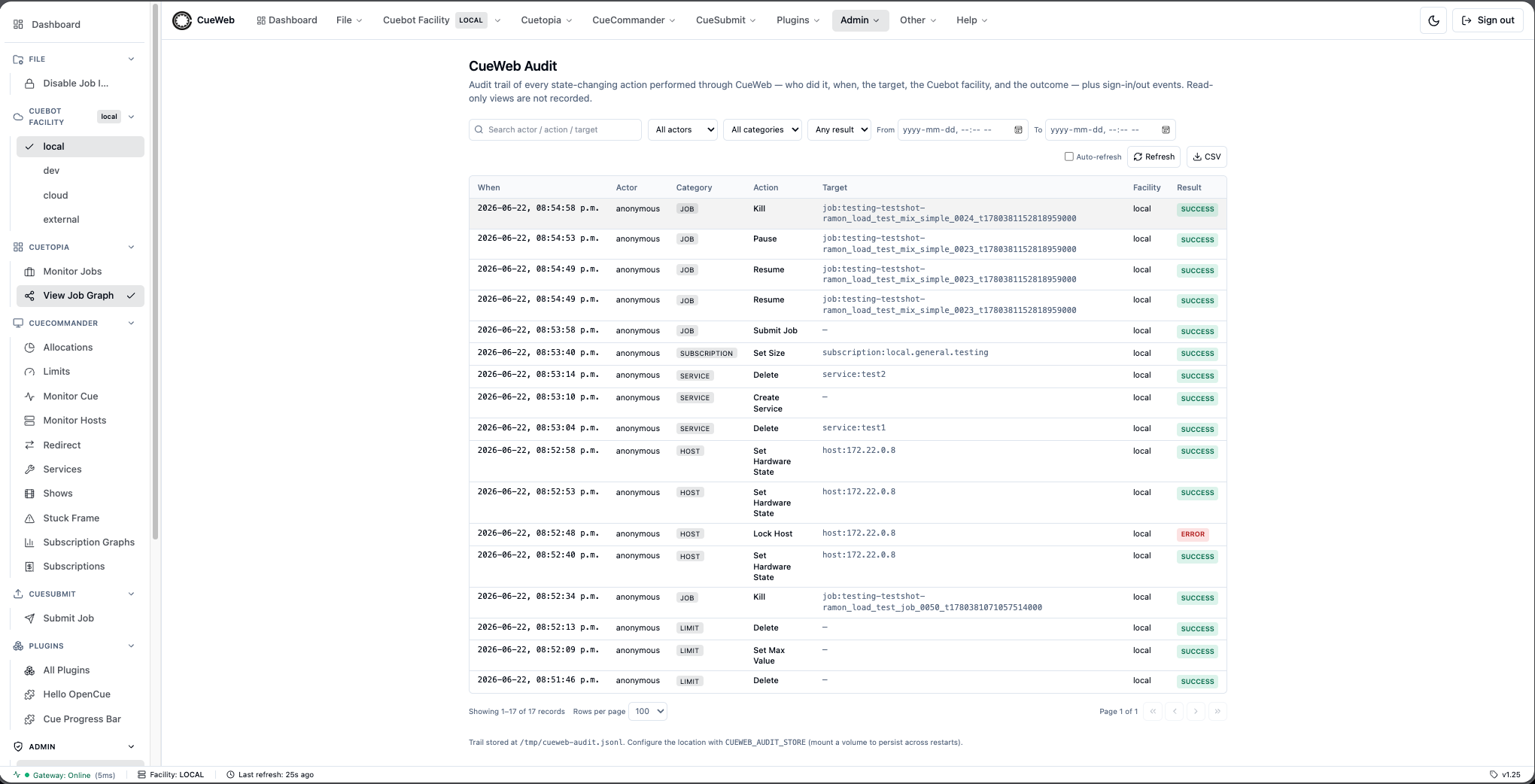
Auth events (lib/auth.ts)
Sign in / sign out are not gateway calls, so they are captured separately via the NextAuth events: { signIn, signOut } callbacks in lib/auth.ts, which write straight to the store (best-effort - a logging failure must never block sign-in). To avoid a require cycle (lib/audit imports authOptions from lib/auth), lib/auth.ts imports recordAudit directly from lib/audit-store rather than from lib/audit.
Access gating (lib/authz.ts)
The feature plugs into the existing authorization layer rather than inventing a parallel mechanism:
/adminand/api/adminare added toADMIN_PATH_PREFIXES, so the middleware gates them behindCUEWEB_ADMIN_GROUPSexactly like the CueCommander admin pages.isGateActive()andisEffectiveAdmin(groups)are the shared decision: everyone is admin when the gate is inactive - no auth provider,CUEWEB_AUTHZ_ENABLEDoff, or noCUEWEB_ADMIN_GROUPSconfigured - so the page is shown to everyone in those cases; when the gate is active it defers to group membership.- The
sessioncallback inlib/auth.tsstampssession.isAdmin = isEffectiveAdmin(groups)soapp-header.tsx,app-sidebar.tsx, andmobile-nav-sheet.tsxcan hide the admin-only menu from non-admins. The server still enforces - the page and API route re-checkisEffectiveAdminindependently of the UI.
Record schema
Each JSONL line is one record:
| Field | Meaning |
|---|---|
at |
ISO-8601 timestamp (when) |
actor |
User email/name, or anonymous (who) |
category |
job / frame / layer / host / show / … / auth |
action |
Human-friendly action label, e.g. “Kill Frames” (what) |
target |
Best-effort entity id, e.g. job:comp_v2 (on what) |
facility |
Cuebot facility the request was routed to |
result |
success or error (outcome) |
error |
Message when result === "error", else null |
details |
Sanitized request params (secrets dropped) |
endpoint |
Underlying gRPC/REST method, e.g. /job.JobInterface/KillFrames |
method |
HTTP method of the proxied call |
Where to extend
- Capture a new action. No route change is needed - adjust the classifier in
lib/audit.ts(the read-skip predicate, the category/action mapping, or the target extractor). - Swap the storage backend (future). The page and API are structured so the storage behind
readAudit()can be replaced - for example a Cuebotaudit_logtable (Flyway migration) plus a query RPC, with the REST gateway forwarding the JWT subject as gRPC metadata. The OpenCueWeb Audit page could then read from that API instead of (or in addition to) the JSONL file.
Limitations. This captures OpenCueWeb actions only - actions performed from CueGUI, cueman, or pycue are not seen. The store is single-process; multiple OpenCueWeb replicas sharing one file would want a cross-process lock or a shared store (the same caveat as facility-store.ts).
Tests
cd cueweb
npx jest app/__tests__/lib/audit-store.test.ts app/__tests__/lib/authz-admin.test.ts
app/__tests__/lib/audit-store.test.ts- record/read round-trip, newest-first ordering, actor/category/result/time/search filters, pagination, and facets.app/__tests__/lib/authz-admin.test.ts-isAdminPathfor the new/admin+/api/adminpaths, plus the fullisEffectiveAdmin/isGateActivetruth table (the “show to everyone when no group authorization is configured” requirement).
CueSubmit (browser-based job submission)
OpenCueWeb implements a TypeScript port of the standalone CueSubmit CLI tool under /cuesubmit. The form layout mirrors the dialog one-for-one; everything that ran inside cuesubmit.ui.Submit now lives in React components, and everything that ran inside cuesubmit.Submission + outline.backend.cue.serialize now lives in app/cuesubmit/lib/*.ts.
File layout
cueweb/
├── app/cuesubmit/
│   ├── page.tsx                          # /cuesubmit route, react-hook-form + zod
│   ├── lib/
│   │   ├── constants.ts                  # Job types, services, dependency types, tokens, defaults
│   │   ├── frame_spec.ts                 # isValidFrameSpec / firstFrame / isSimpleRange
│   │   ├── schemas.ts                    # zod schemas for job + per-type layer payloads
│   │   ├── commands.ts                   # Per-type command builders (silent + strict modes)
│   │   ├── spec_xml.ts                   # CJSL XML serializer (port of pyoutline cue.serialize)
│   │   ├── getShows.ts                   # Wraps /api/show/getshows for the Show dropdown
│   │   └── history.ts                    # localStorage per-field autocomplete history
│   └── components/
│       ├── section_header.tsx            # "Job Info" / "Layer Info" / ... section labels
│       ├── field.tsx                     # Shared <label> wrapper with required + invalid states
│       ├── help_popover.tsx              # ?-icon popovers (Frame Spec / Command tokens)
│       ├── history_input.tsx             # <input> + <datalist> backed by history.ts
│       ├── type_options.tsx              # Per-type fields (Shell / Maya / Nuke / Blender)
│       └── layers_table.tsx              # Submission Details table + +/-/up/down buttons
├── app/api/job/submit/route.ts           # POST endpoint: zod -> XML -> LaunchSpecAndWait
├── components/ui/confirm-dialog.tsx      # Themed Radix Dialog used by Reset (reusable)
└── __tests__/cuesubmit/builders.test.ts  # 23 tests: validator + builders + XML
Submit pipeline
- Form state lives entirely in a
useForm<Submission>({ resolver: zodResolver(submissionSchema) })instance. Layers are managed byuseFieldArrayso add / remove / reorder mutate the form in place. - Live preview uses
useWatch({ control, name: "layers" }). The destructuredwatch()is intentionally avoided here because RHF can mutate nested layer values in place, which keeps the outer array reference stable across keystrokes and freezes the Final command box.useWatchalways returns a fresh snapshot. - Per-type command builder (
commands.ts > buildLayerCommand) is called twice per render with{ silent: true }for the live Final command preview, then once at submit time with{ silent: false }so the strict path can throw on missing required fields (Shell command,Maya scene file, etc.). - XML serializer (
spec_xml.ts > buildJobSpecXml) emits the cjsl document with the same shape pyoutline produces. Notable invariants:<uid>is1000 + (FNV-1a(username) mod 64000)so cuebot never seesuid=0(“Cannot launch jobs as root”).<facility>defaults tolocalwhen the form is[Default]- cuebot’s internal fallback iscloud, which doesn’t match the seeded sandbox RQD’slocal.generalallocation.<memory>is emitted only when set; the form default of256mkeeps trivial jobs dispatchable on a sandbox RQD that can’t satisfy thedefaultservice’s 3.2 GBint_mem_min.<cores>+<threadable>are emitted only whenOverride Coresis on; threadable follows the cuesubmit heuristic (cores >= 2 || cores <= 0).<depend type="...">(LAYER_ON_LAYER / FRAME_BY_FRAME) is emitted for every layer after the first that has a non-emptydependencyType.
POST /api/job/submitwraps the build + forward to/job.JobInterface/LaunchSpecAndWaitvia the existinghandleRoutehelper, then reshapes theJobSeqresponse into a flatjobs: Job[]array.
Page-level behavior
- Username field: pre-filled from
useSession().editUsernamestate gates editability; unticking the Edit checkbox snaps the value back to the session username. In sandbox mode (no session) the field is always editable and the checkbox is hidden. - Autocomplete history:
history.tsexposesloadHistory(field)/rememberHistory(field, value)/rememberSubmission(values)against threelocalStoragekeys (cueweb.cuesubmit.history.jobName/.shot/.layerName).HistoryInputis a thin wrapper around<input>+<datalist>that re-reads on mount and on acueweb:cuesubmit-history-changedwindow event so any other open tab refreshes immediately after a successful submit. - Draft auto-save:
form.watch((values) => localStorage.setItem(DRAFT_STORAGE_KEY, JSON.stringify(values)))fires on every change. On mount the page callsreset(parsed)if a draft exists. Cleared on Cancel / Reset / successful submit. - Reset: opens a controlled
<ConfirmDialog open={resetDialogOpen} variant="destructive">. On confirm, the draft is wiped fromlocalStorageandreset({...defaults})is called with the signed-in user / first show / default facility. - Final command field: bound to
useMemo(() => buildLayerCommand(currentLayer, { silent: true }))against the watched layers slice.readOnly={true}with the mutedbg-foreground/[0.04]token so it visibly differs from editable inputs.
<ConfirmDialog> primitive
components/ui/confirm-dialog.tsx wraps the existing components/ui/dialog.tsx Radix primitive with a Cancel / Confirm footer and a variant: "default" | "destructive" knob. Designed to be the project’s blanket replacement for window.confirm() going forward - use it for delete / kill / reset / unmonitor confirms across the app.
Tests
23 jest tests live in __tests__/cuesubmit/builders.test.ts:
isValidFrameSpec: accepts every cuebot-supported form (1,1-10,1-10x2,1-10y3,1-100:2, comma-joined) and rejects reverse ranges (10-1).isSimpleRange: only matchesN-M.- Per-type builders: Shell verbatim + trim; Maya / Nuke / Blender include their required tokens (
#FRAME_START#,#IFRAME#,-r file,-noaudio). buildLayerCommandstrict vs silent: strict throws on missing fields; silent never throws and returns whatever’s filled in so the preview can render.buildJobSpecXml: preamble +<job name=>element; UID stable per user + non-zero + different per user; facility defaults tolocalwhen blank, honors explicit non-default; memory emitted only when set; depend block emitted only whendependencyTypeis set; XML special characters escaped in user-supplied strings; service defaulting todefaultwhen none picked.
The same module is consumed by both the API route and the live preview, so a passing test suite means the bytes cuebot actually sees match what the user is reading in the form.
Set Priority dialog (CueGUI parity)
The Jobs table’s right-click Set Priority… entry opens a themed dialog with a 1-100 slider + matching number input. The menu entry is not gated by usePathname() - it appears on every page that mounts JobContextMenu, so the action is available on both Cuetopia → Monitor Jobs (/) and CueCommander → Monitor Cue (/monitor-cue). (The neighboring View Job entry, by contrast, is path-gated to /monitor-cue only - see action-context-menu.tsx for the conditional spread.) Files involved:
cueweb/
├── app/api/job/action/setpriority/route.ts   # Proxy to JobInterface/SetPriority
├── app/utils/action_utils.ts                 # setJobPriority(job, val) + setPriorityGivenRow event dispatcher
├── components/ui/set-priority-dialog.tsx     # The dialog component (slider + number input)
├── components/ui/context_menus/action-context-menu.tsx  # "Set Priority..." menu entry
└── app/jobs/data-table.tsx                   # Mounts <SetPriorityDialog/> + listens for cueweb:priority-changed
CustomEvent dance
The dialog is mounted once at the bottom of DataTable (not inside the context menu) so the menu’s free-function handlers don’t need to reach into component state. Two events glue the pieces together:
| Event | Dispatched by | Listened to by | Payload |
|---|---|---|---|
cueweb:open-set-priority |
setPriorityGivenRow(row) in action_utils.ts (called when the menu item is clicked) |
SetPriorityDialog |
{ job: Job } |
cueweb:priority-changed |
SetPriorityDialog after a successful setJobPriority(job, val) |
DataTable (a useEffect) |
{ jobId: string; priority: number } |
The second event drives the optimistic in-row update: DataTable patches tableData[].priority for the matching id so the Priority column updates immediately instead of waiting for the next 5-second poll tick. The regular poll then reconciles in case cuebot rejected silently for some unforeseen reason.
API route
POST /api/job/action/setpriority validates { job, val: number }, checks Number.isInteger(val) && 1 <= val <= 100, and forwards to /job.JobInterface/SetPriority.
Email Artist dialog (CueGUI parity)
The Jobs table’s right-click Email Artist… entry opens a themed dialog mirroring CueGUI’s EmailDialog. Same CustomEvent pattern as Set Priority - the dialog is mounted once at the bottom of DataTable and the free-function context-menu handler dispatches an event with the row’s job. Files involved:
cueweb/
├── app/utils/action_utils.ts                 # emailArtistGivenRow(row) event dispatcher
├── components/ui/email-artist-dialog.tsx     # The dialog component
├── components/ui/context_menus/action-context-menu.tsx  # "Email Artist..." menu entry
└── app/jobs/data-table.tsx                   # Mounts <EmailArtistDialog />
CustomEvent dance
| Event | Dispatched by | Listened to by | Payload |
|---|---|---|---|
cueweb:open-email-artist |
emailArtistGivenRow(row) in action_utils.ts (called when the menu item is clicked) |
EmailArtistDialog |
{ job: Job } |
There is no corresponding “sent” event - the browser hands the composed mail off to the OS via a mailto: URL, so there’s nothing for the table to optimistically update.
Pre-filled defaults
On cueweb:open-email-artist, the dialog derives:
From = <show>-${NEXT_PUBLIC_EMAIL_SUPPORT_SUFFIX}@${NEXT_PUBLIC_EMAIL_DOMAIN}(informational - see below).To = <user>@${NEXT_PUBLIC_EMAIL_DOMAIN}(the job’s owner).CC = From.BCC = "".Subject = "cuemail: please check <jobName>".Body = "Your Support Team requests that you check <jobName>\n\nHi <user>,\n".
Both env vars are read at module scope: NEXT_PUBLIC_EMAIL_DOMAIN defaults to "your.domain.com" and NEXT_PUBLIC_EMAIL_SUPPORT_SUFFIX defaults to "pst", matching CueGUI’s <show>-pst@<domain> placeholders.
Send mechanism
handleSend builds a mailto: URL with to, cc, bcc, subject, and body via URLSearchParams (and encodeURIComponent on the to part) and assigns it to window.location.href. The OS hands the URL off to the user’s default mail client.
Browsers don’t let mailto: override the user’s mail account’s From: header, so the dialog’s From field is informational only. CueGUI’s EmailDialog can spoof From because it sends through CueGUI’s own SMTP relay; OpenCueWeb’s mailto-based equivalent uses whatever account the user’s mail client is configured with. The dialog’s DialogDescription calls this out so the user isn’t surprised.
The Send button is disabled when to.trim() is empty.
Request Cores dialog (CueGUI parity)
The Jobs table’s right-click Request Cores… entry opens a themed email composer mirroring CueGUI’s RequestCoresDialog. Same CustomEvent pattern as Email Artist - the dialog is mounted once at the bottom of DataTable and the free-function context-menu handler dispatches an event with the row’s job. Files involved:
cueweb/
├── app/utils/action_utils.ts                 # requestCoresGivenRow(row) event dispatcher
├── components/ui/request-cores-dialog.tsx    # The dialog component
├── components/ui/context_menus/action-context-menu.tsx  # "Request Cores..." menu entry
└── app/jobs/data-table.tsx                   # Mounts <RequestCoresDialog />
CustomEvent dance
| Event | Dispatched by | Listened to by | Payload |
|---|---|---|---|
cueweb:open-request-cores |
requestCoresGivenRow(row) in action_utils.ts (called when the menu item is clicked) |
RequestCoresDialog |
{ job: Job } |
Pre-filled defaults
On cueweb:open-request-cores, the dialog derives:
From = session.user.email(fallback to<sessionName>@${NEXT_PUBLIC_EMAIL_DOMAIN}, then empty).To = ""(user fills in).CC = <show>-${NEXT_PUBLIC_EMAIL_REQUEST_CORES_SUFFIX}@${NEXT_PUBLIC_EMAIL_DOMAIN}.BCC = "".Subject = "Requesting Cores for <jobName>".
The body is auto-populated with buildPrelude(job, layers):
Requesting more cores for:
Job Name:       <jobName>
Group (Folder): <group or show fallback>

Layers that have frames remaining (waiting and running):

Layer Name                          Minimum Memory    Min Cores
<remaining layers>
Async layer fetch
Layer data isn’t on the row, so the dialog kicks off getLayersForJob(job) in the same effect that handles the open event. Until the response lands, layers is null and the prelude renders Loading layers...; once it resolves the dialog re-renders with a filtered list (waitingFrames + runningFrames > 0) so only layers that could actually use the extra cores show up.
If the fetch rejects, layers is set to [] and the prelude reads (no layers currently have waiting or running frames).
Send mechanism
handleSend stitches the auto-populated prelude with two editable sections - Date/Time by which completion is needed and Additional notes (flag priority frames etc.) - and builds a mailto: URL the same way Email Artist does. Same From:-is-informational caveat. The Send button is disabled when to.trim() is empty.
Subscribe to Job (Email subscription via Cuebot)
The Jobs table’s right-click Subscribe to Job entry opens a themed
dialog mirroring CueGUI’s SubscribeToJobDialog. Unlike the Notify
bell in the Jobs table (a browser-side subscription that fires an
in-app toast + optional desktop popup), this dialog registers a
server-side, email subscriber on Cuebot. When the job reaches
FINISHED, Cuebot sends an email to the saved address.
Files involved:
cueweb/
├── app/utils/action_utils.ts                              # subscribeToJobGivenRow / addJobSubscriber
├── components/ui/subscribe-to-job-dialog.tsx              # The dialog component
├── components/ui/context_menus/action-context-menu.tsx    # "Subscribe to Job" menu entry
├── app/jobs/data-table.tsx                                # Mounts <SubscribeToJobDialog />
└── app/api/job/action/addsubscriber/route.ts              # Proxy to /job.JobInterface/AddSubscriber
CustomEvent dance
| Event | Dispatched by | Listened to by | Payload |
|---|---|---|---|
cueweb:open-subscribe-to-job |
subscribeToJobGivenRow(row) in action_utils.ts (called when the menu item is clicked) |
SubscribeToJobDialog |
{ job: Job } |
Pre-filled defaults
On cueweb:open-subscribe-to-job, the dialog derives:
Job name(read-only): fromdetail.job.name.From(read-only label):NEXT_PUBLIC_SUBSCRIBE_FROM_EMAILif set, otherwiseopencue-noreply@${NEXT_PUBLIC_EMAIL_DOMAIN}.To(editable):session.user.emailif available; fallback to<sessionName-or-jobUser>@${NEXT_PUBLIC_EMAIL_DOMAIN}.
Save mechanism
handleSave validates to.trim() against a permissive
^\S+@\S+\.\S+$ regex (Cuebot does its own validation server-side),
then calls:
await addJobSubscriber(job, to.trim());
which posts { job, subscriber } to /api/job/action/addsubscriber.
The proxy route forwards to /job.JobInterface/AddSubscriber on the
REST gateway via handleRoute. A busy flag disables both buttons
while the request is in flight and prevents onOpenChange from closing
the dialog mid-save.
Why this is separate from the Notify bell
Two completely different lifecycles:
| Aspect | Subscribe to Job (this entry) | Notify bell (subscribe-bell.tsx) |
|---|---|---|
| State lives on | Cuebot (persisted across browsers / users / machines) | The browser (localStorage) |
| Notification channel | Email sent by Cuebot | In-app toast + optional desktop popup |
| Trigger | AddSubscriber RPC |
Polling loop in JobSubscriptionPoller |
| Cancel | Outside OpenCueWeb (whatever Cuebot supports) | Click the bell again |
| Survives reinstall | Yes | No (per-browser store) |
They can be used together: a user can both click the bell to get a browser popup and Save the dialog to also receive an email. The two codepaths never touch each other.
Configurable env vars
| Var | Default | Purpose |
|---|---|---|
NEXT_PUBLIC_EMAIL_DOMAIN |
your.domain.com |
Shared with Email Artist + Request Cores. Drives the default To address. |
NEXT_PUBLIC_SUBSCRIBE_FROM_EMAIL |
opencue-noreply@<EMAIL_DOMAIN> |
The informational From label shown in the dialog. The actual sender is whatever Cuebot is configured with. |
Job Dependencies (CueGUI parity)
The job context menu groups four dependency entries together. Each is a
one-for-one mirror of the corresponding cuegui.MenuActions.JobActions
handler:
| Entry | CueGUI handler | Cuebot RPC |
|---|---|---|
| View Dependencies… | viewDepends → DependDialog |
/job.JobInterface/GetDepends |
| Dependency Wizard… | dependWizard → DependWizard |
/job.JobInterface/CreateDependencyOnJob, CreateDependencyOnLayer, CreateDependencyOnFrame |
| Drop External Dependencies | dropExternalDependencies |
/job.JobInterface/DropDepends with target = EXTERNAL |
| Drop Internal Dependencies | dropInternalDependencies |
/job.JobInterface/DropDepends with target = INTERNAL |
File layout
cueweb/
├── app/api/job/action/getdepends/route.ts                  # Proxy to JobInterface/GetDepends
├── app/api/job/action/createdependonjob/route.ts           # Proxy to JobInterface/CreateDependencyOnJob
├── app/api/job/action/createdependonlayer/route.ts         # Proxy to JobInterface/CreateDependencyOnLayer
├── app/api/job/action/createdependonframe/route.ts         # Proxy to JobInterface/CreateDependencyOnFrame
├── app/api/job/action/dropdepends/route.ts                 # Proxy to JobInterface/DropDepends
├── app/api/job/action/getwhatdependsonthis/route.ts        # Proxy to JobInterface/GetWhatDependsOnThis (Group-By "Dependent" tree builder)
├── app/api/layer/action/createdependonjob/route.ts         # Proxy to LayerInterface/CreateDependencyOnJob
├── app/api/layer/action/createdependonlayer/route.ts       # Proxy to LayerInterface/CreateDependencyOnLayer
├── app/api/layer/action/createdependonframe/route.ts       # Proxy to LayerInterface/CreateDependencyOnFrame
├── app/api/layer/action/createframebyframedepend/route.ts  # Proxy to LayerInterface/CreateFrameByFrameDependency (used by FBF and JFBF/Hard Depend)
├── app/api/frame/action/createdependonjob/route.ts         # Proxy to FrameInterface/CreateDependencyOnJob
├── app/api/frame/action/createdependonlayer/route.ts       # Proxy to FrameInterface/CreateDependencyOnLayer
├── app/api/frame/action/createdependonframe/route.ts       # Proxy to FrameInterface/CreateDependencyOnFrame (used by FOF and LOS)
├── app/utils/action_utils.ts                               # 12 wrappers + viewDependencies/wizardGivenRow + fetchJobDepends + drop helpers
├── components/ui/view-dependencies-dialog.tsx              # Dialog for View Dependencies
├── components/ui/dependency-wizard-dialog.tsx              # State machine dialog covering all 12 CueGUI depend types
└── components/ui/context_menus/action-context-menu.tsx     # Wires the four entries
CustomEvent dance
The free-function context menu handlers can’t reach into React component state, so the dialogs listen for CustomEvents at the window level:
| Event | Dispatched by | Listened to by | Payload |
|---|---|---|---|
cueweb:open-view-dependencies |
viewDependenciesGivenRow(row) from the View Dependencies... menu entry |
ViewDependenciesDialog mounted in data-table.tsx |
{ job: Job } |
cueweb:open-dependency-wizard |
dependencyWizardGivenRow(row) from the Dependency Wizard... menu entry |
DependencyWizardDialog mounted in data-table.tsx |
{ job: Job } |
The drop entries don’t need a dialog - they call the proxy route directly
via dropJobDepends(job, target).
View Dependencies dialog
ViewDependenciesDialog calls fetchJobDepends(job) on open and on
Refresh. That helper posts { job } to /api/job/action/getdepends,
which forwards to /job.JobInterface/GetDepends. The dialog renders the
returned depend.DependSeq as a table with columns Type / Target /
Active / OnJob / OnLayer / OnFrame, matching CueGUI’s DependDialog
table layout.
Dependency Wizard
DependencyWizardDialog is a state machine driven by a per-type
TYPE_CONFIG table that enumerates every CueGUI depend.DependType
plus the UI-only JFBF (“Frame By Frame for all layers - Hard Depend”)
variant. Every picker is multi-select (matching CueGUI’s
QListWidget(ExtendedSelection) behavior), so the config only carries:
steps[]- the ordered list of pickers to walk for that type (some combination oftype,sourceLayer,sourceFrame,targetJob,targetLayer,targetFrame,confirm).filterTargetLayer(optional) - client-side predicate used byLAYER_ON_SIM_FRAMEto restrict the target layer picker to layers whoseservicesarray matches/sim/i.
Step-by-step flow
The wizard renders the picker matching steps[stepIdx]. Each picker
shares a generic renderPicker helper plus a shared pickerClick
handler (Click toggles; Shift-click range; Cmd/Ctrl-click toggles
explicitly). Since every picker is multi-select, downstream fetchers
aggregate from all upstream selections:
- Source layers come from
getLayersForJob(thisJob). - Source frames come from one
getFramesForJob(thisJob)filtered to every selected source-layer name via aSet<string>lookup, so the user can multi-pick layers and still pick frames spanning them. - Target jobs come from
getJobsForRegex(query, true). - Target layers come from a parallel
Promise.all(selectedTargetJobs.map(getLayersForJob))whose results are flat-concatenated and tagged withparentJobNameso the picker can disambiguate same-name layers across multiple parents. - Target frames are the same shape: parallel fetch from each unique parent job, flatten, filter to the selected target-layer names.
Each fetcher runs inside a useEffect keyed on (open, step, upstream
selections) with a cancellation flag, so a Go-Back / re-pick never
leaks stale results.
Done dispatch
handleDone switches on dependType and calls the matching wrapper
in action_utils.ts. Every wrapper takes a cross-product of source
and target arrays and expands them into one performAction batch:
| Type | Wrapper signature |
|---|---|
JOB_ON_JOB |
createDependOnJob(thisJob, onJobs[]) |
JOB_ON_LAYER |
createDependOnLayer(thisJob, onLayers[]) |
JOB_ON_FRAME |
createDependOnFrame(thisJob, onFrames[]) |
JFBF |
createHardDepend(thisJob, thisJobLayers, perTargetJobLayers[]) |
LAYER_ON_JOB |
createLayerOnJob(thisJob, sourceLayers[], onJobs[]) |
LAYER_ON_LAYER |
createLayerOnLayer(thisJob, sourceLayers[], onLayers[]) |
LAYER_ON_FRAME |
createLayerOnFrame(thisJob, sourceLayers[], onFrames[]) |
FRAME_BY_FRAME |
createFrameByFrameDepend(thisJob, sourceLayers[], dependLayers[]) |
FRAME_ON_JOB |
createFrameOnJob(thisJob, sourceFrames[], onJobs[]) |
FRAME_ON_LAYER |
createFrameOnLayer(thisJob, sourceFrames[], onLayers[]) |
FRAME_ON_FRAME |
createFrameOnFrame(thisJob, sourceFrames[], onFrames[]) |
LAYER_ON_SIM_FRAME |
createLayerOnSimFrame(thisJob, sourceLayerNames[], sourceFrames[], onFrames[]) |
A shared crossBodies(sources, targets, makeBody) helper builds the
N*M request body array; performAction fires the RPCs in parallel and
surfaces one summary toast (Added <Type> depend: <thisJob> (<N>
pair(s))). Empty source or target lists short-circuit the call so a
mis-picked confirm step is a no-op rather than a hang.
Hard Depend special case
JFBF doesn’t map to a single RPC. CueGUI’s Cuedepend.createHardDepend
iterates source/target layer pairs that share a layer type and fires
LayerInterface.CreateFrameByFrameDependency once per pair. The
OpenCueWeb wrapper does the same and now scales to multi-picked target
jobs: on Done the wizard runs one getLayersForJob for this job
plus one per picked target job in parallel, then createHardDepend
walks each target job’s layer list, pairs them with this job’s layers
by layer.type, and concatenates every matched pair into one
performAction batch. The success toast names the count of target
jobs matched and total layer pairs. If no types match across any
target job it surfaces a warning toast instead of issuing empty calls.
LAYER_ON_SIM_FRAME special case
CueGUI implements this by looping FrameInterface.CreateDependencyOnFrame
once for every frame in every picked source layer x every picked sim
frame. The wizard doesn’t render a source-frame picker for this type;
instead handleDone runs one getFramesForJob(thisJob), filters to
the set of picked source-layer names, and cross-products with the
picked target sim frames before bulk-firing the F-on-F RPC.
Multi-select semantics
Each picker stores its selection as a Set<string> of ids plus an
anchorId for shift-click range support. A shared pickerClick helper
folds the three click modes into one place:
| Modifier | Behavior |
|---|---|
| Click | Toggle the row in / out of the selection (more discoverable on touch than the desktop convention of “replace”). Also updates the anchor. |
| Shift-click | Replace the selection with every row between the anchor and the clicked row, inclusive. |
| Cmd / Ctrl-click | Toggle, same as plain click, but also explicit so power users with the desktop muscle memory aren’t surprised. |
Multi-select is only enabled for the target type that fans out at
Done: JOB_ON_JOB → jobs; JOB_ON_LAYER → layers; JOB_ON_FRAME →
frames. The pickers for source steps (e.g. the Job picker under
JOB_ON_LAYER) narrow to one row so the next step’s fetch has a
deterministic parent. The continue-handlers trim the selection to the
first picked row in that case and surface a toast explaining why.
Drop External / Internal
dropExternalDependsGivenRow and dropInternalDependsGivenRow both
call dropJobDepends(job, target) which posts { job, target } to
/api/job/action/dropdepends. That route validates target against
{ INTERNAL, EXTERNAL, ANY_TARGET } server-side so an unknown value
returns a 400 instead of a Cuebot stack trace, then forwards to
/job.JobInterface/DropDepends.
Group-By “Dependent” tree
The Jobs table’s Group-By dropdown (data-table.tsx) has a Dependent
mode that mirrors CueGUI’s MonitorJobsPlugin tree view: a job that
other monitored jobs depend on becomes a parent and the dependents
nest under it.
Data flow:
getWhatDependsOnThisJobNames(job)inapp/utils/get_utils.tsposts{ job }to/api/job/action/getwhatdependsonthis(mirroringJobInterface.GetWhatDependsOnThis) and returns the list ofdepend_er_jobnames from every active depend in the returneddepend.DependSeq.- A
useEffectindata-table.tsxkeyed on(state.groupBy === "Dependent", state.tableDataUnfiltered)fires the helper in parallel for every monitored job not already in thedependencyChildren: Record<jobId, string[]>cache. New jobs added to the table cost one extra RPC; unmonitoring drops the cached entry. The cache resets only on full page reload. treeInfoById = useMemo(...)walks the cache and produces aMap<jobId, { depth, hasChildren }>. The DFS picks roots (monitored jobs whose name doesn’t appear as a child anywhere) and assigns depths via recursive visit; cycle-safe via avisitedset; orphaned children (parent filtered out) fall back to depth 0 so the row never disappears.displayItemshas a dedicated branch forstate.groupBy === "Dependent"that emits rows in DFS order from the cached graph, skipping descendants of any collapsed parent (tracked incollapsedTreeNodes: Set<string>).- The Name column reads
table.options.meta.dependencyTree(a{ info, collapsed, toggle }triple). Wheninfo.get(jobId)returns a TreeInfo it renders a chevron +padding-left = depth * 14px; otherwise it falls back to the default centered layout, so the column stays decoupled from the grouping mode.
Dependency graph panel
The inline Job Dependency Graph (JobDependencyGraph,
components/ui/job-dependency-graph.tsx) is the read-only, visual
counterpart to the Group-By Dependent tree - it mirrors CueGUI’s
JobMonitorGraph Monitor-Jobs dock rather than the tree view.
- New dependencies. The component pulls in three new npm packages:
@xyflow/react(React Flow,^12) for the canvas,dagre(^0.8.5) for directed-graph layout, and@types/dagre(dev). - Toggle + mount. Visibility is owned by the shared
useShowDependencyGraph()hook (see Application state hooks), flipped from the Cuetopia → View Job Graph menu entry and the panel header.JobDetailsInlinemounts it as a third stacked panel under Layers + Frames when the hook is on. - Tree walk.
walkDependencyTree(focus, maxDepth)runs a BFS from the focus job over both directions -silentGetDepends(downstream,GetDepends) andsilentGetWhatDependsOnThis(upstream,GetWhatDependsOnThis, filtered toactive !== false) - bounded bymaxDepth(default 4) and avisitedjob-name set to break cycles. MirrorsJobMonitorGraph.getRecursiveDependentJobs. - Name → UUID resolution. Each hop calls
resolveJobIdByName(name, cache), which posts an anchored^escapeRegex(name)$query to/api/job/getjobs(Cuebot rejects name-only depend lookups). Results are memoized in aMapseeded with the focus job, so the walk costs ~oneGetJobsper distinct job. - Silent fetches.
silentPost(endpoint, body)deliberately bypassesaccessGetApi; non-OK responses and{ error }bodies returnnullso jobs in other shows / unmonitored + pruned don’t firehandleError()red toasts. - Layout + rendering.
layoutNodesbuilds a freshdagre.graphlib.Graphper call (no module-level singleton) withrankdir: "TB".describeEndpointderives a stable node id, kind (JOB / LAYER / FRAME), and a hierarchical label per endpoint;ingestDependmerges eachDependinto node/edgeMaps and returns the er/on job names to expand the frontier. The customDependencyNodetruncates the label (full name intitle), color-codes the left border by kind, and rings the focus job. - Decoupled effects. The data fetch is keyed on
[job.id, job.name,
maxDepth]
so flipping the theme doesn’t re-walk the tree; the crosshair-cursor SVG is memoized onresolvedThemeand scoped to the instance via adata-graph-idattribute. Node double-clicks (onNodeDoubleClick) callonNodeNavigate(jobName)when supplied, elserouter.push("/jobs/<jobName>?tab=overview"); a single click only selects. - Focus-job layers.
ingestFocusLayers(focus, nodes, edges)fetches the focus job’s layers (/api/job/getlayers) and adds a LAYER node per layer wired to the job node with a “contains” edge, so a job with no cross-job dependencies still renders its structure (CueGUI’sJobMonitorGraphis a layer graph). Layers already created by a depend reuse the same node id; the fullLayerobject is stored in the node’sdata.layer. The empty state now only shows when there are zero nodes. - Node context menu.
onNodeContextMenuopens a cursor-positionedNodeContextMenufor layer nodes that reuses the Layers-table action handlers (viewLayerDependenciesGivenRow,layerDependencyWizardGivenRow,markdoneLayerGivenRow,reorderLayerFramesGivenRow,staggerLayerFramesGivenRow,layerPropertiesGivenRow,killLayerGivenRow,eatLayerFramesGivenRow,retryLayerFramesGivenRow,retryLayerDeadFramesGivenRow) via a{ original: layer }shim - those helpers only readrow.original. Plus an Auto Layout Nodes item that re-runslayoutNodesandfitView. The layer dialogs +DependencyWizardDialogare already mounted by the host (data-table.tsxfor the inline panel, the job page for/jobs/[name]), so the dispatched events resolve in both.
Pause / Unpause Toggle (Job Context Menu)
The job context menu’s Pause / Unpause entry is a single toggle: the
label, icon, and click handler all flip based on the row’s isPaused
flag. CueGUI’s MonitorJobs widget does the same thing, so this is a
parity item.
Files involved:
cueweb/
├── app/utils/action_utils.ts                              # pauseJobGivenRow / unpauseJobGivenRow
└── components/ui/context_menus/action-context-menu.tsx    # The toggle entry
State derivation
Inside JobContextMenu (components/ui/context_menus/action-context-menu.tsx):
const isJobPaused = !!contextMenuState.row?.original.isPaused;
The toggle entry
The menuItems array contains a single Pause/Unpause entry instead of two static ones:
{
  label: isJobPaused ? "Unpause" : "Pause",
  onClick: isJobPaused ? unpauseJobGivenRow : pauseJobGivenRow,
  isActive: destructiveActive,
  component: isJobPaused ? (
    <TbPlayerPlay className="mr-1" size={14} color={grayIfDisabled(destructiveActive)} />
  ) : (
    <TbPlayerPause className="mr-1" size={14} color={grayIfDisabled(destructiveActive)} />
  ),
},
Disabled-state matrix
destructiveActive is already defined as:
const isActive = contextMenuState.row ? contextMenuState.row.original.state !== "FINISHED" : false;
const destructiveActive = isActive && !jobInteractionDisabled;
So the toggle resolves like this:
| Job state | isPaused |
Label shown | Active? |
|---|---|---|---|
| In Progress | false |
Pause | yes |
| Failing | false |
Pause | yes |
| Dependency | false |
Pause | yes |
| Paused | true |
Unpause | yes |
| Finished | false |
Pause | no (state-gated) |
| Any state + global safety flag on | - | shown label | no (flag-gated) |
No additional code is needed to handle Finished or the global safety flag
- both fall out of the existing
destructiveActiveboolean.
Toolbar buttons
The Jobs toolbar still surfaces separate Pause Jobs / Unpause Jobs
buttons (pauseJobsFromSelectedRows / unpauseJobsFromSelectedRows in
action_utils.ts) because the toolbar acts on the multi-row checkbox
selection - those rows can have mixed isPaused states, so a single
toggle would be ambiguous. Only the single-row right-click menu collapses
to one entry.
Set Min/Max Cores dialog (CueGUI parity)
The Jobs table’s right-click Set Min/Max Cores… entry opens a themed dialog with two number inputs (Min / Max, range 0-50000) pre-filled with the job’s current cores and a client-side min <= max guard. Like Set Priority, the entry is not path-gated, so it appears on both Cuetopia → Monitor Jobs (/) and CueCommander → Monitor Cue (/monitor-cue). Files involved:
cueweb/
├── app/api/job/action/setmincores/route.ts   # Proxy to JobInterface/SetMinCores
├── app/api/job/action/setmaxcores/route.ts   # Proxy to JobInterface/SetMaxCores
├── app/utils/action_utils.ts                 # setJobCores(job, min, max) + setCoresGivenRow event dispatcher
├── components/ui/set-cores-dialog.tsx        # The dialog component (two number inputs + min<=max guard)
├── components/ui/context_menus/action-context-menu.tsx  # "Set Min/Max Cores..." menu entry
└── app/jobs/data-table.tsx                   # Mounts <SetCoresDialog/> + listens for cueweb:cores-changed
CustomEvent dance
The dialog is mounted once at the bottom of DataTable, decoupled from the menu the same way as Set Priority:
| Event | Dispatched by | Listened to by | Payload |
|---|---|---|---|
cueweb:open-set-cores |
setCoresGivenRow(row) in action_utils.ts |
SetCoresDialog |
{ job: Job } |
cueweb:cores-changed |
SetCoresDialog after a successful setJobCores(job, min, max) |
DataTable (a useEffect) |
{ jobId: string; minCores: number; maxCores: number } |
cueweb:cores-changed patches the in-memory job data (tableData[].minCores/maxCores) so a re-opened Set Min/Max Cores dialog pre-fills the new values without waiting for the next 5-second poll. The jobs table has no cores column, so — like the existing Set Priority / cueweb:priority-changed update — this is an in-memory refresh rather than a visible cell change. Following the same success-gating contract as the host actions, setJobCores returns a boolean and the dialog fires cueweb:cores-changed only when both calls succeeded, so a rejected change never patches stale data.
API route
POST /api/job/action/setmincores and POST /api/job/action/setmaxcores each validate { job, val: number }, check Number.isFinite(val) && 0 <= val <= 50000, and forward to /job.JobInterface/SetMinCores and /job.JobInterface/SetMaxCores respectively. setJobCores POSTs both in turn (Cuebot has no combined call); if the min call fails it skips the max call and surfaces the error.
Unbook job dialog (CueGUI parity)
The Jobs table’s right-click Unbook… entry opens a dialog that unbooks every proc the job currently holds, with an optional Kill unbooked frames? checkbox that adds a second kill-confirmation phase. It is the first OpenCueWeb action to route through ProcInterface. Files involved:
cueweb/
├── app/api/proc/action/unbook/route.ts       # Proxy to ProcInterface/UnbookProcs
├── app/utils/action_utils.ts                 # unbookJob(job, kill) + unbookGivenRow event dispatcher
├── components/ui/unbook-dialog.tsx           # The dialog (kill checkbox + 2nd kill-confirm phase)
├── components/ui/context_menus/action-context-menu.tsx  # "Unbook..." menu entry
└── app/jobs/data-table.tsx                   # Mounts <UnbookDialog/> + listens for cueweb:refresh-now
CustomEvent dance
| Event | Dispatched by | Listened to by | Payload |
|---|---|---|---|
cueweb:open-unbook |
unbookGivenRow(row) in action_utils.ts |
UnbookDialog |
{ job: Job } |
cueweb:refresh-now |
UnbookDialog after a successful unbookJob(job, kill) |
DataTable (an immediate re-poll) |
(none) |
Unlike the cores / priority dialogs (which patch one column optimistically), an unbook can free an arbitrary number of procs across layers, so on success it asks the table to re-poll immediately via the existing cueweb:refresh-now event instead of patching a row. unbookJob propagates performAction’s boolean, so the refresh fires only on success.
Gateway path
UnbookProcs lives on ProcInterface, but the REST path is /host.ProcInterface/UnbookProcs, not /proc.ProcInterface/...: host.proto declares package host;, and grpc-gateway derives the path prefix from the proto package, not the file or service name. (The gateway’s own test scripts use the wrong proc. prefix; the correct one was verified live against a running rest-gateway.)
API route
POST /api/proc/action/unbook validates { r, kill: boolean } and forwards to /host.ProcInterface/UnbookProcs. unbookJob posts { r: { jobs: [job.name] }, kill } - a job-scoped ProcSearchCriteria. That criteria’s other fields (allocs, max_results, memory_range, duration_range) map to CueGUI’s allocation / amount / memory / runtime filters and are intentionally left out of this MVP; adding them later needs no backend change.
Multi-job batch operation confirmation
Selecting two or more jobs and using a Jobs-toolbar bulk action (Pause, Unpause, Retry, Eat, Kill) routes through a confirmation step before any RPC is sent. There is no new API route - this is purely a gate in app/jobs/data-table.tsx reusing the existing components/ui/confirm-dialog.tsx.
Confirmation policy
Mirroring CueGUI, the gate is per-action:
- Kill / Eat / Retry always confirm - even for a single job - because they are destructive.
- Pause / Unpause confirm only when two or more jobs are selected.
The confirm dialog lists the affected job names; destructive actions use the destructive button variant and CueGUI’s kill warning text. Cancel dispatches no RPC.
Monitor Cue page (CueCommander parity)
The /monitor-cue page (app/monitor-cue/page.tsx) replicates CueGUI’s
CueCommander Monitor Cue window: a show-grouped job tree with a CueGUI-parity
column set, booking bar, and right-click menu. Files involved:
app/monitor-cue/page.tsx               # page: Shows select, tree load, toolbar, selection, row coloring, mounted dialogs
components/ui/monitor-cue-show-menu.tsx # Shows multi-select (All Shows / Clear / per-show)
components/ui/job-booking-bar.tsx       # Booking column (CueGUI JobBookingBarDelegate parity)
components/ui/send-to-group-dialog.tsx  # Send To Group… (reparentJobs)
components/ui/context_menus/action-context-menu.tsx  # JobContextMenu (Monitor-Cue-only entries gated by pathname)
app/utils/action_utils.ts              # reparentJobs (+ the shared job action helpers)
app/utils/get_utils.ts                 # getActiveShows/getShowGroups/getGroupJobs
Data + tree
On mount the page loads getActiveShows(), then for each selected show
getShowGroups() (/api/show/getgroups) and per group getGroupJobs()
(/api/group/getjobs), assembled by buildTreeFromGroups. Jobs are keyed by
group id (a job carries only its group name, not unique within a show). It
auto-refreshes every 5s (REFRESH_MS), guarded by a monotonic
loadRequestIdRef so a slow earlier load can’t overwrite a newer one, and also
reloads on GROUPS_CHANGED_EVENT.
Table
Column visibility/order persist to localStorage["cueweb.monitor-cue.columnOrder"]
and ["cueweb.monitor-cue.columnHidden"]; the selected shows to
["cueweb.monitor-cue.shows"]. JobContextMenu receives the table storage
names cueweb.monitor-cue.jobs / .jobsUnfiltered. Row tint comes from
jobRowClass() (paused/dead/maxRss/depend/waiting). The Booking column
(JobBookingBar) computes cores-per-frame as reserved/running (default 6) and
places cyan (min) / red (max) markers over a running/waiting bar.
Context-menu gating
JobContextMenu shows Monitor-Cue-only items when pathname === "/monitor-cue":
View Job, Send To Group…, the resource/priority setters (Set Min/Max Cores,
Set Minimum/Maximum Cores, Set Minimum/Maximum Gpus, then Set Priority - CueGUI
order), Use Local Cores, Unbook Frames… (renamed from “Unbook…”), and Set /
Clear User Color. Auto-eat is a single state-aware toggle (Enable / Disable auto
eating). Send To Group (send-to-group-dialog.tsx) reparents via
reparentJobs() → /api/group/reparentjobs →
group.GroupInterface/ReparentJobs, then fires cueweb:refresh-now.
JobExtraDialogs, JobCommentsDialog, and SendToGroupDialog are all mounted
on the page so every menu action resolves.
No-auth kill fix
The kill username falls back to UNKNOWN_USER ("unknown",
app/utils/constants.ts) when there is no session, so the username-required
kill RPC validates in no-auth (sandbox) mode.
Host management actions (CueCommander parity)
The Monitor Hosts table (app/hosts/page.tsx) and the host detail page
(app/hosts/[host-name]/page.tsx) share one set of host actions, all routed
through the REST gateway. Files involved:
app/api/host/action/{lock,unlock,takeownership,reboot,rebootwhenidle,addtags,removetags,renametag,setallocation,delete,sethardwarestate,addcomment}/route.ts  # proxy routes
app/api/host/{findhost,getprocs,getcomments}/route.ts  # detail-page data routes
app/api/proc/getprocs/route.ts                         # proc panel data -> host.ProcInterface/GetProcs
app/api/proc/action/{kill,unbookone}/route.ts          # proc panel actions
app/hosts/columns.tsx                                  # full column set (Swap/Physical/GPU/Temp bars, Load %, comment icon, ...)
app/hosts/host_format_utils.ts                         # kbStringToNumber/kbStringToHuman + hostRowClassName (row coloring)
app/utils/action_utils.ts                              # lock/unlock/reboot/rebootWhenIdle/addTags/removeTags/renameTag/setAllocation/delete/setHardwareState/addComment host helpers + *GivenRow; killProcs/unbookProcs
app/utils/get_utils.ts                                 # Host/Proc types, findHostByName/getHostProcs/getHostComments/getProcsByHosts
app/utils/comment_macros.ts                            # predefined-comment (macro) store, localStorage["cueweb-comment-macros"]
components/ui/host-action-events.ts                    # shared event names + payload types (incl. VIEW_HOST_PROCS_EVENT)
components/ui/host-lock-dialog.tsx                     # Lock/Unlock confirmation
components/ui/host-reboot-dialog.tsx                   # immediate-Reboot confirmation
components/ui/edit-host-tags-dialog.tsx                # tag editor (cmdk autocomplete)
components/ui/host-monitor-dialogs.tsx                 # Comments (+ macros), Rename Tag, Change Allocation, Delete confirm, Take Ownership
components/ui/proc-monitor-panel.tsx                   # bottom proc panel (View Procs) + per-proc View Job/Unbook/Kill
components/ui/context_menus/action-context-menu.tsx    # HostContextMenu
CustomEvent dance
The free-function context-menu handlers (lockHostGivenRow,
rebootHostGivenRow, editHostTagsGivenRow, …) don’t touch component
state - they dispatch a window CustomEvent that a page-level dialog listens
for, mirroring the Set Priority / Email Artist pattern. All names + payload
types live in one module (host-action-events.ts) so the dialogs and the
pages agree on the contract:
cueweb:open-host-lock→HostLockDialog(detail:{ hosts, action }).cueweb:open-host-reboot→HostRebootDialog(immediate reboot is destructive, so it confirms; Reboot When Idle fires directly fromrebootHostWhenIdleGivenRow).cueweb:open-host-tags→EditHostTagsDialog.cueweb:hosts-changed(detail:{ hostIds, patch }) is fired on success by every action; the hosts table and the detail page listen for it, optimistically applypatch(aPartial<Pick<Host, "lockState"|"state"|"tags">>) to the matching rows, then re-fetch to reconcile.
Success gating
performAction (action_utils.ts) returns a boolean instead of void; the
six host helpers propagate it. The dialogs and rebootHostWhenIdleGivenRow
fire cueweb:hosts-changed only when the action succeeded, so a rejected
RPC (toasted via handleError) never optimistically flashes a state the
backend refused. Existing job/layer/frame callers ignore the return value and
are unaffected.
Menu gating
HostContextMenu enables entries from the row’s state: Lock Host when
lockState === "OPEN", Unlock Host when LOCKED (a NIMBY_LOCKED host
can’t be unlocked), Take Ownership only when NIMBY_LOCKED (CueGUI
canTakeOwnership parity) - it opens HostTakeOwnershipDialog via
OPEN_HOST_TAKE_OWNERSHIP_EVENT and on confirm calls takeHostOwnership →
/api/host/action/takeownership → host.OwnerInterface/TakeOwnership with
the signed-in user as owner. Reboot unless REBOOTING, Reboot when idle unless
REBOOTING / REBOOT_WHEN_IDLE, Restart service now / Restart service
when idle only when UP (Cuebot refuses a service restart on any other
state), Set Repair State unless already REPAIR,
Clear Repair State only when REPAIR. Comments…, View Procs,
Edit Tags…, Rename Tag…, Change Allocation…, and Delete Host
are always enabled. Set/Clear Repair State both proxy
host.HostInterface/SetHardwareState (REPAIR vs UP); the proc panel is
populated through the VIEW_HOST_PROCS_EVENT, dispatched both by the menu’s
View Procs (viewHostProcsGivenRow) and by the hosts page’s onRowClick
(a left-click on a host row loads its procs into ProcMonitorPanel alongside
the Attributes-panel selection).
Edit Tags diff
EditHostTagsDialog loads the registry-wide tag set on open (via getHosts())
for cmdk autocomplete, plus a “create” item for new tags. On Save it diffs
the working set against the original (added / removed), calls
addHostTags / removeHostTags (each a no-op when its list is empty), and
dispatches a per-host optimistic patch - each host’s resulting tag set is
(its tags ∪ added) ∖ removed, so a multi-host edit never over-claims the
shared working set.
Host detail page
/hosts/[host-name] resolves the host by name (findHostByName →
FindHost), with Overview / Procs / Comments / Tags tabs synced to ?tab=.
The Procs tab polls getHostProcs every 15s and renders proc-columns.tsx in a
SimpleDataTable with the read-only isProcsTable flag; an onRowClick opens
the proc’s frame log by passing the proc’s logPath as the viewer’s
frameLogDir.
Route hardening
The /api/host/action/* routes validate the body (400 on malformed JSON or a
missing host; addtags / removetags additionally require a tags array),
set the real HTTP status via NextResponse.json’s second argument (a failed RPC
returns its 4xx/5xx, not 200), and avoid the redundant stringify/parse
round-trip - matching the findhost / getprocs / getcomments data routes.
Shows window (CueCommander parity)
The /shows page (app/shows/page.tsx + shows-client.tsx) replicates the
CueGUI CueCommander Shows window. Files involved:
app/api/show/getactiveshows/route.ts                   # active shows for the table
app/api/allocation/getall/route.ts                     # allocations for the subscription dropdowns
app/api/show/action/{enablebooking,enabledispatching,setdefaultmaxcores,setdefaultmincores,setcommentemail,createsubscription}/route.ts
app/utils/get_utils.ts                                 # widened Show type + Allocation type, getActiveShows/getAllocations
app/utils/action_utils.ts                              # enableShowBooking/Dispatching, setShowDefaultMax/MinCores, setShowCommentEmail, createShowSubscription + row dispatchers
app/shows/show-columns.tsx                             # stats columns
components/ui/show-action-events.ts                    # shared dialog event contract
components/ui/show-properties-dialog.tsx               # four-tab properties dialog
components/ui/create-subscription-dialog.tsx           # Create Subscription
components/ui/create-show-dialog.tsx                   # Create Show + per-allocation subscriptions
components/ui/context_menus/action-context-menu.tsx    # ShowContextMenu
Stats table
shows-client.tsx fetches the active shows on the client (getActiveShows())
so the table auto-refreshes every 30s, and re-fetches on cueweb:shows-changed.
It renders through SimpleDataTable with the isShowsTable flag and
show-columns.tsx - Show Name (links to the detail page), Cores Run
(reserved_cores), Frames Run (running_frames), Frames Pending
(pending_frames), Jobs (pending_jobs), all sorting by underlying value.
CustomEvent dance
The ShowContextMenu dispatchers (showPropertiesGivenRow,
createSubscriptionGivenRow) fire cueweb:open-show-properties /
cueweb:open-create-subscription; the page-level dialogs listen for them. The
names + payload types live in show-action-events.ts (same pattern as
host-action-events.ts); cueweb:shows-changed is fired on success so the
table re-fetches.
Dialogs
- Show Properties (
show-properties-dialog.tsx): four tabs (Settings, Booking, Statistics, Raw Show Data). Save validates the core inputs (non-negative, min ≤ max), then calls only the setters whose value changed and firescueweb:shows-changed. - Create Subscription (
create-subscription-dialog.tsx): Show + Alloc dropdowns, Size/Burst validated as non-negative numbers before submit. - Create Show (
create-show-dialog.tsx): the subscription map is built fresh on open and cleared on close so a prior session can’t carry over; each checked allocation’s Size/Burst is validated before anything is created; the show is created then a subscription on each checked allocation, with a per-allocation failure tracked so a partial failure warns rather than reporting unqualified success.
Action helpers + routes
The show mutations go through accessActionApi (returning a boolean) in
action_utils.ts. The /api/show/action/* routes validate their bodies
(enabled boolean, max_cores/min_cores numeric, allocation_id non-empty
string) and propagate the gateway’s real HTTP status; createsubscription
rewrites Cuebot’s duplicate-key error into a short user-facing message.
Stuck Frames page (CueCommander parity)
The /stuck-frames page (app/stuck-frames/page.tsx) replicates the CueGUI
CueCommander Stuck Frame plugin. Unlike the other tables it renders its own
job-grouped layout (not SimpleDataTable), because rows are grouped under a job
header and the detection runs client-side. Files involved:
app/api/stuck-frames/route.ts                  # aggregate every RUNNING frame across unfinished jobs
app/api/stuck-frames/lastline/route.ts         # tail a frame's .rqlog for the "Last Line" column
app/stuck-frames/page.tsx                       # page + detection helpers (metricsOf/pickFilter/isExcluded/isStuck)
components/ui/stuck-frame-filters.tsx           # StuckFilter type, DEFAULT_FILTER, SERVICE_DEFAULTS, makeServiceFilter, StuckFrameFilters
app/utils/get_utils.ts                          # StuckFrame type, getStuckFrames(), getStuckFrameLastLine()
app/utils/action_utils.ts                       # retryFrames/eatFrames/killFrames, setLayerMinCores (Core Up)
Data source
getStuckFrames() → /api/stuck-frames aggregates every RUNNING frame
across unfinished jobs server-side, stamping each with its service,
avgFrameSec, layerId, and layerMinCores (the StuckFrame type extends
Frame). The page polls it on a timer (Auto-refresh). Per visible frame,
getStuckFrameLastLine() → /api/stuck-frames/lastline fills the Last
Line column; that route canonicalizes the path with realpath, enforces the
optional CUEWEB_LOG_ROOTS allow-list, and tails the .rqlog via execFile
(no shell) - best-effort, returning an empty line when the log FS isn’t mounted.
Detection (client-side)
The detection lives in page.tsx so the filters stay instant. metricsOf(f)
derives runtime = now - startTime, llu = now - lluTime (RUNNING only) and
percentStuck = llu / runtime. pickFilter selects the most specific filter
for a frame (a service row whose service matches, else the catch-all at index
0). isExcluded runs the filter’s comma-separated regex keywords against the
job/layer name. isStuck mirrors CueGUI: llu > minLlu*60 and
percentStuck*100 > filter.percentStuck threshold and runtime > avg*avgComp/100
and percentStuck < 1.1 and runtime > 500. The percentStuck < 1.1
term is a CueGUI-parity sanity bound, not a maximum-stuck filter: llu normally
cannot exceed runtime, so the ratio stays in [0, 1], but a stale log
timestamp, a reused log path on retry, or clock skew between the log filesystem
and the server can push it slightly above 1.0 - the bound discards those
implausible readings rather than flagging them as stuck.
Filters
stuck-frame-filters.tsx owns the StuckFilter shape and the
StuckFrameFilters bar. Filter 0 is the catch-all (service: ""); the +
button appends a makeServiceFilter(service) row for the first
not-yet-used service from the page-supplied availableServices, seeded from
SERVICE_DEFAULTS (preprocess/nuke/arnold) or DEFAULT_FILTER otherwise.
The full filter list persists to localStorage["cueweb.stuck-frames.filters"]
(FILTERS_KEY).
Actions
Frame/job context menus are rendered inline in page.tsx (not the shared
action-context-menu.tsx). Retry/Eat/Kill call retryFrames / eatFrames /
killFrames (/api/frame/action/{retry,eat,kill}). Core Up opens a small
dialog and calls setLayerMinCores() → /api/layer/action/setmincores
(one call per target layer; the job variant fans out across the job’s stuck
layers). Log Stuck Frame / Log and Retry/Eat/Kill run a client-side
exportLog(...) before the action. Frame/Job Not Stuck and the Exclude
entries are client-only: the former hide ids in component state (cleared by
Clear), the latter append to the active filter’s exclude keywords.
Job / Layer / Frame menu parity + frame log viewer
The Cuetopia tables reach CueGUI parity across the Job, Layer and Frame right-click menus, backed by event-driven dialogs and REST-gateway routes. Files involved:
components/ui/job-extra-dialogs.tsx     # job: Max Retries, Use Local Cores, Reorder, Stagger, Show Progress Bar, Set Min/Max GPUs
components/ui/layer-extra-dialogs.tsx   # layer: View Dependencies, Dependency Wizard (LAYER_ON_LAYER), Mark done, Reorder, Stagger, Properties, Eat and Mark done, View Processes
components/ui/frame-extra-dialogs.tsx   # frame: View Host, View Dependencies, Dependency Wizard (FRAME_ON_FRAME), Drop depends, Mark as waiting, Mark done, Filter Selected Layers, Reorder, Preview All, Eat and Mark done, View Processes
components/ui/frame-range-selector.tsx  # drag / shift-click a contiguous frame range, then Retry / Eat / Kill it
components/ui/frame-log-search.tsx      # in-log search bar (highlight, n/total, Enter/Shift+Enter, case + regex)
components/ui/frame-preview-panel.tsx   # frame preview thumbnail viewer (-> /api/frame/preview)
app/utils/preview_utils.ts              # fileExtension / isWebRenderableImage helpers
app/utils/user_colors.ts                # Set User Color palette + per-browser store
New API routes (all proxy through gateway_server’s handleRoute):
app/api/frame/action/{getdepends,dropdepends,markaswaiting}/route.ts
app/api/frame/preview/route.ts                         # filesystem-backed preview bytes (auth + CUEWEB_PREVIEW_ROOTS allow-list)
app/api/job/action/{addrenderpart,markdoneframes,reorderframes,staggerframes,setmingpus,setmaxgpus}/route.ts
app/api/layer/action/{getdepends,getoutputpaths,markdone,reorderframes,staggerframes,setmincores,setminmemory,setmingpumemory,settags,setthreadable}/route.ts
Notes
- Dependency package fix. The layer/frame
createdepend*routes targetjob.LayerInterface/job.FrameInterface(notlayer.*/frame.*), so depend creation now succeeds. - Single wizard mount.
DependencyWizardDialogis mounted once per page (it previously opened twice on Monitor Jobs) and accepts aninitialTypeopen option so the layer/frame menus can pre-selectLAYER_ON_LAYER/FRAME_ON_FRAME. - Configurable commands. Show Progress Bar renders
NEXT_PUBLIC_CUEPROGBAR_COMMAND({job}), and Preview All rendersNEXT_PUBLIC_PREVIEW_COMMAND({paths}/{job}/{layer}/{frame}); each has an optional*_URLregistered scheme for a launch button. All are build-timeNEXT_PUBLIC_*args (Dockerfile + docker-compose.yml). - Log viewer.
page.tsxadds search (frame-log-search.tsx), follow/tail mode (auto-scroll, pause-on-scroll-up, jump-to-bottom; Tail Log opens with?mode=tail, last 200 lines, ~1s poll), absolute Monaco line numbers, and a per-line copy glyph/context-action (copyLineText). - Sandbox.
sandbox/load_test_jobs.py’sblendersubcommand (and therender_blender_demo.pywrapper) render a real image sequence and register the layer output path, so the frame preview has actual frames; Blender is auto-discovered across macOS/Windows/Linux.
Layer Start After (deferred booking)
A layer can carry a start-after gate: no frame of the layer is booked before
that time. Cuebot writes it automatically when a frame reports an exit status
configured in dispatcher.layer_delay.rules (a license shortage, typically);
operators write it through job.LayerInterface/SetStartAfter. CueWeb surfaces
both. Files involved:
app/api/layer/action/setstartafter/route.ts  # POST -> /job.LayerInterface/SetStartAfter
app/utils/layer_start_after_utils.ts         # layerStartAfterSeconds / isLayerDelayed / layerRowClassName
app/utils/action_utils.ts                    # setLayerStartAfter() / clearLayerStartAfter()
app/layers/layer-columns.tsx                 # Layer.startAfter + startAfterReason, "Start After" column
components/ui/layer-extra-dialogs.tsx        # LayerStartAfterDialog
int64 on the wire. Layer.start_after is a proto int64, so the gateway’s
protojson marshaller emits it as a JSON string (the same treatment
minMemory and maxRss already get), while an older Cuebot omits it
entirely. layerStartAfterSeconds() is the single place that normalizes
string | number | undefined to a number, and every consumer goes through it -
including the column’s accessorFn, so the column sorts numerically rather
than lexically on the formatted date.
Row tint. layerRowClassName() feeds SimpleDataTable’s
getRowClassName hook (the mechanism the Hosts table uses for its state tint)
from both layer tables - the job detail page and job-details-inline.tsx. It
compares against Date.now(), so the tint self-clears on the first render after
the deadline passes; the pages already re-fetch layers on a 5s interval, which
is also what refreshes the column after a Set or Clear.
Dialog. LayerStartAfterDialog opens on the cueweb:open-layer-start-after
event (dispatched by setLayerStartAfterGivenRow, wired into both the Layers
table context menu and the Job Dependency Graph’s layer-node menu). The picker
is a datetime-local input, so it reads and writes the browser’s local time;
apply() converts to UTC epoch seconds. The +15m / +1h / +4h /
Tonight 18:00 buttons only fill the picker - they are not a separate input
mode, and the value stays editable afterward. Clear sends
start_after: 0.
Provenance and validation. Cuebot stores Set by <user> as the layer’s
startAfterReason, which every client displays as the provenance of the delay -
so the route resolves the username from the session (getServerSession, the
same source lib/audit.ts uses for its actor) and ignores any username in the
request body. The browser never sends one. With no auth provider configured
there is no session and no identity to forge either; the name goes empty and
Cuebot records Set by unknown. The reason renders as a title tooltip in the
column and as text in the dialog - both plain-text paths, so a username can
never be interpreted as markup. The route rejects a
non-integer, negative, or more-than-five-years-out start_after before it
reaches the gateway, mirroring the INVALID_ARGUMENT Cuebot raises for a
milliseconds-for-seconds mistake.
Frame log backends (file-based and Loki)
The frame log page (app/frames/[frame-name]/page.tsx) supports two backends.
By default it reads the .rqlog from the render-log directory mounted into the
OpenCueWeb server; when NEXT_PUBLIC_LOKI_URL is set it pulls the log from a
Grafana Loki server instead, mirroring CueGUI’s
LokiViewPlugin (cuegui/cuegui/plugins/LokiViewPlugin.py). Files involved:
lib/loki.ts                                # read-only Loki HTTP API client
app/frames/[frame-name]/page.tsx           # branches on isLokiEnabled()
app/frames/[frame-name]/loki-log-view.tsx  # LokiLogView (Loki-backed viewer)
app/__tests__/loki.test.ts                 # lib/loki.ts unit tests
Selecting the backend
The choice is made once, at render time, from the build-time env var: page.tsx
calls isLokiEnabled() (true when NEXT_PUBLIC_LOKI_URL is non-empty). When
true it renders <LokiLogView frameId=... startTime=... /> in place of the
inline file-based viewer and skips the file-based effects (fetchInitialLogs,
fetchLogVersions) entirely. There is no UI toggle - a deployment is either
file-based or Loki-backed. Both viewers share the same read-only Monaco editor,
Log versions dropdown, and empty/loading/missing states, so they are
visually identical.
lib/loki.ts
A thin, read-only client for the Loki HTTP API (no writes, no auth headers,
cache: "no-store" so a running frame’s log is never stale):
getLokiUrl()- the configured base URL with trailing slashes trimmed, or"".isLokiEnabled()- whethergetLokiUrl()is non-empty.getFrameLogVersions(frameId, startTime?)- reads the distinctsession_start_timelabel values for{frame_id="..."}via/loki/api/v1/label/session_start_time/values, sorted newest-first; each is one frame attempt (“log version” in the UI).startTime(job/frame start, unix seconds) is scaled to nanoseconds to bound the label query.getFrameLogLines(frameId, sessionStartTime?, startTime?)- runs a backwardquery_range(limit5000) so that when a log exceeds the per-query cap the most recent lines are kept, then flattens all streams (stdout/stderr may arrive separately) and re-sorts ascending by Loki’s nanosecond timestamp - compared asBigIntbecause the values exceedNumber.MAX_SAFE_INTEGER- before joining with\n.
LokiLogView
Two effects: one fetches the attempt list and defaults to the newest
(missing when Loki has no streams for the frame), the second loads the
selected attempt’s lines once Monaco has mounted (empty when the attempt
produced no lines). The editor stays mounted across loading/empty states and
the notices render as an overlay, so the editor ref is never invalidated
mid-fetch. A Refresh button bumps a refreshKey to re-run the line fetch
for the current attempt.
Deployment note
Because NEXT_PUBLIC_LOKI_URL is a NEXT_PUBLIC_* var, the fetches run in the
browser: the Loki host must be reachable from clients and must allow CORS from
the OpenCueWeb origin. RQD must be configured to ship frame logs to Loki tagged with
frame_id and session_start_time labels.
Facility Service Defaults (CueCommander parity)
The /services page replicates the CueGUI CueCommander Facility Service Defaults
tab (ServiceDialog / ServiceForm). The sidebar/header Services item
already pointed at /services. Files involved:
app/services/page.tsx                                  # two-pane list + form, New/Del, delete confirm
components/ui/service-defaults-form.tsx                # right-pane edit form (create/update)
app/api/service/{getdefaultservices,create,update,delete}/route.ts
app/utils/get_utils.ts                                 # Service type + getDefaultServices
app/utils/action_utils.ts                              # createService / updateService / deleteService
Page
services/page.tsx loads the facility default services on mount
(getDefaultServices()), sorts them by name, and renders a left list (with
New / Del) beside the right-pane ServiceDefaultsForm. The form is keyed on
the selected service name (or __new__) so it re-initializes straight from props
on every selection. Del opens a ConfirmDialog; its onConfirm
(deleteService) throws when the helper returns false so the dialog stays open
for retry rather than dismissing as if the delete had succeeded.
Form, units, and validation
service-defaults-form.tsx mirrors CueGUI’s ServiceForm:
- Units: memory fields are MB in the UI but KB in the proto (×1024);
Min/Max Threads are centcores (
100= 1 thread, shown directly). - Tags: a predefined two-column checkbox matrix (row-major order
general/desktop,playblast/util,preprocess/wan,cuda/splathw,naiad/massive, matching CueGUI’sCheckBoxSelectionMatrix) plus a Custom Tags toggle that swaps to a free-text, space/comma-separated input. - Validation: name length/charset; every numeric field a non-negative integer (they back int32 centcores / int64 KB / int32 minute proto fields, and CueGUI uses integer spin boxes, so fractional input is rejected up front); min ≤ max threads when max > 0; OOM increase > 0; and the custom-tag charset. A failure raises a warning toast and blocks the save.
- Save: opens a facility-wide
ConfirmDialog, then callscreateService()(new) orupdateService()(existing). Like the delete path,onConfirmthrows on afalseresult to keep the dialog open for retry.
Action helpers + routes
getDefaultServices() throws on a non-array response (mirroring getHosts())
so a failed load reaches the page’s catch/error state instead of collapsing to an
empty list. createService / updateService / deleteService go through
accessActionApi (returning a boolean). The /api/service/* routes forward to
service.ServiceInterface/{GetDefaultServices,CreateService,Update,Delete}.
Subscriptions and Subscription Graphs (CueCommander parity)
The /subscriptions and /subscription-graphs pages replicate the CueGUI
CueCommander Subscriptions window and Subscription Graphs window. Files involved:
app/subscriptions/page.tsx                             # show selector + table + header buttons
app/subscriptions/subscription-columns.tsx             # Alloc/Usage/Size/Burst/Used columns
app/subscription-graphs/page.tsx                        # Shows multi-select + per-show graph sections
components/ui/subscription-graph.tsx                    # ShowSubscriptionGraph + per-subscription bar
components/ui/subscription-dialogs.tsx                  # Edit Size / Edit Burst / Delete dialogs
components/ui/subscription-action-events.ts            # shared dialog event contract
app/api/show/getsubscriptions/route.ts                  # /show.ShowInterface/GetSubscriptions
app/api/subscription/{setsize,setburst,delete}/route.ts # SubscriptionInterface SetSize/SetBurst/Delete
app/utils/get_utils.ts                                 # Subscription type + getShowSubscriptions
app/utils/action_utils.ts                              # setSubscriptionSize/Burst, deleteSubscription + row dispatchers
Units
size, burst, and reservedCores arrive from the gateway as centcores
(cores × 100). The table and graph divide by 100 for display; the edit
dialogs take cores and send int(value * 100) back, matching CueGUI. Allocation
stats.cores (from getAllocations()) is already in whole cores.
Subscriptions table
subscriptions/page.tsx loads the active shows for the selector (selection
persisted to localStorage["cueweb.subscriptions.show"]) and the selected
show’s subscriptions via getShowSubscriptions(). It auto-refreshes every 30s
and re-fetches on cueweb:subscriptions-changed / cueweb:shows-changed,
forwarding an isCancelled guard into the event handlers so a fetch that
resolves after unmount does not setState. The table renders through
SimpleDataTable with the isSubscriptionsTable flag; Usage is
reservedCores / size as a percent. The header Show Properties /
Add Subscription buttons reuse the Shows window dialogs via the
cueweb:open-show-properties / cueweb:open-create-subscription events.
Subscription Graphs
subscription-graphs/page.tsx keeps a multi-show selection (All Shows / Clear /
per-show checkboxes, persisted to
localStorage["cueweb.subscription-graphs.shows"]), polls each selected show’s
subscriptions every 15s, and polls getAllocations() to build an
allocationName → cores map. The two changed-event handlers are split: a
subscription change reloads against the current shows snapshot; a show change
re-fetches the active-show list, prunes any selected show that no longer exists,
and reloads against the fresh snapshot so the dropdown and per-show lookups do
not go stale.
subscription-graph.tsx draws each subscription as a row of positioned divs
(not a charting library) scaled to the allocation’s total cores, mirroring
CueGUI’s SubBookingBarDelegate:
- sky-blue track = allocation capacity (
#87cfeb, CueGUIWAITING), - yellow-green fill = in-use/reserved cores (
#c8c837, CueGUIRUNNING), - blue marker = size (
#58a3d1,PAUSE_ICON_COLOUR), - red marker = burst (
#e03434,KILL_ICON_COLOUR).
The domain is max(alloc, size, burst, inUse, 1) so the markers stay on-screen
even when burst exceeds the allocation. The hover tooltip renders the real usage
percentage when size > 0, ∞ when size is 0 but usage is live, and —
for an empty subscription. The whole show section forwards right-clicks so an
empty show can still raise Add new subscription; subscription bars
stopPropagation so they keep their own (sub-specific) menu.
Dialogs, events, and routes
subscription-dialogs.tsx provides Edit Size / Edit Burst / Delete, opened via
the cueweb:open-edit-subscription-size / cueweb:open-edit-subscription-burst
/ cueweb:open-delete-subscription events
(subscription-action-events.ts), with CueGUI’s exact prompt text including the
billing-confirmation step on size edits. The action helpers in action_utils.ts
(setSubscriptionSize / setSubscriptionBurst / deleteSubscription) post to
the /api/subscription/* routes, which validate their bodies and forward to
subscription.SubscriptionInterface/{SetSize,SetBurst,Delete}; reads go through
/api/show/getsubscriptions → show.ShowInterface/GetSubscriptions. Each
successful mutation fires cueweb:subscriptions-changed so the table and graph
re-fetch.
Redirect tool (CueCommander parity)
The /redirect page (app/redirect/page.tsx) replicates the CueGUI CueCommander
Redirect plugin: it finds busy procs and reassigns their cores to a target job
(killing the frames currently on those procs). Files involved:
app/api/redirect/search/route.ts               # search (GetProcs -> filter -> group by host -> FindHost/GetJobs)
app/api/host/action/redirecttojob/route.ts     # the redirect action (RedirectToJob)
app/redirect/page.tsx                            # page: filters, results table, redirect flow
app/utils/get_utils.ts                          # searchRedirect(), RedirectHost / RedirectProc types
app/utils/action_utils.ts                        # redirectHostToJob()
Search
searchRedirect() → /api/redirect/search does the heavy lifting
server-side (CueGUI Redirect.update()): it lists the procs for the selected
show + allocations via host.ProcInterface/GetProcs, filters them (target job,
already-redirected, exclude regex, required service, included groups,
proc-hour cutoff), groups the survivors by host, then enriches each host with
its idle cores/memory (host.HostInterface/FindHost) and the source job’s
reserved cores / waiting frames (job.JobInterface/GetJobs), keeping only hosts
whose totals satisfy the core/memory/runtime thresholds, up to the Result Limit.
The exclude-regex pattern length is bounded before compiling to keep the
worst-case backtracking small (ReDoS guard).
Target auto-detect
On blur of the Target field the page resolves the job and pre-fills Show +
Minimum Cores / Minimum Memory from the job’s layers (CueGUI detect()), so the
search defaults to procs large enough to help the target. Best-effort - failures
are swallowed so a typo doesn’t block the form.
Redirect flow + validation
redirectHostToJob(host, procNames, jobId) (action_utils.ts) →
/api/host/action/redirecttojob → host.HostInterface/RedirectToJob, one
call per selected host. Before firing, the page re-resolves the target job and
rejects the redirect when the job is gone, has no waiting frames, or has
reached its max cores; it soft-warns (a confirm dialog) when the target is
paused or any selected proc is cross-show (redirecting it kills another show’s
frame). Per-host failures are counted so a partial failure reports a warning
rather than unqualified success.
Plugin system
OpenCueWeb has a minimal plugin architecture - the browser counterpart of the CueGUI
plugin system (cuegui/cuegui/Plugins.py, cuegui/cuegui/cueguiplugin/loader.py).
A plugin is a manifest plus a lazily-loaded React component that mounts on
its own route under /plugins/<name>. Files involved:
lib/plugins.ts                       # PluginManifest / PluginModule types + PLUGIN_REGISTRY (getPlugins/getPlugin)
app/plugins/[plugin-name]/page.tsx   # server: resolve manifest by name, set metadata, notFound() unknown, generateStaticParams
app/plugins/[plugin-name]/plugin-host.tsx  # client: next/dynamic({ ssr: false }) loader
app/plugins/page.tsx + plugins-browser.tsx # searchable, paginated index
app/utils/use_plugin_menu.ts         # enabled-set hook, synced across tabs
components/ui/settings-dialog.tsx     # shared PluginSettingsDialog + registerSetting/get/set/reset + usePluginSetting
app/plugins/hello/ , app/plugins/cue-progress-bar/   # sample plugins (manifest.ts + component)
The contract
PluginManifest-name(URL-safe id and route segment),title,version,route, optionaldescription.PluginModule- the manifest plus aloadthunk returning a dynamicimport()of the component. Keepingloada staticimport()expression lets the bundler split each plugin into its own chunk, fetched only when its route is visited.- Components receive
PluginComponentProps(the resolved manifest).
How it loads
PLUGIN_REGISTRY in lib/plugins.ts is the discovery mechanism. The dynamic
route’s server component resolves the manifest by name (404 via notFound()
for unknown names) and generateStaticParams() pre-renders one page per plugin;
the actual component is loaded in the client plugin-host.tsx with
next/dynamic({ ssr: false }) - plugin UIs are client components, and Next.js 15
disallows ssr: false in a server component, so the dynamic import lives in the
client host.
Settings persistence
registerSetting({ key, label, kind, default, plugin }) registers a setting; the
SSR-guarded get/set/reset helpers persist values to
localStorage["cueweb.plugin-settings.<key>"] and fire a change event.
PluginSettingsDialog (mounted once in the layout) is opened scoped to a single
plugin via openPluginSettings(), and usePluginSetting is a reactive read hook.
jsdom tests cover the persistence round-trip and reload survival.
Menu selection
The Plugins menu is built from a user-chosen enabled set: checkboxes on
/plugins write localStorage["cueweb.plugin-menu.enabled"], seeded from each
manifest’s defaultEnabled. use_plugin_menu.ts keeps the set in sync across
components and tabs; the header and sidebar render the menu (to the right of
CueSubmit) from it.
Adding a plugin
- Create
app/plugins/<name>/<name>-plugin.tsx- a default-exported React component takingPluginComponentProps. - Add
app/plugins/<name>/manifest.tsexporting aPluginModulewhoseloadis() => import("./<name>-plugin"). - Register it in
PLUGIN_REGISTRYinlib/plugins.ts.
See app/plugins/hello/ for a working example and app/plugins/README.md for
the full contract reference.
Workspace layout (view presets, immersive, split view)
Three web-native replacements for CueGUI window/layout affordances, all built on
the existing localStorage + cross-tab storage-event conventions (the same
pattern as use_disable_job_interaction.ts). Files involved:
components/ui/views-menu.tsx          # the Views dropdown + captureView/applyView/loadViews/saveViews helpers
app/utils/use_immersive_mode.ts       # useImmersiveMode() hook
components/ui/app-shell.tsx           # owns header/sidebar/status-bar chrome; drops it when immersive or inside a split pane
app/split/page.tsx                    # the /split route (Suspense around useSearchParams)
components/ui/split-view.tsx          # SplitView component
app/utils/split_view_utils.ts         # pure helpers (sanitizePanePath, ratio clamp, ...)
Saveable view presets
ViewsMenu is table-agnostic: it reads and writes everything through the
TanStack table instance (setColumnOrder / setColumnVisibility /
setSorting / setColumnFilters / setPageSize), which both the Jobs
data-table.tsx and the shared SimpleDataTable expose, so each table’s
existing per-key persistence keeps working unchanged. SimpleDataTable renders
the menu when given a viewsPageKey prop. A View captures
{ name, columns: { id, visible, order }[], sort, filters, pageSize } and
persists per page under localStorage["cueweb.views.<page>"], with the active
preset name under cueweb.views.<page>.active; both broadcast via the storage
event for cross-tab sync. The reserved name Default and duplicates are
rejected. Pure helpers are unit-tested.
Immersive (full-screen) mode
useImmersiveMode() ({ immersive, setImmersive, toggle }) mirrors
use_disable_job_interaction.ts - persisted to
localStorage["cueweb.layout.immersive"], SSR-safe hydration after mount,
cross-tab sync via the storage event plus an internal
cueweb:immersive-changed CustomEvent. AppShell (mounted in app/layout.tsx)
owns the chrome and unmounts it when immersive; the keyboard handler, attributes
panel, mobile nav and toast host stay at the layout root so F keeps working.
Toggled via F / Cmd/Ctrl+Shift+F, the Other menu, the menu registry
(Help search), and a floating Exit immersive button.
Multi-pane split view
/split?left=/jobs&right=/hosts/server-01 keeps both pane targets in the query
string, so the workspace is URL-addressable and reload-safe. Each pane is a
same-origin <iframe> so it keeps its own Next.js router context (rendering
the page components directly would force both panes to share one router,
breaking dynamic routes and searchParam-driven pages). AppShell detects
window.self !== window.top and hides its chrome inside panes (composes with
immersive). In-pane navigation fires the iframe load handler, which
router.replaces the pane’s pathname+search back into left/right; the
src is only re-driven when it differs from what the iframe already shows, so
there’s no reload loop. The divider resize clamps to 15-85% and persists to
localStorage["cueweb.split.ratio"]. sanitizePanePath accepts only internal
absolute paths (rejecting external/protocol-relative URLs and /split itself,
to prevent recursive embedding). Entry points: Other ▸ Split view and the
menu registry (other.split-view).
Development Workflow
Running in Development Mode
# Start development server with hot reload
npm run dev

# Run with specific port
npm run dev -- -p 3001

# Run with debug mode
DEBUG=* npm run dev
Code Quality Tools
# Run ESLint
npm run lint

# Fix linting issues automatically
npm run lint -- --fix

# Format code with Prettier
npm run format:fix

# Check formatting
npm run format:check
Testing
# Run all tests
npm test

# Run tests in watch mode
npm run test:watch

# Run tests with coverage
npm run coverage

# Run specific test file
npm test -- JobsTable.test.tsx
Building for Production
# Build production bundle
npm run build

# Start production server
npm run start

# Analyze bundle size
npm run build -- --analyze
API Integration
OpenCue REST Gateway
OpenCueWeb communicates with OpenCue through the REST Gateway using JWT authentication.
API Client Setup
// lib/api.ts
import { createJWTToken } from './auth';

class OpenCueAPI {
  private baseUrl: string;
  private jwtSecret: string;

  constructor() {
    this.baseUrl = process.env.NEXT_PUBLIC_OPENCUE_ENDPOINT!;
    this.jwtSecret = process.env.NEXT_JWT_SECRET!;
  }

  private async getAuthHeaders() {
    const token = createJWTToken(this.jwtSecret, 'cueweb-user');
    return {
      'Authorization': `Bearer ${token}`,
      'Content-Type': 'application/json',
    };
  }

  async fetchShows() {
    const headers = await this.getAuthHeaders();
    const response = await fetch(
      `${this.baseUrl}/show.ShowInterface/GetShows`,
      {
        method: 'POST',
        headers,
        body: JSON.stringify({}),
      }
    );
    return response.json();
  }
}
JWT Token Generation
// lib/auth.ts
import jwt from 'jsonwebtoken';

export function createJWTToken(secret: string, userId: string): string {
  const payload = {
    sub: userId,
    exp: Math.floor(Date.now() / 1000) + (60 * 60), // 1 hour
  };

  return jwt.sign(payload, secret, { algorithm: 'HS256' });
}
Job Comments
OpenCueWeb implements the CueGUI Comments dialog (cuegui/cuegui/Comments.py) via four proxy routes that wrap the underlying gRPC services.
Proxy routes
| Browser route | Forwards to | Notes |
|---|---|---|
POST /api/job/getcomments |
job.JobInterface/GetComments |
Returns the Comment array flattened from data.comments.comments. |
POST /api/job/action/addcomment |
job.JobInterface/AddComment |
Body: { job: { id, name }, new_comment: { user, subject, message } }. |
POST /api/comment/action/save |
comment.CommentInterface/Save |
Body: { comment: Comment }. comment.id is required. |
POST /api/comment/action/delete |
comment.CommentInterface/Delete |
Body: { comment: Comment }. Only comment.id is read. |
Helpers
Located in app/utils/ and consumed by the Comments page (app/jobs/[job-name]/comments/page.tsx):
// app/utils/get_utils.ts
export type JobComment = {
  id: string;
  timestamp: number;  // unix seconds - mirrors comment.Comment in proto/src/comment.proto
  user: string;
  subject: string;
  message: string;
};
export async function getJobComments(job: Job): Promise<JobComment[]>;

// app/utils/action_utils.ts
export async function addJobComment(job: Job, username: string, subject: string, message: string): Promise<void>;
export async function saveJobComment(comment: JobComment): Promise<void>;
export async function deleteJobComment(comment: JobComment): Promise<void>;
Predefined comment macros
Macros are stored per-browser in localStorage under the cueweb-comment-macros key. Loading, upserting (with optional rename), and deleting are exposed by app/utils/comment_macros.ts:
export type CommentMacro = { name: string; subject: string; message: string };
export function loadCommentMacros(): CommentMacro[];
export function upsertCommentMacro(macro: CommentMacro, replaceName?: string): CommentMacro[];
export function deleteCommentMacro(name: string): CommentMacro[];
Markdown rendering
Comment messages are rendered with react-markdown and sanitized with rehype-sanitize - embedded HTML/scripts are stripped before render.
Viewer identity and authorization
The Comments page derives the signed-in user from the authenticated NextAuth session by fetching /api/auth/session on mount, applying the same email → name precedence used in app/page.tsx. URL query parameters are never used as an authorization signal.
The session-derived currentUser only drives client-side UI state:
isAuthor = comment.user === currentUserenables/disables the editor and Delete button.addJobComment(..., currentUser, ...)stamps new-comment author from the session, not the URL.
Authoritative ownership enforcement lives server-side in Cuebot. The client-side gate is a convenience to avoid a doomed round-trip; Cuebot still rejects unauthorized save/delete attempts.
Comment indicator on the jobs table
The Job columns definition (app/jobs/columns.tsx) declares a dedicated comments column immediately after name. It is rendered as a sortable, icon-only column (lucide-react StickyNote + ArrowUpDown in the header, with <span className="sr-only">Comments</span> for screen readers) so jobs with comments can be pulled to the top in one click - mirroring CueGUI’s Monitor Jobs column for comment presence.
The cell opens the Comments page with ?jobId=<id> only - no user identifier is forwarded in the URL. Identity is resolved on the Comments page itself from the authenticated NextAuth session (/api/auth/session), and only Cuebot’s server-side ownership check authorizes save/delete. Keeping PII out of the query string also avoids leakage into browser history, server logs, and shared links.
Both the indicator click and the context-menu “Comments” entry open the page with window.open(url, "_blank", "noopener,noreferrer") so the new tab cannot reach back via window.opener and the Referer header is suppressed.
Data Fetching Patterns
Server-Side Rendering (SSR)
// app/page.tsx
import { getShows } from '@/lib/api';

export default async function HomePage() {
  const shows = await getShows();

  return (
    <div>
      <JobsTable initialShows={shows} />
    </div>
  );
}
Client-Side Fetching
// components/JobsTable.tsx
import { useEffect, useState } from 'react';
import { useAPI } from '@/lib/hooks/useAPI';

export function JobsTable() {
  const { data: jobs, loading, error, refetch } = useAPI('/jobs');

  useEffect(() => {
    const interval = setInterval(refetch, 30000); // Auto-refresh
    return () => clearInterval(interval);
  }, [refetch]);

  if (loading) return <LoadingSpinner />;
  if (error) return <ErrorMessage error={error} />;

  return <DataTable data={jobs} />;
}
Error Handling
// lib/api.ts
export class APIError extends Error {
  constructor(
    public status: number,
    public message: string,
    public code?: string
  ) {
    super(message);
    this.name = 'APIError';
  }
}

async function handleResponse(response: Response) {
  if (!response.ok) {
    const error = await response.json();
    throw new APIError(
      response.status,
      error.message || 'API request failed',
      error.code
    );
  }
  return response.json();
}
Component Development
Creating New Components
Component Structure
// components/JobCard.tsx
import React from 'react';
import { Job } from '@/lib/types';

interface JobCardProps {
  job: Job;
  onPause: (jobId: string) => void;
  onKill: (jobId: string) => void;
  className?: string;
}

export function JobCard({ job, onPause, onKill, className }: JobCardProps) {
  return (
    <div className={`job-card ${className}`}>
      <h3>{job.name}</h3>
      <p>Status: {job.status}</p>
      <div className="actions">
        <button onClick={() => onPause(job.id)}>
          {job.isPaused ? 'Resume' : 'Pause'}
        </button>
        <button onClick={() => onKill(job.id)}>Kill</button>
      </div>
    </div>
  );
}
Component Testing
// __tests__/JobCard.test.tsx
import { render, screen, fireEvent } from '@testing-library/react';
import { JobCard } from '@/components/JobCard';

const mockJob = {
  id: 'job-1',
  name: 'Test Job',
  status: 'RUNNING',
  isPaused: false,
};

describe('JobCard', () => {
  it('renders job information', () => {
    render(
      <JobCard
        job={mockJob}
        onPause={jest.fn()}
        onKill={jest.fn()}
      />
    );

    expect(screen.getByText('Test Job')).toBeInTheDocument();
    expect(screen.getByText('Status: RUNNING')).toBeInTheDocument();
  });

  it('calls onPause when pause button clicked', () => {
    const onPause = jest.fn();
    render(
      <JobCard
        job={mockJob}
        onPause={onPause}
        onKill={jest.fn()}
      />
    );

    fireEvent.click(screen.getByText('Pause'));
    expect(onPause).toHaveBeenCalledWith('job-1');
  });
});
State Management
React Context for Global State
// lib/context/JobsContext.tsx
import React, { createContext, useContext, useReducer } from 'react';

interface JobsState {
  jobs: Job[];
  selectedJobs: string[];
  filters: JobFilters;
}

type JobsAction =
  | { type: 'SET_JOBS'; payload: Job[] }
  | { type: 'UPDATE_JOB'; payload: Job }
  | { type: 'SELECT_JOB'; payload: string }
  | { type: 'SET_FILTERS'; payload: JobFilters };

const JobsContext = createContext<{
  state: JobsState;
  dispatch: React.Dispatch<JobsAction>;
} | null>(null);

export function JobsProvider({ children }: { children: React.ReactNode }) {
  const [state, dispatch] = useReducer(jobsReducer, initialState);

  return (
    <JobsContext.Provider value=>
      {children}
    </JobsContext.Provider>
  );
}

export function useJobs() {
  const context = useContext(JobsContext);
  if (!context) {
    throw new Error('useJobs must be used within JobsProvider');
  }
  return context;
}
Custom Hooks
// lib/hooks/useJobActions.ts
import { useCallback } from 'react';
import { useAPI } from './useAPI';
import { useToast } from './useToast';

export function useJobActions() {
  const { toast } = useToast();

  const pauseJob = useCallback(async (jobId: string) => {
    try {
      await fetch('/api/jobs/pause', {
        method: 'POST',
        body: JSON.stringify({ jobId }),
      });
      toast.success('Job paused successfully');
    } catch (error) {
      toast.error('Failed to pause job');
    }
  }, [toast]);

  const killJob = useCallback(async (jobId: string) => {
    try {
      await fetch('/api/jobs/kill', {
        method: 'POST',
        body: JSON.stringify({ jobId }),
      });
      toast.success('Job killed successfully');
    } catch (error) {
      toast.error('Failed to kill job');
    }
  }, [toast]);

  return { pauseJob, killJob };
}
Styling and Theming
Tailwind CSS Configuration
// tailwind.config.js
module.exports = {
  content: [
    './app/**/*.{js,ts,jsx,tsx}',
    './components/**/*.{js,ts,jsx,tsx}',
  ],
  darkMode: 'class',
  theme: {
    extend: {
      colors: {
        // Custom color palette
        primary: {
          50: '#eff6ff',
          500: '#3b82f6',
          900: '#1e3a8a',
        },
        // Status colors
        success: '#10b981',
        warning: '#f59e0b',
        error: '#ef4444',
        // Job status colors
        running: '#10b981',
        paused: '#6b7280',
        failed: '#ef4444',
        pending: '#f59e0b',
      },
      animation: {
        'fade-in': 'fadeIn 0.2s ease-in-out',
        'slide-up': 'slideUp 0.3s ease-out',
      },
    },
  },
  plugins: [
    require('@tailwindcss/forms'),
    require('@tailwindcss/typography'),
  ],
};
Theme Implementation
// components/ThemeProvider.tsx
import { createContext, useContext, useEffect, useState } from 'react';

type Theme = 'light' | 'dark' | 'system';

const ThemeContext = createContext<{
  theme: Theme;
  setTheme: (theme: Theme) => void;
} | null>(null);

export function ThemeProvider({ children }: { children: React.ReactNode }) {
  const [theme, setTheme] = useState<Theme>('system');

  useEffect(() => {
    const root = window.document.documentElement;

    if (theme === 'dark' ||
        (theme === 'system' && window.matchMedia('(prefers-color-scheme: dark)').matches)) {
      root.classList.add('dark');
    } else {
      root.classList.remove('dark');
    }
  }, [theme]);

  return (
    <ThemeContext.Provider value=Jekyll::Drops::ThemeDrop>
      {children}
    </ThemeContext.Provider>
  );
}
Component Styling Patterns
// components/ui/Button.tsx
import { cva, type VariantProps } from 'class-variance-authority';

const buttonVariants = cva(
  // Base styles
  'inline-flex items-center justify-center rounded-md text-sm font-medium transition-colors focus-visible:outline-none focus-visible:ring-2 focus-visible:ring-ring disabled:pointer-events-none disabled:opacity-50',
  {
    variants: {
      variant: {
        default: 'bg-primary text-primary-foreground hover:bg-primary/90',
        destructive: 'bg-destructive text-destructive-foreground hover:bg-destructive/90',
        outline: 'border border-input bg-background hover:bg-accent hover:text-accent-foreground',
        ghost: 'hover:bg-accent hover:text-accent-foreground',
      },
      size: {
        default: 'h-10 px-4 py-2',
        sm: 'h-9 rounded-md px-3',
        lg: 'h-11 rounded-md px-8',
        icon: 'h-10 w-10',
      },
    },
    defaultVariants: {
      variant: 'default',
      size: 'default',
    },
  }
);

interface ButtonProps
  extends React.ButtonHTMLAttributes<HTMLButtonElement>,
    VariantProps<typeof buttonVariants> {}

export function Button({ className, variant, size, ...props }: ButtonProps) {
  return (
    <button
      className={buttonVariants({ variant, size, className })}
      {...props}
    />
  );
}
Usage metrics (Prometheus + Grafana)
OpenCueWeb exposes per-user usage metrics at GET /api/metrics (Prometheus text)
so operators can see who uses what, how often, and how fast. Bounded
cardinality is the design constraint: page / action label values come from
fixed allow-lists, and the API counters carry no user label. Files involved:
lib/metrics-service.ts            # prom-client singleton Registry + metric set + helpers + ALLOWED_PAGES/ALLOWED_ACTIONS
lib/track-user.ts                 # extractUser(req): session -> X-User/X-Forwarded-User -> "anonymous"
app/api/metrics/route.ts          # GET /api/metrics (registry.metrics())
app/api/track/route.ts            # POST /api/track client beacon (resolves user server-side)
app/utils/usage_tracking.ts       # client beacons: trackPage/trackAction/trackActionEndpoint/trackFacility/trackLogin
components/ui/usage-tracker.tsx    # mounted in layout; emits a page-view beacon on route change
app/utils/gateway_server.ts       # handleRoute records cueweb_api_requests_total + cueweb_api_request_duration_seconds
app/utils/api_utils.ts            # accessActionApi calls trackActionEndpoint (per-user action tracking)
Metric set
| Metric | Type | Labels |
|---|---|---|
cueweb_page_views_total |
Counter | user, page |
cueweb_actions_total |
Counter | user, action |
cueweb_api_requests_total |
Counter | endpoint, status |
cueweb_api_request_duration_seconds |
Histogram | endpoint |
cueweb_logins_total |
Counter | user |
cueweb_facility_selected_total |
Counter | user, facility |
How it flows
- Page views:
UsageTracker(mounted once inapp/layout.tsx) maps the pathname to a coarse page name (pageNameForPath) andPOSTs/api/track{kind:"page",name}on route change (deduped per pathname).navigator.sendBeaconsurvives navigation. - Actions: the shared client dispatcher
accessActionApi(endpoint, …)callstrackActionEndpoint(endpoint), which derives an action key (/api/job/action/kill→job-kill) and beacons it. SinceperformActionroutes throughaccessActionApi, every job/layer/frame/host/proc action is covered from one place. - API requests + latency:
handleRoute(the single server-side gateway proxy used by ~119 routes) times each call and records the short endpoint (/job.JobInterface/GetJobs→job.getjobs) + status class. Nouserlabel keeps it small; failures never affect the response. - User resolution: the client never sends the
user./api/trackresolves it server-side viaextractUser()(NextAuth session → identity header →anonymous), so it can’t be spoofed.
Wiring + dashboard
Prometheus scrapes cueweb:3000/api/metrics
(sandbox/config/prometheus-monitoring.yml); Grafana auto-provisions
sandbox/config/grafana/dashboards/cueweb-usage.json (“OpenCueWeb User Usage”, with
a $user variable). Use a fixed [5m] rate window for the latency percentile
panels. Opt out of the client beacon with NEXT_PUBLIC_USAGE_TRACKING=off.
Configuration and Deployment
Environment Configuration
Development Environment
# .env.local (for local development overrides)
NEXT_PUBLIC_OPENCUE_ENDPOINT=http://localhost:8448
NEXT_PUBLIC_URL=http://localhost:3000
NEXT_JWT_SECRET=dev-secret-very-long-key

# Debug settings
DEBUG=cueweb:*
NODE_ENV=development
NEXT_TELEMETRY_DISABLED=1

# Development database (if using local DB)
DATABASE_URL=postgresql://user:pass@localhost:5432/opencue_dev
Production Environment
# .env.production
NEXT_PUBLIC_OPENCUE_ENDPOINT=https://api.renderfarm.company.com
NEXT_PUBLIC_URL=https://cueweb.company.com
NEXT_JWT_SECRET=production-secret-key-very-long-and-secure

# Production optimizations
NODE_ENV=production
NEXT_TELEMETRY_DISABLED=1

# Monitoring
SENTRY_DSN=https://your-sentry-dsn
SENTRY_ENVIRONMENT=production

# Authentication
NEXT_PUBLIC_AUTH_PROVIDER=okta,google
NEXTAUTH_URL=https://cueweb.company.com
NEXTAUTH_SECRET=nextauth-production-secret

# OAuth credentials (from secure storage)
OKTA_CLIENT_ID=${OKTA_CLIENT_ID}
OKTA_CLIENT_SECRET=${OKTA_CLIENT_SECRET}
OKTA_ISSUER=https://company.okta.com
Docker Deployment
Dockerfile
# cueweb/Dockerfile
FROM node:18-alpine AS base

# Install dependencies only when needed
FROM base AS deps
WORKDIR /app
COPY package.json package-lock.json ./
RUN npm ci --only=production

# Build the app
FROM base AS builder
WORKDIR /app
COPY package.json package-lock.json ./
RUN npm ci
COPY . .
RUN npm run build

# Production image
FROM base AS runner
WORKDIR /app

ENV NODE_ENV=production
ENV NEXT_TELEMETRY_DISABLED=1

RUN addgroup --system --gid 1001 nodejs
RUN adduser --system --uid 1001 nextjs

COPY --from=builder /app/public ./public
COPY --from=builder --chown=nextjs:nodejs /app/.next/standalone ./
COPY --from=builder --chown=nextjs:nodejs /app/.next/static ./.next/static

USER nextjs

EXPOSE 3000

ENV PORT=3000
ENV HOSTNAME="0.0.0.0"

CMD ["node", "server.js"]
Docker Compose
# docker-compose.yml
version: '3.8'

services:
  cueweb:
    build:
      context: .
      dockerfile: Dockerfile
    ports:
      - "3000:3000"
    environment:
      - NEXT_PUBLIC_OPENCUE_ENDPOINT=http://rest-gateway:8448
      - NEXT_PUBLIC_URL=http://localhost:3000
      - NEXT_JWT_SECRET=${JWT_SECRET}
      - NEXTAUTH_SECRET=${NEXTAUTH_SECRET}
    depends_on:
      - rest-gateway
    networks:
      - opencue

  rest-gateway:
    image: opencue-rest-gateway:latest
    ports:
      - "8448:8448"
    environment:
      - CUEBOT_ENDPOINT=cuebot:8443
      - JWT_SECRET=${JWT_SECRET}
      - REST_PORT=8448
    networks:
      - opencue

networks:
  opencue:
    external: true
Kubernetes Deployment
# k8s/cueweb-deployment.yaml
apiVersion: apps/v1
kind: Deployment
metadata:
  name: cueweb
  labels:
    app: cueweb
spec:
  replicas: 3
  selector:
    matchLabels:
      app: cueweb
  template:
    metadata:
      labels:
        app: cueweb
    spec:
      containers:
      - name: cueweb
        image: cueweb:latest
        ports:
        - containerPort: 3000
        env:
        - name: NEXT_PUBLIC_OPENCUE_ENDPOINT
          value: "http://rest-gateway:8448"
        - name: NEXT_PUBLIC_URL
          value: "https://cueweb.company.com"
        - name: NEXT_JWT_SECRET
          valueFrom:
            secretKeyRef:
              name: cueweb-secrets
              key: jwt-secret
        - name: NEXTAUTH_SECRET
          valueFrom:
            secretKeyRef:
              name: cueweb-secrets
              key: nextauth-secret
        resources:
          requests:
            memory: "256Mi"
            cpu: "250m"
          limits:
            memory: "512Mi"
            cpu: "500m"
        livenessProbe:
          httpGet:
            path: /api/health
            port: 3000
          initialDelaySeconds: 30
          periodSeconds: 10
        readinessProbe:
          httpGet:
            path: /api/health
            port: 3000
          initialDelaySeconds: 5
          periodSeconds: 5

---
apiVersion: v1
kind: Service
metadata:
  name: cueweb
spec:
  selector:
    app: cueweb
  ports:
  - port: 3000
    targetPort: 3000
  type: ClusterIP